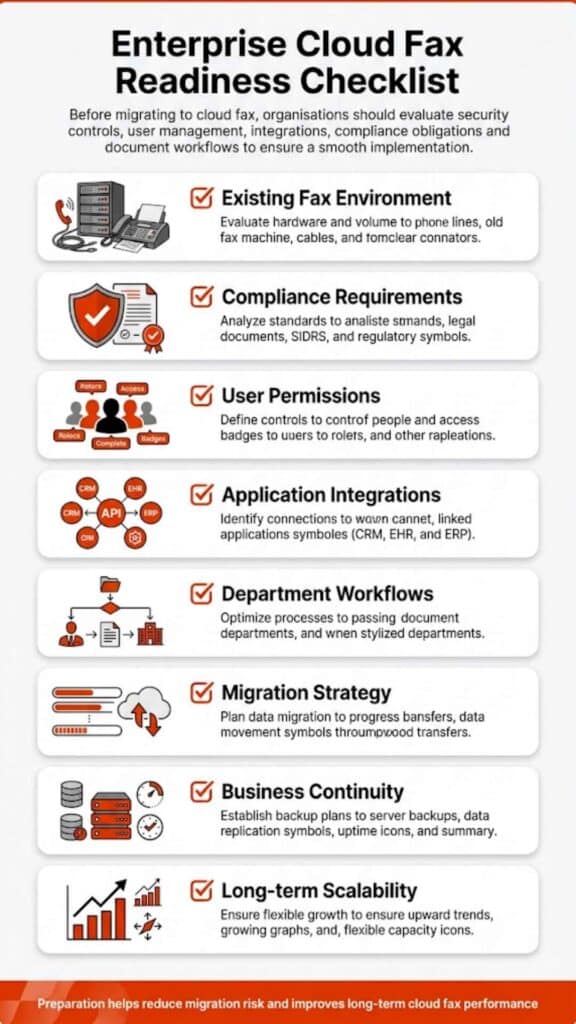
Can Cloud Fax Handle High Volume Sending? What Businesses Need to Know

High-volume faxing used to mean one thing: delays. Either the line was busy, or someone was waiting for documents to go through one by one. That’s no longer how it works.

Cloud fax changed the structure entirely. Instead of depending on physical lines or machines, it routes documents through a secure infrastructure built for scale. So yes, if you’re wondering, can cloud fax handle high volume sending? It can, and in most cases, it handles it far better than legacy systems ever could.

Can Cloud Fax Handle High Volume Sending?

Yes, and not just in theory, but in day-to-day operations across industries that rely heavily on document exchange. Traditional faxing has a built-in limitation: it moves one document per line at a time. Add more volume, and things slow down. Add urgency, and things break. That’s where cloud fax steps in.

Instead of sending faxes sequentially, cloud systems distribute them. Multiple transmissions happen at once. No waiting, no stacked queues sitting on a single machine, no busy signals blocking progress.

Here’s what I’ve seen across organizations: once they switch, the question isn’t whether cloud fax can handle volume; it’s why they didn’t move earlier.

What Is Cloud Fax and How It Works in High Volume Environments

If you strip it down, cloud fax is simply fax communication over the internet. No physical fax machines. No dedicated phone lines.

A user uploads a fax document, maybe through email, maybe through a web portal, and the system handles the rest. It routes the document, processes it, and delivers it to the recipient’s fax number using digital infrastructure.

Now, here’s where high volume changes the picture. Instead of relying on one device, cloud fax systems operate inside distributed data centers. That means sending faxes isn’t tied to a single point of failure. When demand spikes, the system doesn’t stall; it adapts. And that’s the key difference. Traditional faxing reacts to load. Cloud fax absorbs it.

How Cloud Fax Handles High Volume Fax Workflows

High-volume faxing isn’t just about sending more documents. It’s about how those documents move. Older setups rely on linear processing. One job finishes, then the next begins. That works, until it doesn’t.

Cloud fax works differently. Healthcare Cloud Fax Solutions help organizations split workloads and manage transmissions more efficiently. Instead of waiting in line, transmissions can happen in parallel, allowing hundreds or even thousands of documents to be processed depending on the setup.

There’s also queue management happening behind the scenes. Documents don’t pile up randomly. They’re distributed intelligently across available capacity. That keeps delivery consistent, even during peak demand.

And then there’s automation. Many organizations don’t manually send each fax anymore. They connect systems using APIs. Through solutions like bulk and broadcast fax APIs, entire batches move automatically from one system to another.

So what you end up with isn’t just faster faxing. It’s a workflow that runs without constant oversight.

Cloud Fax vs Traditional Faxing for High Volume Sending

The contrast becomes obvious when volume increases.

Feature Traditional Faxing Cloud Fax
Transmission flow One at a time Multiple at once
Infrastructure Physical fax machines Cloud-based systems
Busy signals Common Rarely occur
Scalability Limited Expands automatically
Workflow integration Minimal Built for integration

Traditional fax machines were never designed for scale. They were designed for occasional use. Cloud fax, on the other hand, was built with volume in mind.

Real-World Use Cases of High Volume Fax Sending

This isn’t theoretical. High volume faxing happens every day.

Healthcare is the clearest example. Patient records, referrals, and lab results these documents move constantly. Systems like managing high volume faxes in healthcare exist for a reason. Without automation, the workload becomes unmanageable.

Insurance companies process claims in bulk. Financial institutions send compliance documents across departments. Government agencies distribute official records at scale.

In all of these environments, speed matters, but consistency matters more. Cloud fax delivers both.

Benefits of Cloud Fax for High Volume Sending

When volume increases, inefficiencies show up quickly. Cloud fax addresses that in a few practical ways.

First, it improves efficiency. Documents move without manual intervention. That alone reduces delays that usually come from handling paperwork.

Second, it enhances security. Data doesn’t sit on machines or paper trays. It moves through controlled systems with encryption and access controls.

Third, it provides visibility. You don’t have to guess whether a fax went through. You can check in real time.

Organizations looking into the broader benefits of cloud fax for businesses often notice the same pattern: fewer interruptions, more predictable workflows.

Security and Compliance in High Volume Fax Communication

Security becomes more critical as volume grows. More documents mean more exposure, unless the system is designed properly.

Cloud fax platforms address this through layered protection. Data is encrypted. Access is restricted. Every transmission leaves a record.

In healthcare, compliance isn’t optional. Tools like HIPAA-compliant fax help ensure sensitive data stays protected. Many organizations also review whether fax is HIPAA-compliant before adopting new systems.

So here’s the takeaway: cloud fax doesn’t just handle volume, it does so while maintaining compliance.
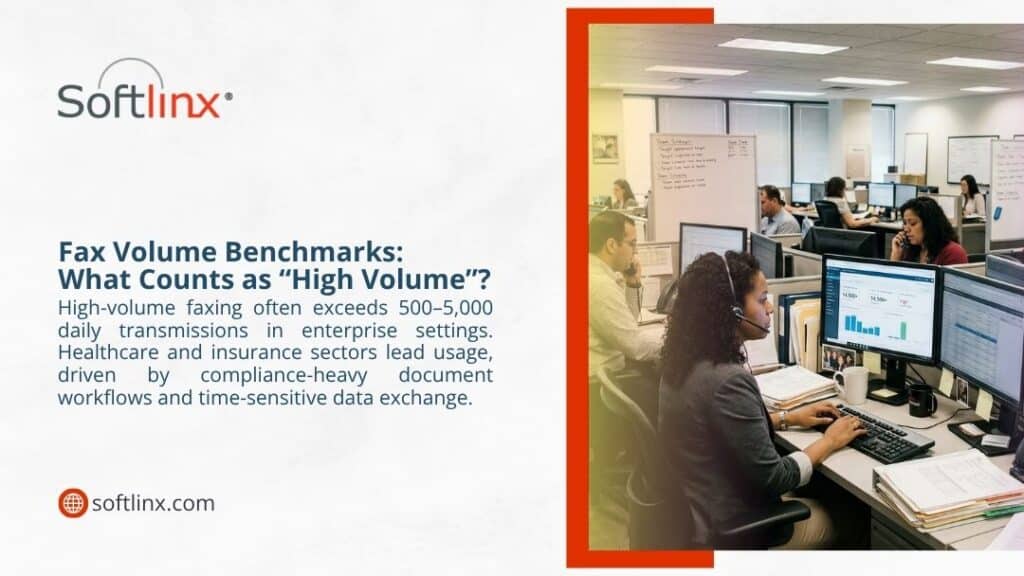
Busy enterprise call centre managing high-volume fax benchmarks of 500–5,000 daily transmissions in healthcare and insurance sectors.

Cloud Fax Infrastructure: Why It Scales Without Breaking

Scaling isn’t magic. It’s architecture.

Component Role
Data centers Handle processing
Virtual fax servers Manage routing
APIs Enable automation
Cloud storage Store documents
Load balancers Distribute demand

Traditional systems require upgrades when demand increases. Cloud fax doesn’t. It adjusts automatically, which is why performance stays stable even during high usage.

Common Challenges in High Volume Faxing (And How Cloud Fixes Them)

When fax volume increases, problems don’t show up gradually, they tend to surface all at once. Systems that worked fine at low volume start breaking under pressure.

One of the first issues is transmission failure. In traditional setups, even a small disruption, a dropped line or weak signal, can interrupt an entire batch. That often leads to retries, delays, and sometimes lost documents. Cloud fax avoids this by rerouting transmissions automatically. If one path fails, another takes over without manual intervention.

Then there’s document routing. In busy environments, faxes often end up in the wrong department or inbox. That creates extra work and, in healthcare settings, increases compliance risks. With cloud fax, routing rules are predefined. Incoming documents are directed based on metadata, sender details, or workflow logic. This is where many organizations see a noticeable shift, especially those trying to streamline operations through automated routing workflows.

Another common issue is visibility. Traditional faxing offers very little insight into what’s happening after a document is sent. Staff are left wondering whether it went through or not. Cloud systems remove that uncertainty. Every fax document has a status, sent, delivered, failed, and it updates in real time.

Capacity limits also create friction. A single fax machine can only process so much at once. Add more volume, and queues build up quickly. Cloud fax distributes that load across multiple channels, so the system doesn’t slow down when demand spikes.

Here’s how those challenges compare in practical terms:

Challenge Traditional Faxing Cloud Fax Approach
Transmission failure Requires manual resend Automatic rerouting
Document routing Manual sorting Rule-based automation
Status tracking Limited visibility Real-time tracking
Capacity limits Fixed by hardware Dynamically scalable
Error handling Reactive Preventive controls

What stands out isn’t just the improvement, it’s the consistency. Once the system stabilizes, these issues stop recurring.

Can Cloud Fax Replace Enterprise Fax Servers Completely?

In many environments, that transition has already happened. Enterprise fax servers were designed for a different era. They rely on on-site infrastructure, require ongoing maintenance, and need regular upgrades to keep up with demand. As volume grows, so does the complexity of managing those systems. IT teams end up spending more time maintaining infrastructure than improving workflows.

Cloud fax shifts that responsibility away from internal teams. There’s no hardware to maintain, no capacity planning tied to physical limits, and no need to scale infrastructure manually. Everything runs through managed environments that expand as needed.

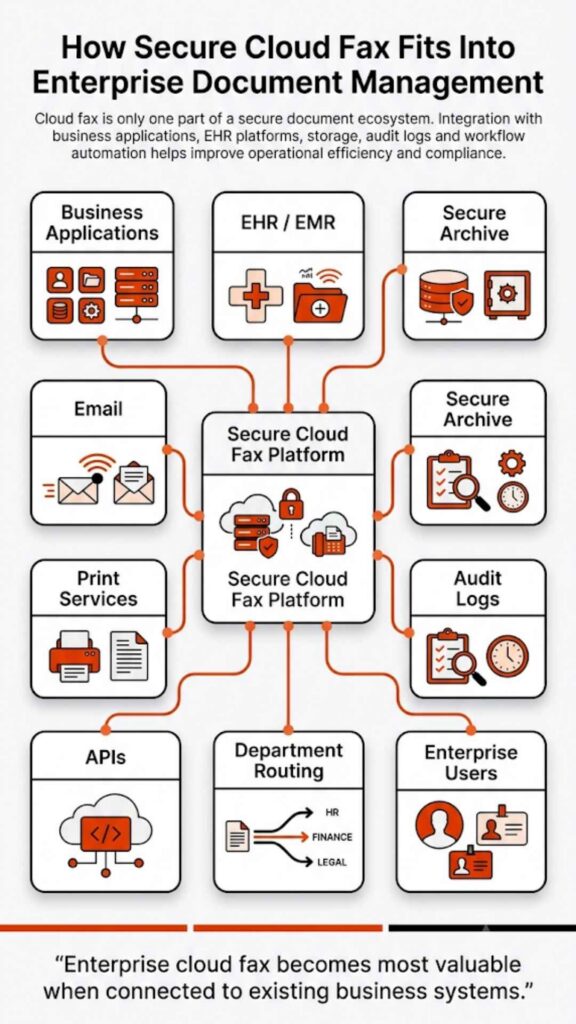
Another factor is integration. Modern organizations rarely operate in isolation. Systems such as EHR platforms, billing applications, and document management tools need to exchange information continuously. Cloud fax platforms are built with that in mind. They integrate directly into existing workflows, rather than sitting outside them.

Security also becomes easier to manage. Instead of securing multiple devices or servers, organizations work within centralized systems that apply consistent policies across all transmissions. That reduces gaps and simplifies compliance efforts.

So while there are still cases where hybrid setups exist, most organizations handling high volume communication find that cloud fax can replace enterprise fax servers without sacrificing performance or control.
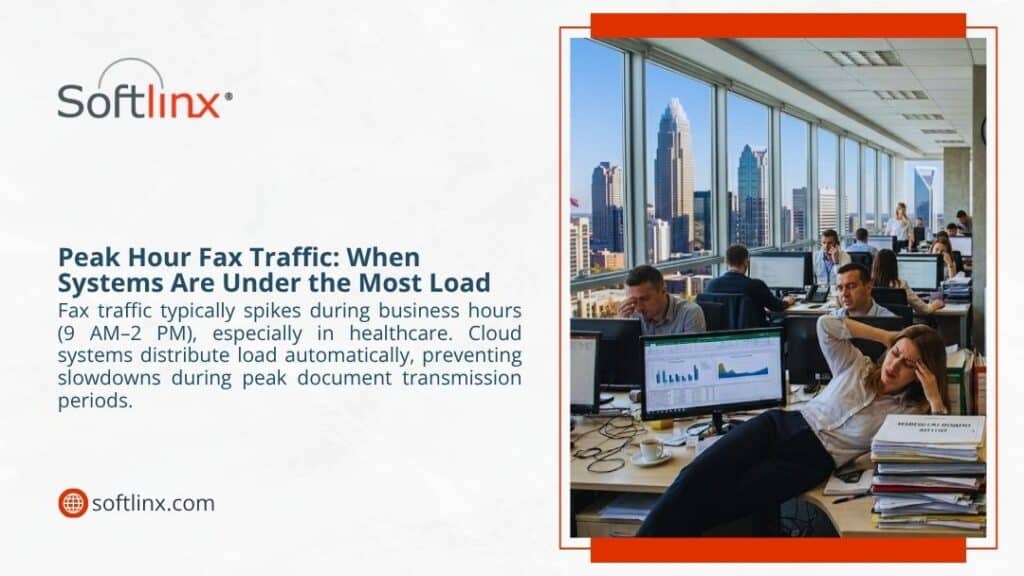
Overwhelmed office staff during peak hour fax traffic between 9 AM–2 PM, when systems face maximum load in healthcare settings.

How to Choose the Right Cloud Fax Solution for High Volume Needs

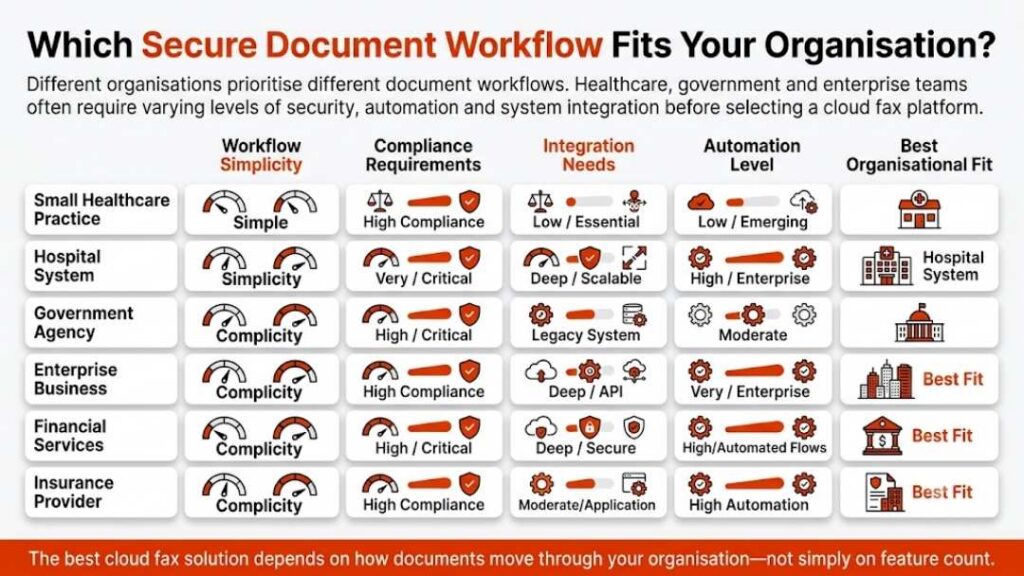
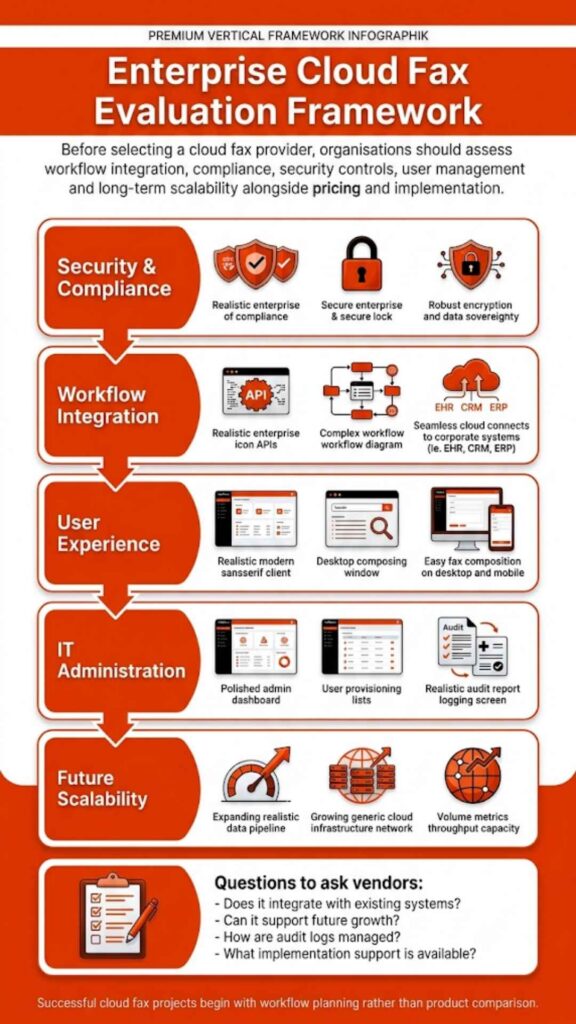
Choosing a cloud fax solution isn’t just about features. It’s about how the system behaves when demand increases.

Reliability comes first. High volume environments don’t allow for downtime. If the system slows or becomes unavailable, operations stall. That’s why uptime guarantees and infrastructure redundancy matter. A solution built on distributed systems will handle spikes more smoothly than one relying on limited capacity.

Then there’s throughput. Some platforms can send large batches, but not all maintain consistent speed. It’s worth looking at how the system processes concurrent transmissions. Does it queue efficiently? Does it scale without delays? These details often separate average solutions from enterprise-ready ones.

Integration should not be overlooked. A cloud fax service should fit into existing workflows without requiring major adjustments. Whether it connects to an EHR system, a CRM, or internal applications, the process should feel seamless rather than forced.

Security and compliance are equally important, especially in regulated industries. Encryption, access control, and audit logging should be standard, not optional.

Support is another factor that tends to get overlooked until something goes wrong. In high volume environments, issues need immediate attention. A responsive support team can make the difference between a minor disruption and a major delay.

The right choice isn’t always the most visible brand. It’s the one that performs consistently under pressure.

Is Concord Cloud Fax Suitable for High Volume Sending?

Concord Cloud Fax is often part of the conversation when organizations explore digital fax solutions. It offers basic cloud-based functionality, which may work for moderate usage levels.

However, high volume environments tend to expose limitations more quickly. Performance under heavy load depends on how the system manages concurrency, routing, and automation. If those elements are not built for scale, delays and bottlenecks can still occur.

Another consideration is workflow flexibility. Some platforms focus on simple send-and-receive functionality, while others are designed for deeper integration and automation. In environments where fax workflows are tied to core operations, such as healthcare or financial services, Healthcare Fax Solutions can make a significant difference by supporting more efficient and reliable document e

So while Concord Cloud Fax may meet certain needs, organizations dealing with sustained high volume often look for solutions that are built specifically for enterprise-level demand and complex workflows.

Can Cloud Fax Handle High Volume Sending?

Yes, cloud fax can handle high volume sending, and it does so reliably. It removes the constraints of fax machines and replaces them with scalable infrastructure. It supports automation, integrates with existing systems, and maintains security even when document flow increases. For organizations that rely on fax communication, that shift changes everything.

FAQs

Can Cloud Fax send thousands of faxes at once?

Yes. Cloud fax systems use parallel processing, allowing multiple transmissions at the same time instead of sequential sending.

Does cloud fax eliminate busy signals?

In most cases, yes. Because it doesn’t rely on a single phone line, cloud fax avoids the congestion that causes busy signals.

Is cloud fax secure for high volume communication?

Yes. Most cloud fax solutions include encryption, access controls, and audit logs to protect sensitive data.

Can cloud fax integrate with business systems?

Yes. Many platforms offer APIs that connect fax workflows directly to applications such as EHRs or CRM systems.

Do I need hardware for cloud fax?

No. Cloud fax operates through internet-based systems, so physical fax machines and servers are not required.

Take the Next Step Toward Scalable Faxing

If high volume faxing still depends on machines, manual routing, or overloaded fax servers, it may be time to rethink the setup.

Softlinx cloud fax solutions are designed for organizations that need reliability at scale, especially in healthcare and other regulated industries. With secure infrastructure, workflow automation, and integration-ready systems, they support high volume fax communication without disruption.

Explore how a modern cloud fax approach can fit into your environment and support your daily operations without slowing them down.

Security & Compliance

HIPAA-Compliant Since 1999 25+ years of secure, encrypted fax transmission for healthcare organizations.

HIPAA
PCI-DSS
Encrypted
Audit Trail
25+ Years Experience
100% HIPAA Compliant
Learn About Our Compliance

Industries We Serve

Healthcare Cloud Fax Solutions

Healthcare & Medical

Financial Services

Insurance Companies

Government Agencies

Manufacturing

Higher Education

Trusted by Fortune 1000 companies including State Street, IBM, HSBC, and United Nations.

Explore Industry Solutions

Why Choose Softlinx

No Hardware Required Eliminate costly fax servers and infrastructure. Cloud-based solution accessible anywhere, anytime.

Seamless Integration Easy API integration with your EHR, EMR, or business applications. Epic-certified integration available.

Enterprise Reliability 99.9% uptime SLA. No busy signals. Disaster recovery in real-time with automatic failover.

Superior Support U.S.-based technical support team. Dedicated account management for enterprise clients.

Cost Savings Reduce IT overhead by up to 60%. Pay only for what you use with flexible, scalable pricing.

Ready to Go Cloud?

Join healthcare leaders, financial institutions, and Fortune 1000 companies who trust Softlinx for secure, compliant faxing.

(978) 881-0560

Headquarters: 19321 US Highway 19 N, Suite 607
Clearwater, FL 33764 | help@softlinx.com

Trusted By Industry Leaders

"For over 25 years, Fortune 1000 companies and healthcare organizations have relied on Softlinx for mission-critical document transmission."

State Street
IBM
HSBC
Ericsson
Fannie Mae
United Nations
500+ Clients Worldwide
4.8★ Capterra Rating

Latest Articles By Softlinx

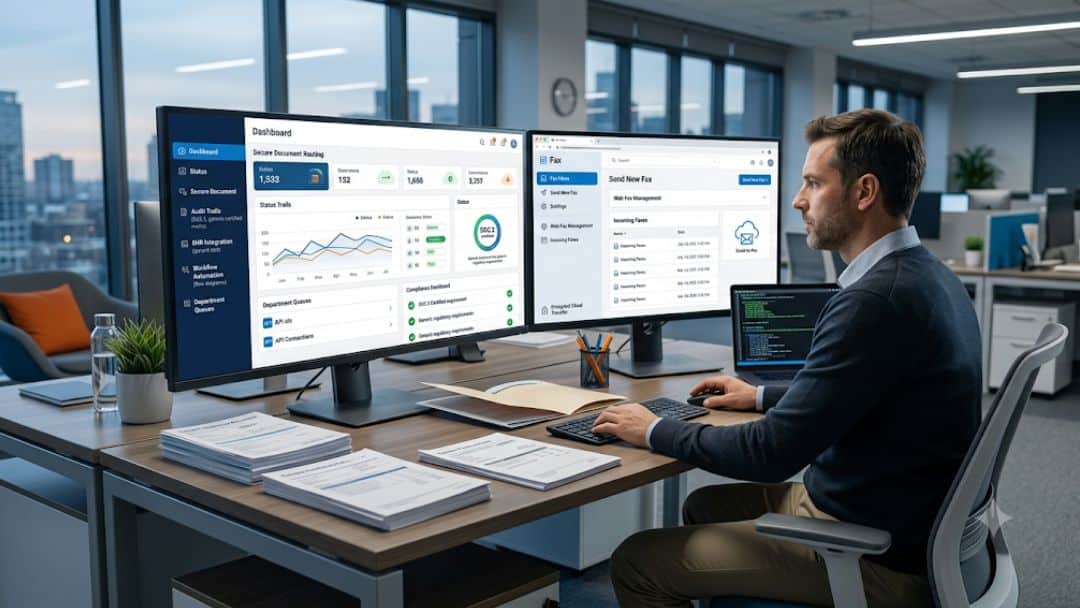
Softlinx vs Concord — professional at dual-monitor workstation viewing cloud dashboard with document routing, audit logs, and workflow automation

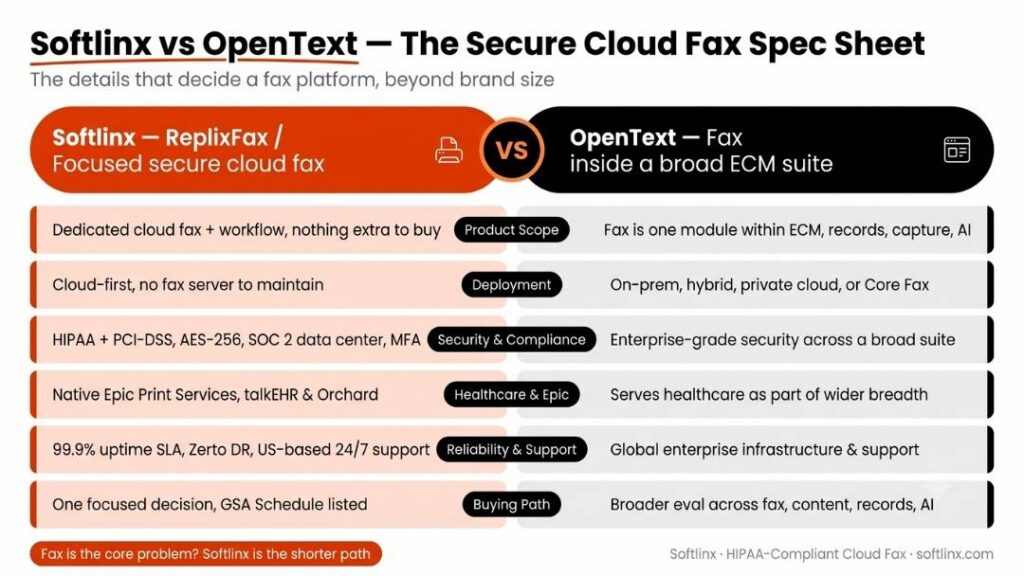
Softlinx vs Concord: Which Cloud Fax Service Fits Your Business?

Softlinx is a strong fit for healthcare, finance, insurance, government, manufacturing, higher education, ISVs, developers, and enterprise teams that need secure cloud fax through ReplixFax. Concord is a strong option for organizations that want cloud fax as part of a wider document automation and healthcare data exchange platform. In this article, we explore Softlinx vs Concord for buyers who need secure cloud fax, HIPAA-aware workflows, APIs, and enterprise fax support without getting lost in sales noise.

Softlinx vs Concord

Softlinx vs Concord is not a casual “which online fax app is cheaper?” comparison. This is a buyer’s question for organizations that still depend on fax for sensitive documents, regulated records, high-volume traffic, and application-connected workflows.

Both companies serve serious business users. Both talk about secure cloud fax. Both appeal to healthcare and enterprise buyers. The difference is where each one puts its weight.

Softlinx positions ReplixFax as a secure cloud fax service for healthcare and enterprise businesses, with support for web portal fax, email-to-fax, print-to-fax, production faxing, workflow automation, barcode fax workflow, industry compliance, and API-based fax integration. Its own site presents Softlinx as a provider for ISVs, enterprise businesses, developers, IT service providers, and healthcare IT teams through its secure cloud fax services.

Concord positions Concord Cloud Fax as part of a broader secure data exchange and document automation platform. Its cloud fax section highlights HIPAA-compliant fax, migration from fax servers, AI-powered data capture, document routing, and cloud fax for healthcare and other enterprise environments through Concord Cloud Fax.

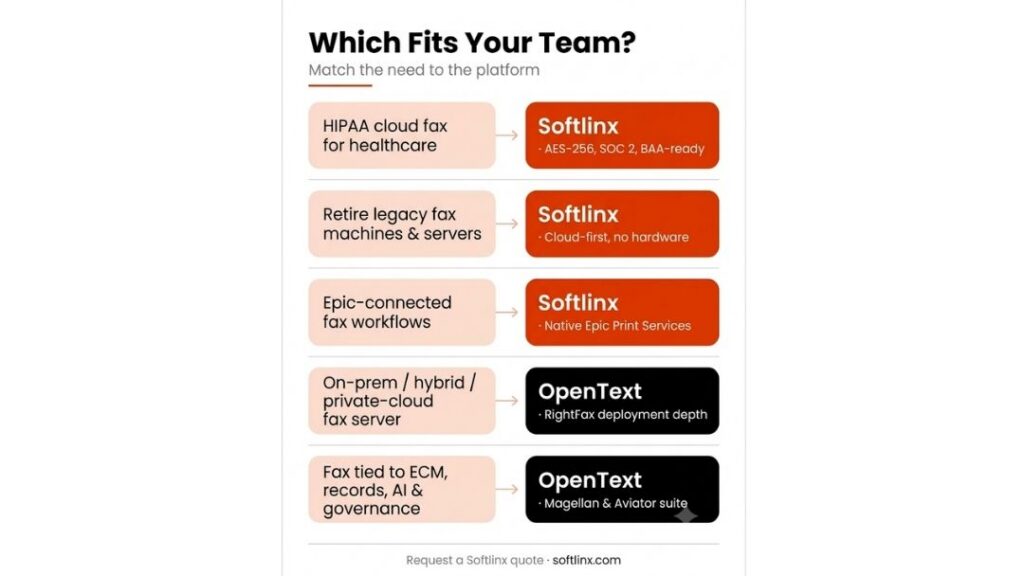
That makes the Softlinx vs Concord decision less about which company “does fax” and more about which platform matches your workflow. If your team wants a focused cloud fax service with practical user tools and strong application-fax support, Softlinx deserves a close look. If your team wants cloud fax wrapped into a broader document automation and healthcare intake strategy, Concord may fit the conversation.

Comparison AreaSoftlinxConcord
Best fitRegulated businesses that need secure cloud fax, workflow tools, and application fax integrationHealthcare and enterprise teams that want cloud fax plus broader document automation
Core product angleReplixFax for cloud fax, enterprise fax, healthcare fax, APIs, and workflowConcord Cloud Fax plus secure data exchange, Concord Connect, and intelligent document processing
Strong use casesHealthcare faxing, enterprise faxing, production faxing, barcode routing, web fax, email-to-fax, print-to-fax, fax APIsHealthcare intake, referral workflows, document automation, high-scale secure fax, AI-assisted data capture
Pricing visibilityQuote-based approach for business and enterprise needsPublic FaxPro rates for some plans, with enterprise quote options
Main buyerHealthcare IT, enterprise IT, compliance-heavy teams, ISVs, developers, operations teamsLarge healthcare organizations, enterprise operations teams, document processing leaders
Watch pointPublic pricing is not as visible, so buyers should request a tailored quoteThe platform may be broader than some fax-first teams need

What Is Cloud Fax and Why This Comparison Matters

Cloud fax is a digital fax solution that lets users send, receive, route, manage, and store faxes through cloud-based infrastructure instead of a physical fax machine or traditional fax server software. For many organizations, cloud faxing is not just a way to remove hardware. It is a way to manage secure document exchange, user access, audit history, application workflows, and departmental fax traffic from one controlled environment.

That is why Softlinx vs Concord matters for serious buyers. A small office may only need a simple hosted fax service. A hospital, payer, public agency, university, manufacturer, or financial services firm usually needs more than that. It may need secure cloud fax, enterprise cloud fax solutions, cloud fax APIs, multiple user roles, automated routing, EHR integration, production fax, document workflow, and compliance support.

For healthcare teams, this decision carries extra weight. The U.S. Department of Health and Human Services explains that the HIPAA Security Rule requires regulated entities to use reasonable and appropriate administrative, physical, and technical safeguards to protect electronic protected health information. That is why cloud-based fax solutions for healthcare should not be judged only by monthly price or page count. Security design, controls, routing, access, and auditability matter just as much as basic send-and-receive features.

Secure Cloud Fax for Healthcare, Finance, Insurance, and Government

Softlinx has a clear regulated-industry angle. Its healthcare faxing solution describes ReplixFax as a HIPAA-compliant electronic fax service for healthcare, with security features such as encryption, secure IP transmission, multi-factor authentication, centralized storage, fax logs, and audit trails.

That matters because healthcare fax is still used for referrals, authorizations, lab results, discharge paperwork, billing documents, pharmacy records, and clinical documentation. In that type of environment, a cloud fax service has to do more than send a file from one point to another. It has to support the way real departments work.

Softlinx also has a wider business audience. Its site includes dedicated industry sections for healthcare, financial services, insurance, government, manufacturing, and higher education. That broader footprint helps position Softlinx as a secure cloud fax option for organizations that may have different departments, locations, and document types under one fax environment.

Concord also has strong healthcare credibility. Its company history says the company opened in Seattle in 1996, built more than 20 years of healthcare experience, reached a milestone of more than 3 billion pages of protected health information processed each year in 2023, and acquired Biscom in 2024. Concord’s current platform language leans heavily into secure data exchange, intelligent document processing, interoperability, and healthcare straight-through processing.

Here’s the thing. Concord may appeal more to buyers who want cloud fax as one part of a larger data and document automation strategy. Softlinx may appeal more to teams that want secure cloud fax with practical tools for business users, developers, and departments that still depend on fax-heavy workflows.

Cloud Fax Service Features, APIs, and Workflow Automation

Softlinx covers the everyday fax methods that enterprise users tend to ask for first. It lists email, print-to-fax, web fax, self-service fax administration, high-volume fax support, cloud fax APIs, automation tools, and HIPAA- and PCI-DSS-compliant secure fax service as core enterprise cloud fax features.

For teams that need user-facing tools, Softlinx provides a web fax portal, email-to-fax, and print-to-fax. For workflow-heavy environments, Softlinx supports fax workflow automation and a developer fax API for application integration.

Concord’s feature story is different. It still covers secure cloud fax, but its site puts more emphasis on cloud migration, better data management, AI-powered data capture, secure exchange, and document automation. Concord also says its cloud fax service is built for organizations that need to send hundreds, thousands, or millions of faxes every day.

Feature AreaSoftlinx ReplixFaxConcord Cloud Fax
Web faxStrong fit through web portal faxAvailable through cloud fax platform
Email-to-faxStrong fit for users who work inside emailSupported as part of cloud fax workflows
Print-to-faxUseful for Windows apps, legacy workflows, and EHR-style print outputSupported, with more emphasis on cloud migration and broader automation
Fax APIsStrong developer and ISV fit through API integrationAPI access available for fax and document automation
Healthcare integrationEHR, EMR, PM, LIS, Epic-related workflows, and healthcare fax use casesHealthcare systems, referral intake, document automation, interoperability
Workflow automationFax routing, production fax, barcode fax, folder fax, metadata, reportsStraight-through processing, document capture, AI-driven extraction
Compliance storyHIPAA, PCI-DSS, encryption, MFA, logs, audit trails, secure storageHIPAA, HITRUST, PCI DSS, SOC 2, and secure document exchange
Flowchart: Choosing between cloud fax and document automation — decision tree based on regulated documents, security needs, and AI processing

Softlinx Pros and Cons

Softlinx vs Concord becomes clearer when the buyer looks at workflow fit instead of brand size alone. Softlinx is not trying to be a broad healthcare AI platform first. Its strength is secure cloud fax for business teams that need several ways to send, receive, route, track, and integrate fax documents.

ProsCons
Strong fit for healthcare and regulated business fax needsPublic pricing is less visible than some competitors
Supports web, email, print-to-fax, production fax, workflow, and APIsBuyers may need a sales conversation to map complex needs
Useful for ISVs, developers, IT service providers, and enterprise teamsLess public third-party review volume than larger software categories
Good match for HIPAA-focused and compliance-aware fax workflowsBroader document AI capabilities are not the main public message
Industry pages cover healthcare, finance, insurance, government, manufacturing, and higher educationSome website claims should be verified with sales before procurement

Need secure cloud fax built around healthcare, enterprise workflows, APIs, and compliance-heavy document exchange? Softlinx can review your current fax process and help you compare the right setup for your team. Request a tailored review before you choose between Softlinx vs Concord.

Concord Pros and Cons

Concord is a credible option in the same category, especially for larger healthcare organizations that want cloud fax to sit beside secure data exchange and document automation. Its public materials highlight long healthcare experience, AI-driven workflows, interoperability, and large-scale secure document transmission.

ProsCons
Strong healthcare document automation positionMay feel broader than needed for fax-first buyers
Public company history and scale signalsEnterprise quote process can add steps for buyers
Supports secure cloud fax, APIs, interoperability, and AI document processingSome messaging centers on ROI and cost reduction, which may not fit every compliance-first article
Public rates exist for some FaxPro plansRate pages may not reflect every enterprise use case
Biscom acquisition expanded secure communication footprintMore platform complexity may require deeper implementation review

Concord’s Biscom acquisition announcement says the combined organizations serve more than 4,500 customers and process more than 4 billion pages of protected information every year. Its security and compliance section also says Concord has exceeded its 99.9% uptime guarantee every month for more than three years and that Concord Cloud Fax is HIPAA compliant and SOC 2 audited.

These are useful trust signals, but buyers should still compare them against their actual use case. A vendor’s scale does not always mean the platform is the cleanest fit for a department that simply needs secure, dependable cloud faxing with flexible user tools.

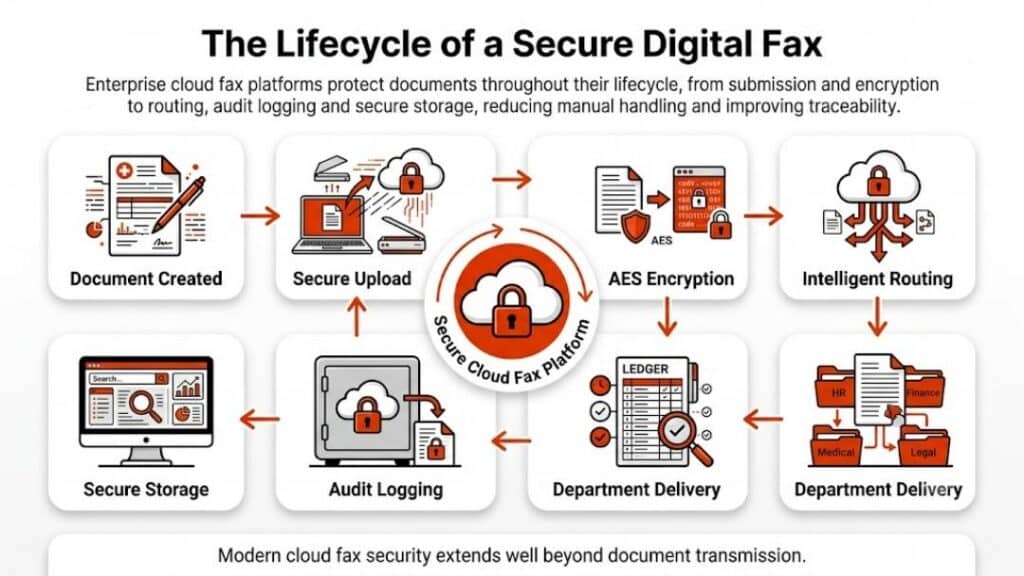
Infographic: How regulated documents move through a modern enterprise workflow — 8 steps from creation through encryption, routing, to archive

Cloud-Based Fax Pricing and Buyer Caution

Pricing is often the most tempting part of a Softlinx vs Concord comparison, but it needs careful treatment. Concord publishes some FaxPro rates for U.S. and Canadian fax use, including monthly plan examples and per-page details. Softlinx, by contrast, is better treated as a quote-based option for business and enterprise needs, especially when workflow, compliance, volume, users, numbers, APIs, and integration requirements may vary.

That does not automatically make one cloud-based fax service better than the other. Public pricing helps quick comparison, but enterprise fax cost can depend on fax volume, inbound and outbound mix, departments, numbers, storage, support model, API use, number porting, implementation, and compliance scope.

For Softlinx content, avoid claims such as “Softlinx saves X%” or “Softlinx costs less than Concord.” Softlinx gives regulated teams a way to centralize fax workflows, support secure document exchange, and connect fax to existing business systems through several end-user and application-based methods.

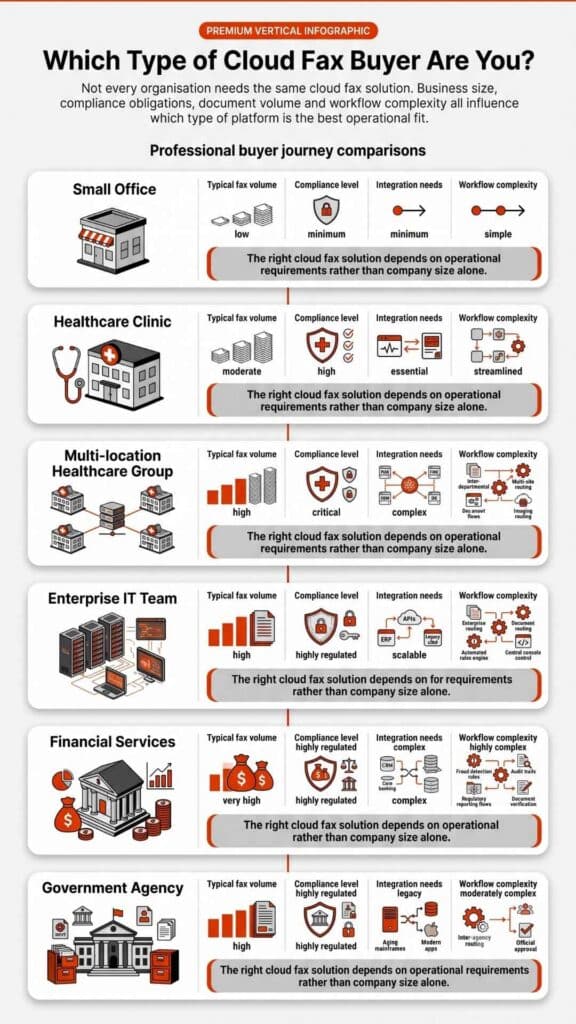
Best Fit by Business Type

Softlinx vs Concord is not a winner-takes-all choice. It depends on what the buyer actually needs.

A hospital, clinic, medical center, lab, pharmacy, or medical billing company that wants HIPAA-conscious cloud fax, secure document transmission, and practical end-user tools should give Softlinx serious attention. Softlinx’s healthcare industry cloud fax materials support this angle well, especially when the discussion highlights PHI, routing, audit trails, and EHR-adjacent workflows.

A large healthcare system that wants cloud fax inside a wider intake, referral, AI document processing, and structured-data workflow may want to evaluate Concord closely. Concord’s platform story is built around more than fax, which can be useful for organizations that want to rethink document intake across departments.

A financial services team that sends sensitive account forms, transaction documents, loan files, or compliance records may find Softlinx relevant through its financial services fax solution. An insurance company that still handles claims, authorizations, policy records, and provider documents may want to review Softlinx’s insurance fax workflows. A public-sector organization can also evaluate Softlinx through its government cloud fax solutions.

Manufacturers and higher education teams should not ignore this comparison either. Fax still appears in procurement, vendor documents, student records, HR files, health records, and administrative workflows. 

Epic Integration, EHR Fax, and Application Workflows

The most valuable part of a secure cloud fax comparison is often not the basic fax feature list. It is how well the system fits existing software. Softlinx supports application faxing and healthcare workflows, including direct transmission from EMR, PM, and LIS systems. It also highlights specific capabilities for Epic cloud fax integration, aligning with the needs of healthcare environments that require seamless and secure data exchange. For developers and ISVs, Softlinx’s fax API story is also useful because software teams often need fax functions inside existing apps rather than a separate portal.

Concord also supports API access and document automation. Its broader platform language may suit teams that want to move unstructured documents into structured workflows. That can be valuable, but it can also be more than a fax-first team needs.

This is where buyers should slow down and ask better questions. Can the fax solution connect to the existing EHR or enterprise application? Can it route inbound faxes by department? Can it pass metadata? Can it support batch fax or high-volume outbound jobs? Can users work from email, web, or print workflows? Can IT control roles, access, and audit logs? The better fit will be the provider that answers those questions without forcing major workflow disruption.

The Better Choice Comes Down to Workflow Fit

Softlinx vs Concord comes down to product fit, not hype. Concord is a strong option for large healthcare organizations that want cloud fax as part of a broader secure document exchange and intelligent document processing platform. It has strong public scale signals, a long company history, and clear healthcare automation messaging.

Softlinx is a strong option for organizations that want focused secure cloud fax solutions for real business fax workflows. ReplixFax fits teams that need web fax, email-to-fax, print-to-fax, production faxing, fax workflow automation, API access, compliance support, and secure document delivery across regulated industries.

For a fax-first organization, Softlinx may be the cleaner choice. For a document-automation-first organization, Concord may deserve a deeper review. For a healthcare or enterprise team that wants secure fax without making the project larger than it needs to be, Softlinx deserves a direct look.

Softlinx vs Concord FAQs

Is Softlinx better than Concord?

Softlinx may be better for organizations that want a focused secure cloud fax service with web fax, email-to-fax, print-to-fax, production fax, workflow automation, and API integration. Concord may be better for organizations that want cloud fax as part of a wider document automation and healthcare data exchange platform.

Does Softlinx support HIPAA-conscious cloud fax workflows?

Yes. Softlinx positions ReplixFax around HIPAA-compliant cloud fax for healthcare and enterprise businesses. Its healthcare faxing content mentions security controls such as encryption, secure transmission, multi-factor authentication, centralized storage, fax logs, and audit trails.

Does Concord publish pricing?

Concord publishes FaxPro pricing information for some plans and also supports quote-based enterprise evaluation. Buyers should review plan limits, inbound and outbound page terms, overtime charges, user needs, and enterprise requirements before they compare Concord pricing with Softlinx.

Which platform is better for healthcare fax workflows?

Softlinx is a strong fit for healthcare teams that want secure cloud fax, EHR-adjacent workflows, practical fax methods, and API support. Concord is a strong fit for healthcare organizations that want cloud fax linked to larger intake, referral, data extraction, and document automation goals.

Which option is better for enterprise fax integration?

Softlinx has a strong case for enterprise fax integration because it supports APIs, print-to-fax, email-to-fax, web fax, workflow automation, and production fax. Concord also supports enterprise use cases, but its messaging leans more heavily into secure data exchange and intelligent document processing.

Infographic: 8-step regulated document workflow in a modern enterprise — creation, encryption, routing, integration, and secure archive

A Practical Next Step for Secure Cloud Fax Buyers

The best way to settle Softlinx vs Concord is to map your actual fax workflow before you compare demos. Count the departments that use fax, list the systems that generate documents, identify which documents contain PHI or other sensitive data, check which users need web, email, or print-to-fax access, and note whether your team needs APIs, production fax, barcode routing, or EHR integration.

If your organization wants a focused secure cloud fax service for regulated business use, start with the Softlinx cloud fax service overview and then request a tailored review. A clear workflow review will help you compare Softlinx vs Concord on the details that matter most: security, compliance fit, user experience, implementation, integrations, support, and long-term fax reliability.

Softlinx vs eFax — professional using dual monitors showing cloud fax dashboard with document routing, encryption status, and audit logs

Softlinx vs eFax: Secure Cloud Fax Comparison

Softlinx vs eFax is not a simple “which online fax service is better?” question. The better choice depends on how your team sends, receives, routes, stores, audits, and secures faxed documents. eFax is a well-known digital fax service for online fax access, while Softlinx focuses on secure cloud fax, healthcare fax solutions, enterprise fax workflows, and business-grade integrations.

Fax has not vanished from business communication. It still sits inside healthcare referrals, insurance claims, lab reports, financial records, government forms, purchase orders, student files, and other document-heavy processes. The question has changed, though. Most teams are no longer only asking, “Can you fax from a computer?” They are asking whether a cloud fax service can protect sensitive files, support HIPAA workflows, integrate with internal systems, and provide IT teams with sufficient control to manage faxing at scale.

That is where Softlinx vs eFax becomes a more serious comparison. This article explores Softlinx vs eFax for healthcare, enterprise, and regulated teams that need more than basic online fax. It compares security, HIPAA support, APIs, workflow automation, EHR fit, pricing questions, pros, cons, and the best use case for each provider.

Softlinx vs eFax

Softlinx vs eFax comes down to workflow depth. If the goal is to send online faxes from a browser, email account, or mobile device, eFax may feel familiar and easy to shortlist. If fax is tied to healthcare operations, enterprise document flow, department routing, audit trails, API access, Epic integration, or high-volume production faxing, Softlinx deserves closer attention.

Softlinx was founded in 1993 and was acquired by Valsoft in February 2025. Valsoft describes Softlinx as a provider of secure, HIPAA-compliant cloud fax services, integration, and automation solutions with a focus on healthcare, finance, and government. That background matters because buyers comparing Softlinx vs eFax are usually not choosing a one-time fax tool. They are choosing a fax service provider that may sit inside daily operations for years.

Comparison AreaSoftlinxeFax
Best fitHealthcare teams, enterprises, regulated industries, developers, ISVs, high-volume fax operationsIndividuals, small businesses, mobile users, general business fax buyers, eFax Corporate buyers
Main strengthSecure cloud fax, HIPAA-focused workflows, API support, Epic/EHR integration, production faxing, fax workflow automationBrand familiarity, online fax access, mobile fax use, email fax service, enterprise fax options
Healthcare valueStrong fit for PHI-heavy workflows, audit trails, routing, encryption, and BAA-based cloud fax needsHIPAA-focused plans and eFax Corporate options are available for healthcare and regulated users
Integration depthFax APIs, documented RESTful API use, Epic integration, inbound routing, department workflowseFax API, cloud fax API, CRM/ERP/EHR use cases, enterprise admin features
Best choice whenFax is part of a secure business process, not just a document send taskThe buyer wants a known online fax service with broad access options

For healthcare, finance, insurance, government, and enterprise teams, the right fax provider should match the workflow behind the fax. If your team needs secure cloud fax, HIPAA-focused controls, API support, or EHR-connected workflows, Softlinx is worth reviewing before you choose a general online fax service.

What Softlinx Is Built For

Softlinx is not positioned as a free fax app or a light faxing app for occasional personal use. Its strongest fit is business fax service for organizations that need secure online fax, workflow control, and reliable document exchange. The company’s ReplixFax platform supports cloud fax, web fax, email to fax, print to fax, production faxing, API-based fax, and workflow automation.

That makes Softlinx a strong option for teams that still depend on fax but no longer want disconnected fax machines, isolated fax servers, manual routing, or paper-heavy processes. A healthcare clinic may need a HIPAA-compliant online fax service that routes records to the right team. A hospital may need fax inside Epic. A financial services team may need secure electronic fax for account files. A government office may need a cloud-based fax service with stronger controls than a basic fax online service. These are the types of use cases where Softlinx’s secure cloud fax service fits naturally.

Softlinx also gives business users several ways to send and receive faxes. Teams can use an email-to-fax service, a web fax portal, print-to-fax workflows, and application-based fax through its fax API for developers. That matters because enterprise fax solutions rarely depend on one user path. One department may prefer email fax service, another may use a browser portal, and a healthcare software vendor may need fax built into its own application.

What eFax Is Built For

eFax is one of the better-known names in online fax services. Its core appeal is convenience. Users can send faxes online, receive documents as digital files, and work from a computer, tablet, or phone. For many users, that is enough. If the buyer needs a familiar e-fax service for basic business fax, eFax is easy to understand and easy to compare against other online fax providers.

The larger eFax ecosystem also extends into enterprise fax. eFax Corporate says it supports email, web portal, mobile app use, number portability, admin controls, API connections, and compliance features. Its corporate section also states that eFax Corporate supports EMR integration through the eFax API and is used by large organizations.

That said, Softlinx vs eFax is not only about whether both companies can send an online fax. They can. The sharper question is whether the service fits the buyer’s actual fax environment. A small office may only need a virtual fax service. A hospital, lab, insurance claims team, or enterprise IT group may need secure cloud fax, automated routing, fax server replacement, audit records, and integration support.

Security, HIPAA, and BAA Support Matter More Than the Fax Button

For healthcare and regulated industries, fax security cannot be treated as a checkbox. A secure online fax service must support the way sensitive documents move through real departments, not just the moment a file leaves the screen. That includes user access, encryption, audit logs, storage, routing, authentication, business associate agreements, and administrative oversight.

The U.S. Department of Health and Human Services says regulated entities must use “reasonable and appropriate administrative, physical, and technical safeguards” to protect ePHI. That standard is the reason buyers should look past generic claims such as “secure fax” and ask how the fax service handles access, transmission, storage, records, and accountability.

Softlinx states that its healthcare fax solution is HIPAA- and PCI-DSS-compliant, hosted at a HIPAA-compliant SOC 2 audited data center, uses AES 256-bit encryption, and uses TLS protocols over a secure communication link. These details support the company’s fit for healthcare fax solutions and HIPAA-compliant cloud fax needs.

eFax also has HIPAA-focused options. eFax Business says it provides HIPAA-compliant cloud faxing with 256-bit AES encryption, BAA coverage, online cloud storage, a secure admin portal, and user permission controls. eFax Corporate also references HIPAA, BAA, HITRUST, TLS, and 256-bit encryption across its enterprise pages.

So, is Softlinx vs eFax a security win for only one side? Not exactly. Both providers publish security and compliance messaging. The difference is how each one fits the buyer’s workflow. Softlinx’s brand voice is more specific to healthcare fax, workflow automation, Epic/EHR integration, and secure cloud fax operations. eFax has a broader online fax brand with enterprise products layered on top.

Infographic ranking industries by cloud fax business value — Healthcare, Insurance, and Financial Services score highest for security and compliance

Softlinx vs eFax Feature Comparison

Both platforms can help businesses move away from a physical fax machine. Both can support online faxing services. Both can serve regulated users through certain products and plans. The real separation appears when you compare everyday use, integration needs, administrative control, and workflow depth.

FeatureSoftlinxeFaxWhat It Means for Buyers
Online faxYes, through cloud fax tools and end-user fax optionsYes, through web, email, and mobile accessBoth can support fax from a computer without a traditional fax machine.
Email to faxYes, built for business accounts and department useYes, widely used as part of eFax servicesGood for teams that want a fax email service without extra hardware.
Web fax serviceYes, via secure portal accessYes, via online account accessUseful for browser-based fax send and receive tasks.
Print to faxYes, helpful for EHR, office, and Windows-based workflowsAvailable in corporate workflows depending on setupImportant when staff still work inside existing business applications.
Fax APIStrong Softlinx angle for developers, ISVs, EHR apps, and enterprise systemseFax API supports CRM, ERP, and EHR fax use casesAPI depth matters for software teams and high-volume fax operations.
Healthcare faxStrong fit for HIPAA-compliant faxing, PHI, BAA, audit trails, and EHR workflowsStrong HIPAA-focused business and corporate optionsHealthcare buyers should compare plan details, BAA terms, access controls, and workflow fit.
Epic/EHR integrationStrong Softlinx positioning with Epic and EHR workflow supporteFax Corporate supports EMR/EHR integration through APIHospitals and health systems should test routing, status updates, and implementation support.
Workflow automationStrong fit for production fax, barcode fax, routing, and department workflowsEnterprise workflow options are availableSoftlinx has a clearer workflow automation angle for complex fax environments.
Best buyerRegulated organizations with secure, high-volume, workflow-based fax needsUsers who want a known online fax service, plus enterprises that prefer eFax CorporateThe right choice depends on whether fax is a simple task or a business process.

Email to Fax, Web Fax, Print to Fax, and Fax From a Computer

A good Softlinx vs eFax comparison should answer the practical questions buyers actually type into Google. Can you fax from a computer? How do I fax from my computer? Can I send a fax online securely? Do I need a digital fax machine? What is cloud fax? Which fax online service works for business?

The short answer is that both providers can help users fax without a standard fax machine. eFax’s public messaging emphasizes the ability to send and receive faxes from a computer, tablet, or phone. Softlinx supports multiple business fax paths, including email to fax, web portal fax, print to fax, and API-based fax.

For a small team, this may look simple. A user opens a web fax service, uploads a file, enters a fax number, and sends the document. For a larger healthcare or enterprise environment, it is more layered. One department may need inbound fax routing. Another may need faxes stored in a specific folder. A developer may need fax software tied into a patient record system. A compliance manager may need audit trails and user activity reports.

That is where Softlinx’s email-to-fax for business accounts, web-based fax portal, and print-to-fax workflow add a stronger enterprise angle to the overall positioning. These are not flashy features, but they matter in real offices where staff need a fax solution that fits the way they already work.

Workflow Automation and Department Routing

Here is the problem with many online fax service reviews: they compare apps, not workflows. That may work for a one-time fax or a simple office use case. It does not work as well for healthcare, insurance, finance, education, government, and manufacturing teams that process high volumes of sensitive documents every week.

A medical group may receive referrals, lab reports, prior authorizations, signed forms, and discharge summaries. An insurance team may process claims, appeals, adjustments, and benefits documents. A financial institution may handle account paperwork, loan files, and signed forms. In these settings, fax is not one task. It is part of a document chain.

Softlinx has a clearer story here because its site includes fax workflow automation, barcode fax workflow, and production faxing for high-volume workflows. Those features are especially relevant when the buyer needs fax routing, electronic filing, metadata, auditability, department queues, or large batch fax processes.

eFax Corporate also supports enterprise workflows, admin controls, and API-based fax use. Its corporate product describe enterprise cloud fax, compliance features, administration tools, and integration with existing systems.

Still, the Softlinx vs eFax decision should ask a plain question: does the team need an online fax account, or does it need a fax solution that sits inside business operations? When the second answer is true, Softlinx’s workflow-first positioning becomes more valuable.

API, Epic, and EHR Integration

The API and EHR section is one of the most important parts of the Softlinx vs eFax comparison because it separates basic online fax from enterprise cloud fax. A small business may never care about a fax API. A healthcare software company, hospital, lab, or large medical group may care a lot.

Softlinx says ReplixFax connects directly with Epic EHR so clinical and administrative staff can send and receive HIPAA-compliant faxes without leaving their workflow. Its Epic page also states that ReplixFax connects through a documented RESTful API, supports sandbox testing access, and can route inbound faxes to department queues or patient records.

That makes Softlinx a practical fit for organizations that need Epic fax integration, EHR fax integration, or a way to connect fax to EHR. These use cases matter because healthcare teams often want fax to appear inside the tools staff already use, not as a separate tab, inbox, or manual workaround.

eFax also offers a fax API. Its API section says users can fax directly from CRM, ERP, or EHR systems, with TLS 1.2 encryption for fax transmissions and AES 256-bit encryption for fax storage.

So, again, the comparison is not “one has API, and one does not.” It is about fit. Softlinx’s API story is closely tied to healthcare fax solutions, Epic workflows, high-volume fax, and secure cloud fax operations. eFax’s API story fits buyers that want an enterprise-grade online fax provider with recognizable brand reach and corporate options.

Best Fit by Industry

Softlinx vs eFax becomes easier to judge when buyers compare by industry instead of feature lists alone. The same fax service online may feel perfect for one team and too limited for another. A solo consultant may want the best online fax service for occasional documents. A hospital may need HIPAA-compliant digital fax, department routing, Epic integration, BAA support, and clear audit trails.

Buyer or Use CaseBetter Fit to Consider FirstWhy This Fit Makes Sense
Individual user or solo professionaleFaxA known online fax service may be enough for simple send-and-receive needs.
Small office with basic fax needseFaxIf the team mainly needs fax from computer, email fax, and mobile access, eFax may be simple to assess.
Healthcare clinicSoftlinxHIPAA-compliant cloud fax, PHI workflows, BAA support, audit trails, and routing are central to the use case.
Hospital or health systemSoftlinxEpic/EHR integration, high-volume fax, department routing, and secure cloud fax controls matter more.
Insurance claims teamSoftlinxClaims workflows often need secure routing, reliable records, and controlled document access.
Financial institutionSoftlinxSensitive financial documents require a secure fax service with business-grade controls.
Government agencySoftlinxSecure document exchange, records, department routing, and compliance-sensitive workflows are often part of the need.
Developer, ISV, or healthcare software vendorSoftlinxFax API, sandbox-style technical support, and embedded fax workflows are more important than basic online fax access.
Enterprise that already prefers eFax ecosystemeFax CorporateExisting vendor preference, corporate admin tools, and eFax API may make eFax easier to shortlist.

Softlinx can also support industry-specific needs for buyers that want a closer fit, such as healthcare fax solutions, financial services cloud fax, insurance fax workflows, government fax solutions, and higher education fax solutions

Infographic: 9-step secure cloud fax document journey — from creation and AES encryption to routing, department queue, and compliant storage

Which Provider Is Better for Regulated Teams?

Regulated teams should compare more than send limits, mobile access, or whether a service can fax from a computer. The real checklist is deeper: BAA availability, encryption in transit and at rest, user permissions, audit trails, secure storage, department routing, API needs, EHR fit, number porting, uptime expectations, and implementation support.

Softlinx is the stronger fit when fax touches protected health information, claims documents, financial records, government forms, or other sensitive files that must move through defined workflows. Its value is not only that users can send an electronic fax. Its value is that healthcare and enterprise teams can connect fax to the systems, departments, and controls they already depend on.

eFax can still be a good option for regulated buyers, especially those evaluating eFax Business or eFax Corporate. But buyers should confirm exactly which plan includes the BAA, admin portal, user permission controls, storage terms, API access, and security features they need. For HIPAA-heavy or workflow-heavy teams, those details matter more than brand familiarity.

Pricing, Plans, and Contract Questions

Pricing is where comparison often go wrong. It is tempting to say one fax service is cheaper, faster, or more cost-effective. The pricing depends on fax volume, number of users, fax numbers, support needs, compliance requirements, integrations, storage, admin controls, and contract structure.

eFax publishes plan and product details across its site, and its healthcare section shows separate paths for personal, business, and corporate HIPAA-focused needs. eFax Business mentions HIPAA-compliant cloud faxing with BAA coverage, while eFax Corporate is positioned for larger organizations with custom plans, API access, HITRUST certification, dedicated account management, and an admin portal.

Softlinx should not be framed as the cheapest eFax alternative or a low-cost fax service unless the client gives verified pricing evidence. Instead, it should be presented as a secure cloud fax provider for organizations that need the right operational fit. A buyer should request a Softlinx quote when they need pricing based on their fax environment, not a generic plan chart.

A careful pricing paragraph can still convert by guiding buyers to compare setup needs, fax volume, support expectations, compliance terms, API requirements, and migration needs before making a decision. This approach provides more value than relying on a weak claim about cost savings.

Migration, Existing Fax Numbers, and Support

A Softlinx vs eFax buyer may not be starting from zero. Many teams already use fax machines, fax server software, hosted fax, online fax providers, or another cloud-based fax service. That means the real concern is not only the product itself. It is the move.

Buyers often want to know whether they can keep existing fax numbers, whether staff need new equipment, whether departments can share a cloud fax system, whether high-volume fax will work, and whether old workflows need to be rebuilt. These questions matter because fax often touches customers, patients, vendors, clinics, labs, payers, agencies, and outside partners.

Softlinx supports this stage of the buyer journey with guidance on how to switch from a fax machine to cloud fax, how to use an existing fax number with a cloud fax service, and how to follow cloud fax migration steps. For larger teams, it also addresses whether cloud fax can handle high-volume sending.

eFax Corporate also says it supports number portability and that users do not need to buy or maintain fax hardware for its enterprise cloud fax solution.

For a fair comparison, it should not suggest that migration is always easy or instant. It should say that the best provider is the one that can map the current fax setup, protect continuity, help staff adapt, and support the workflow after go-live.

Pros and Cons of Softlinx and eFax

Pros and cons help make the decision easier. 

Softlinx pros and cons

ProsCons
Strong healthcare and enterprise fax focusNot ideal for one-time fax users
HIPAA-focused cloud fax positioningPricing usually requires a quote
API, Epic, and EHR integration supportMore advanced than basic online fax needs
Workflow automation and production fax supportMay require setup planning for complex teams

eFax Pros and Cons

ProsCons
Well-known online fax brandPlan details can be confusing for regulated buyers
Web, email, and mobile fax accessHIPAA/BAA features depend on the product or plan
Business and Corporate options availableLess workflow-specific than Softlinx
API and enterprise features availableBuyers must verify storage, admin, and compliance needs
Infographic: 5 questions to ask before choosing a cloud fax provider — integration, compliance, automated routing, scalability, audit trails

FAQs About Softlinx vs eFax

Is Softlinx better than eFax?

Softlinx may be the better choice if the buyer needs HIPAA-compliant cloud fax, healthcare fax solutions, Epic/EHR integration, fax API support, department routing, production faxing, and secure cloud fax workflows. eFax may be the better choice if the buyer mainly wants a familiar online fax service for basic fax from computer, mobile fax, or email fax use. Softlinx vs eFax is not an absolute winner-takes-all comparison. It is a use-case decision.

Is eFax HIPAA compliant?

eFax offers HIPAA-focused services on certain products. eFax Business says it provides HIPAA-compliant cloud faxing with 256-bit AES encryption and BAA coverage. eFax Corporate also describes HIPAA, BAA, HITRUST, TLS, and 256-bit encryption features for enterprise buyers. Buyers should verify the exact plan, agreement, and compliance terms before they use any fax service for PHI.

Is Softlinx HIPAA compliant?

Softlinx states that its healthcare fax solution is HIPAA- and PCI-DSS-compliant, hosted at a HIPAA-compliant SOC 2 audited data center, uses AES 256-bit encryption, and uses TLS protocols over a secure communication link. For healthcare buyers, Softlinx’s HIPAA-compliant cloud fax for healthcare is one of its strongest product angles.

Can you fax from a computer with Softlinx and eFax?

Yes. Both providers support ways to fax from a computer. eFax highlights online fax from a computer, tablet, or phone. Softlinx supports web fax, email to fax, print to fax, and application-based fax through APIs. The best choice depends on whether the user needs a simple online fax tool or a business fax service tied to secure workflows.

Which is better for healthcare faxing?

Softlinx is especially strong for healthcare teams that need HIPAA-focused fax workflows, Epic/EHR integration, audit trails, department routing, API support, and high-volume secure cloud fax. eFax is also a recognized healthcare fax option through certain HIPAA-focused business and corporate services. The right choice depends on the healthcare organization’s document volume, system environment, compliance needs, and support expectations.

Which is better for a free fax app or one-time fax?

Neither provider should be judged mainly as a free virtual fax or one-time fax option. A user who only needs to fax a PDF online once may prefer a simpler, low-cost, or free fax app. Softlinx is a better fit for business, healthcare, and enterprise fax. eFax can serve lighter users, but plan details should be checked before sign-up.

A Secure Fax Decision Should Match the Workflow

Softlinx vs eFax is not only a feature checklist. It is a question of operational fit. eFax is a strong, familiar name for online faxing, digital fax access, email fax, mobile fax, and enterprise cloud fax products. Softlinx is a stronger fit when fax is tied to secure business workflows, HIPAA-sensitive documents, department routing, API use, Epic/EHR integration, production faxing, and regulated-industry communication.

For a small office that sends occasional online faxes, eFax may be enough. For a healthcare provider, hospital, insurance group, financial institution, government office, developer, or enterprise team, Softlinx may offer a better path because it treats fax as part of the document workflow, not just a send button.

The best next step is not to guess from a feature chart. It is to map how fax works inside your organization today, then compare each provider against that process. If your team needs secure cloud fax with HIPAA-focused workflows, API support, routing, and enterprise controls, talk to Softlinx about secure cloud fax and review the setup that fits your business environment.

A traditional fax machine next to a laptop displaying a secure portal login screen, comparing cloud fax security features against conventional fax machines in a modern office setting.

Is Cloud Fax More Secure Than Traditional Fax?

Yes, in most business settings, cloud fax is more secure than traditional fax when it is built with encryption, access controls, audit trails, secure storage, and compliance-focused administration. That answer matters because fax has not disappeared from healthcare, insurance, finance, government, education, or manufacturing. It still carries referrals, claims, signed forms, authorizations, medical records, account documents, and time-sensitive business paperwork every day.

The real issue is not whether fax still works. It does. The issue is whether the way a business sends, receives, stores, and tracks faxes still fits modern security expectations. Traditional fax machines rely on paper, shared trays, phone lines, manual pickup, and office habits. A secure cloud fax service gives teams more control over who can send documents, who can view them, where they are stored, and how delivery is tracked.

In this article, we’ll explore how cloud fax and traditional fax compare across encryption, access control, audit trails, document handling, compliance needs, and everyday business security risks.

Is Cloud Fax More Secure Than Traditional Fax for Businesses?

For regulated organizations, the practical answer is usually yes. That does not mean every online fax service is safe by default. It means a well-managed cloud fax platform can offer stronger protection than a physical fax machine in a shared office.

Traditional fax machines were built for document delivery, not today’s cybersecurity standards. A fax arrives, prints, and waits. Someone has to collect it. If the wrong person walks by, the document is visible. If a number is mistyped, sensitive information may reach the wrong destination. If the machine stores images or connects to a networked printer, there may be added device risk. None of this looks dramatic from the outside. In real offices, though, small mistakes are often where privacy problems start.

A cloud fax service changes that setup. Instead of routing every document through one physical device, approved users can send and receive faxes through a secure web portal, email-to-fax, print-to-fax, application workflow, or API. The right platform can support authentication, access controls, delivery records, audit trails, encryption, and secure digital storage. For healthcare, financial services, insurance, government, manufacturing, and higher education, those controls can make fax less dependent on paper and more accountable.

Softlinx’s secure cloud fax services for regulated teams fit that need. The goal is not to dress up fax as something new. The goal is to keep fax usable for business while reducing the weak points that come with paper-heavy, machine-based faxing.

Why Traditional Fax Still Feels Secure But Often Isn’t

Traditional fax still has a reputation for privacy because it feels separate from email. It does not sit in a crowded inbox. It does not invite a reply-all mistake. It does not look like a file attachment that can be forwarded across departments in seconds. For years, that gave fax a sense of trust. But “familiar” is not the same as secure. 

Traditional fax security depends on a chain of human and physical controls. The sender must dial the correct number. The recipient must keep the machine in a protected area. Staff must collect pages quickly. Printed documents must be filed, shredded, or routed without delay. The device must not expose stored images. The office must prevent visitors, vendors, patients, students, or unauthorized employees from seeing incoming faxes. That is a lot to ask of a busy workplace.

The American Dental Association’s privacy guidance for fax machines reflects this reality. It recommends confirming fax numbers, placing fax machines in secure locations, using confidential cover sheets, pre-programming common numbers, and avoiding risky redial behavior when sensitive information is involved. Those steps are useful, but they also show the core weakness of traditional fax: safety depends heavily on staff discipline and physical surroundings.

A traditional fax machine may produce a transmission report, but that report does not always answer the questions compliance and IT teams care about. Who viewed the document? Who downloaded it? Where was it stored? Was it routed to the right department? Did anyone access it after delivery? In a high-volume clinic, billing office, insurance department, public agency, or enterprise team, that visibility gap can become a real operational risk.

How Secure Cloud Fax Works

Cloud-based faxing moves the fax process into a controlled digital environment. A user may send a document through web portal faxing, email-to-fax workflows, print-to-fax from business applications, a workflow queue, or a developer API. The cloud fax service then manages the transmission, delivery status, routing, storage, and records.

From the recipient’s side, the fax may still arrive at a normal fax number. From the sender’s side, the process is less like walking to a machine and more like using a managed business system.

That shift matters. A cloud fax platform can require user logins. It can limit access by role. It can track who sent a fax, when it was sent, what number received it, and whether delivery failed or completed. It can route inbound faxes to an approved inbox instead of a paper tray. It can also help teams send and receive faxes without paper jams, toner problems, dedicated phone lines, or one shared machine that everyone depends on.

This is where secure cloud faxing earns its value: it does not simply move fax online; it gives fax a control layer.

Fax Security Comparison: Cloud Fax vs Traditional Fax

The easiest way to compare fax security is to look at where information can leak. Traditional fax exposes documents through paper output, phone-line dependence, machine access, device memory, and manual handling. A secure cloud fax workflow can reduce many of those exposure points.

Security AreaTraditional FaxSecure Cloud Fax
TransmissionOften depends on analog fax protocols, phone lines, and legacy hardwareCan use secure digital transmission methods, depending on provider and workflow
EncryptionTraditional fax is not usually encrypted in the modern cybersecurity senseA business-grade cloud fax service may support encryption in transit and at rest
Access controlAnyone near the machine may see incoming pagesUsers can be managed with logins, roles, permissions, and administrative controls
Audit trailSent reports may exist, but user-level visibility is often limitedDigital records can track sent, received, failed, routed, and accessed faxes
Document storagePaper folders, local drives, or device memory may create exposureControlled digital storage can support retention and access policies
Human errorMisdialed numbers, unattended pages, and misplaced files remain common concernsVerified contacts, routing rules, and digital queues can reduce avoidable mistakes
Remote workStaff may need office access or a workaroundApproved users can fax through secure portals or connected workflows
Business continuityBroken machines, busy lines, paper jams, or office access issues may delay workCloud fax can keep fax workflows available without depending on one physical device

This is why the question “is cloud fax more secure than traditional fax” deserves more than a yes-or-no answer. Security comes from controls. Traditional fax has fewer built-in controls. A secure cloud fax platform can add more of them.

Are Faxes Encrypted?

Many buyers ask this before they replace a fax machine: are faxes encrypted?

For traditional fax, the answer is usually no, not in the way modern security teams use the word. A standard fax sent over a phone line may feel private because it is not email, but that does not mean the document has cryptographic protection. If someone asks, “Is fax encrypted?” the safer answer is that traditional fax generally should not be treated as encrypted communication.

Cloud fax is different when the provider has the right safeguards. A business-grade service may protect documents through encryption in transit, encryption at rest, secure communication protocols, controlled access, and logged activity.

Softlinx positions its healthcare fax solution around secure, HIPAA-compliant transmission, encryption, business continuity, and compliance-focused safeguards for healthcare data. 

Softlinx states that its healthcare fax solution uses AES 256-bit encryption and TLS protocols over a secure communication link, with its ReplixFax service hosted in a HIPAA-compliant, SOC 2-audited data center.

There is still one practical nuance. If a cloud fax reaches a recipient’s physical fax machine, the receiving environment still matters. The sender may use a secure cloud fax platform, but the recipient may print the fax in a shared office. Fax security is not only about the sending tool. It covers the full path: prepare, send, transmit, receive, route, store, and access.

Can Faxes Be Intercepted or Hacked?

Can faxes be intercepted? With traditional fax, the risk can exist. A standard phone-line fax is not the same as an encrypted digital channel. In everyday business, the more common problem may be less technical: a wrong number, an exposed tray, an unattended machine, or a document picked up by the wrong person.

Can fax machines be hacked? Yes, fax-capable devices can create security risk, especially when a fax function is built into an all-in-one printer connected to a network.

Fax is perceived as a secure method of data transmission. That’s a huge misconception; it’s absolutely not secure. Check Point researcher Yaniv Balmas told the BBC in its report on fax machine vulnerabilities.

Check Point’s Faxploit research also showed that attackers could target certain all-in-one printer fax machines by sending a maliciously crafted fax.

That does not mean every fax machine is under attack. It means the old assumption that fax is automatically safe does not hold up. A fax machine can sit quietly in the corner and still create risk if it stores data, connects to a network, lacks updates, or gives unauthorized people access to printed documents.

This is one reason IT teams often prefer to reduce dependence on physical fax machines. Cloud fax gives them a more manageable place to set controls, review logs, and guide users into a safer process.

Softlinx infographic showing hospital staff handling stacks of paper records at a nursing station, highlighting how paper fax records are a leading source of physical healthcare data breaches.

Is Faxing More Secure Than Email?

The fax vs email security debate gets messy fast. Some people say fax is safer than email because it avoids inbox forwarding, phishing messages, and accidental reply-all exposure. Others say email can be safer because it may support encryption, identity controls, and modern security tools. Both claims can be true in the right context.

Is fax more secure than email? Traditional fax may avoid some email-specific problems, but it has its own risks. Paper can sit in a tray. A number can be mistyped. A shared fax machine may not show who handled a document. A networked fax device may create technical exposure. Ordinary email can also expose attachments through compromised accounts, careless forwarding, or weak access control.

A better way to frame it is this: secure cloud fax may be safer than ordinary email for certain regulated document workflows, but no channel is safe by default. The process has to be protected.

For businesses that still need fax interoperability, cloud fax can be a practical middle ground. It keeps fax delivery available while adding security controls that traditional fax machines do not offer on their own.

What Makes a Fax Secure?

A secure fax is not just a document that reaches the right number. It is a controlled process that protects the document before, during, and after delivery.

A strong secure fax workflow should verify recipients, protect files from unauthorized access, encrypt data where possible, track activity, limit users by role, apply retention rules, and support compliance requirements. In healthcare, that may also mean working with a provider that can support Business Associate Agreement needs and HIPAA-focused safeguards.

The U.S. Department of Health and Human Services explains that the HIPAA Security Rule requires regulated entities to use administrative, physical, and technical safeguards to protect electronic protected health information.

That framework is helpful outside healthcare, too. Strong fax security is not one feature hidden in a settings menu. It is a mix of technology, policy, vendor controls, staff behavior, and proof.

For healthcare organizations that handle PHI, a HIPAA-compliant fax service can bring fax workflows closer to the level of control expected in modern clinical and administrative systems.

Cloud Fax Security for Regulated Industries

Cloud fax business needs vary by industry. A small office with one low-risk fax a month does not face the same pressure as a health system, payer, lender, public agency, university, or claims operation. The more sensitive the document, the more important the control layer becomes.

Healthcare

Healthcare faxing still supports referrals, medical records, lab results, prescriptions, billing documents, authorizations, and EHR workflows. These documents may contain PHI, so careless faxing can create privacy and compliance concerns.

Secure cloud fax helps by moving inbound and outbound fax activity into a managed environment with access limits, records, encryption options, and routing rules. Softlinx offers healthcare cloud faxing for organizations that need secure fax communication across clinical and administrative workflows. For teams that need fax inside health IT systems, EHR fax integration can also reduce manual document handling and support more consistent routing.

Insurance

Insurance teams handle claims, policy documents, supporting records, authorizations, medical files, and benefit details. A lost or misdirected fax can slow a case and expose private information. Secure fax workflows can help route documents into controlled inboxes and defined queues rather than loose paper stacks. For claims-heavy teams, secure fax workflows for insurance teams can support better document control without asking every partner to abandon fax.

Financial Services

Banks, brokers, lenders, and finance teams often manage identity documents, signed authorizations, account forms, loan files, and transaction records. In this setting, fax security should include controlled access, delivery records, careful retention, and clear administrative oversight. Cloud fax for financial services helps maintain fax compatibility while giving teams a more manageable document trail.

Government and Education

Government offices process applications, permits, contracts, public records, HR files, and case documents. Higher education teams may handle student records, financial aid paperwork, employment forms, and department files. Both sectors need controlled access and reliable records. Government fax workflows and higher education fax solutions can support fax use where legacy processes still exist, but stronger oversight is needed.

Traditional Fax vs Cloud Fax: Practical Risk Table

Fax risks tend to show up in ordinary moments. A page waits too long. A number is typed wrong. A machine runs out of paper. A document reaches the wrong department. A compliance team later asks who saw the fax, and no one can say for sure.

RiskWhy It MattersBetter Practice
Unattended fax pagesSensitive information may sit where unauthorized people can see itRoute inbound faxes to secure digital inboxes
Misdialed numbersOne wrong digit can expose private recordsUse verified address books and destination controls
Shared fax machinesMany users may send, collect, or view pages without clear accountabilityUse individual user accounts and permission settings
Limited audit trailsIt can be hard to prove who sent, received, or accessed a documentUse fax logs, reports, and delivery records
Device compromiseAll-in-one fax devices may connect phone lines with office networksReduce dependence on physical fax machines where possible
Paper storagePrinted faxes can be copied, misplaced, scanned again, or misfiledStore documents in controlled digital repositories
Workflow delaysPaper jams, busy signals, office access issues, and device failures can interrupt fax workUse cloud fax with business continuity controls

This is where a cloud fax platform can give a business more room to manage risk. It does not remove every problem, but it gives teams more practical controls than a stand-alone machine can provide.

Softlinx infographic showing an IT technician inspecting a multifunction fax printer in a server room, highlighting Check Point Research findings that fax lines can be exploited for network attacks.

Is Online Fax Secure?

It can be, but not every online fax service deserves the same level of trust. A consumer fax app may be fine for occasional low-risk use. It may not be enough for healthcare, finance, insurance, government, or enterprise document exchange. Are online fax services secure? The answer depends on encryption, access control, authentication, audit logs, retention options, compliance support, infrastructure, and vendor accountability.

This is why businesses should look beyond labels like cloudfax, fax app, or online fax. The safer question is: what controls sit behind the service?

A secure cloud faxing solution for regulated teams should show how it protects sensitive documents, how users are managed, how activity is logged, how inbound faxes are routed, and how stored records are handled. Softlinx’s enterprise cloud faxing is positioned for organizations that need more than casual fax delivery. It supports business users, high-volume workflows, administration, application faxing, and secure document communication across enterprise settings.

Fax Machine Alternatives for Businesses That Still Need Fax

What has replaced fax machines? In some workflows, secure portals, encrypted email, EDI, direct messaging, and document exchange platforms have replaced fax. In other workflows, fax is still required because partners, providers, payers, agencies, suppliers, or legacy systems still rely on fax numbers. That is why the best alternative to fax machine hardware is often not ‘no fax at all.’ It is cloud fax.

The scan vs fax comparison explains the difference. Scanning creates a digital copy. Faxing sends that document through a fax channel. Scan-to-email can work in some offices, but it may introduce email security concerns when attachments are sent without proper controls. Traditional fax sends the document, but it may expose it through paper handling. Cloud fax bridges the two by allowing digital document handling while keeping fax delivery available where required.

For teams ready to move away from physical fax machines, Softlinx explains how to switch from a fax machine to cloud fax without breaking fax-dependent communication.

When Traditional Fax May Still Be Acceptable

Traditional fax may still be acceptable in narrow situations. A low-volume office may use a physical fax machine in a locked room, with trained staff, verified numbers, cover sheets, secure pickup procedures, and limited document sensitivity. In that setting, traditional fax can be managed with care.

But many organizations no longer work that way. Staff may work across locations. Fax volume may be high. Documents may need to move into EHRs, claims platforms, billing systems, document repositories, or departmental queues. Teams may need logs, user accountability, secure access, and proof of delivery. A single machine in one corner of the office does not support that reality very well.

So, is cloud fax more secure than traditional fax in every possible case? Not automatically. A poorly configured cloud fax service can still create risk. But for most regulated business workflows, cloud fax gives teams more control than traditional fax machines can provide.

How to Choose a Secure Cloud Fax Service

Choosing a cloud faxing solution should start with risk, not features. The right question is not only, “Can it send a fax?” The better question is, “Can it protect the document, prove delivery, control access, and fit our workflow?”

FeatureWhy It Matters
Encryption in transit and at restHelps protect sensitive information during movement and storage
Role-based access controlsLimits who can view, send, download, route, or manage faxes
User authenticationReduces anonymous or unauthorized fax activity
Audit trailsSupports accountability, review, and compliance documentation
Delivery confirmationsShows whether a document reached the destination or failed
BAA support for healthcareMatters when a provider handles PHI for covered entities or business associates
API accessLets software teams add fax to business applications without manual steps
Workflow integrationHelps route inbound and outbound faxes through existing business processes
Business continuity controlsKeeps fax available when office devices, paper, or phone lines interrupt work
Responsive supportHelps regulated teams resolve fax issues that affect live operations

Developers and software vendors may also need cloud fax APIs for developers so fax can work inside business applications rather than as a separate manual task. Operations teams may need automated fax workflow tools to route documents to the right queue, department, or system.

FAQs About Fax Security

Is faxing secure?

Faxing can be secure, but the method matters. Traditional fax depends on physical safeguards, correct numbers, staff discipline, and secure machine placement. Cloud fax can add encryption, access controls, audit trails, and digital routing, which often makes it stronger for sensitive business documents.

Are fax machines secure?

Fax machines are not secure by default. They can expose documents through printed pages, shared access, local memory, wrong numbers, and device-level vulnerabilities. Offices that still use them need strict handling procedures.

Can faxes be intercepted?

Yes, faxes can be intercepted under certain conditions, especially when traditional fax lines or weak office controls are involved. In daily business, misdirected faxes and exposed printed pages are often more likely than advanced interception.

Is sending a fax secure for personal information?

It can be secure if the sender verifies the number, limits the information to what is necessary, uses a secure fax method, and confirms that the recipient can protect the document. For personal information, a controlled cloud fax workflow is often safer than a shared office fax machine.

Which is more secure, fax or email?

Secure cloud fax with encryption, access controls, and audit trails may be stronger than ordinary email for sensitive business documents. Secure email with encryption and strict identity controls can also be strong. The channel matters less than the safeguards around it.

Softlinx infographic showing a secure enterprise data center with server racks, illustrating what to evaluate in a cloud fax provider's data center including SOC 2 audits and redundancy.

A Safer Way to Keep Fax in Modern Workflows

Is cloud fax more secure than traditional fax? For most healthcare, finance, insurance, government, education, manufacturing, and enterprise teams, yes. A secure cloud fax service gives organizations more ways to protect sensitive information, control user access, reduce paper exposure, track delivery, and support audit-ready workflows.

Traditional fax is not useless. It still works, and in limited settings it may be acceptable. But it was not built for today’s security expectations. It relies too much on shared devices, physical pages, phone lines, manual pickup, and office habits. When the document contains PHI, financial records, claim details, student data, contracts, or government forms, that can be a weak foundation.

Cloud fax keeps the part businesses still need: the ability to send and receive faxes across partners that rely on fax numbers. Then it adds the controls modern teams expect, including permissions, routing, reporting, digital storage, and integration with business systems.

For organizations that still need fax but want stronger control, Softlinx provides cloud fax for business communication across regulated workflows. To review the right setup for your environment, start with Softlinx’s quote and discuss secure cloud fax options for your team.

Skip to content