Fax machines are weird relics that somehow refuse to die. While everyone’s moved on to Slack and Teams, plenty of businesses still get stuck dealing with how to email a fax number because some clients, government offices, or partners insist on this ancient communication method.
The reality is frustrating but simple – certain industries like healthcare and legal services haven’t caught up with the times. Banks, lenders, and investment firms sit in the same boat, which is why implementing cloud fax for financial services companies has become a standard fix for loan documents, signed disclosures, and account paperwork. If email-to-fax is only one piece of a bigger process, you can integrate cloud faxing into document workflows so faxes land directly in the systems your team already uses.
They’re still demanding fax signatures and documents because “that’s how we’ve always done it.” But nobody needs those clunky machines anymore.
So, How to Email a Fax Number?
Let’s say that someone sends an email to what looks like a regular email address, except it ends up spitting out of a fax machine somewhere across town. That’s basically what email-to-fax does – it takes digital stuff and converts it into those weird beeping sounds that fax machines understand.
The whole process is pretty clever when broken down. A service receives the email, looks at where it’s going, then converts everything into a format that works with fax technology from the 1980s. It’s like having a translator who speaks both modern internet and ancient fax machines.
Most people don’t realize that fax machines basically send pictures over phone lines using audio signals. When someone emails a document, the service turns it into the same kind of audio pattern and sends it through regular phone networks.
The Behind-the-Scenes
The email hits a server that recognizes it’s meant for fax transmission based on the address format. The system grabs any attachments, converts them into TIFF or PDF format (because that’s what fax machines can handle), then dials up the destination number.
Once connected, it plays those familiar screeching sounds that anyone who lived through the 90s remembers. The receiving fax machine interprets these sounds and prints out a paper copy of the original document. It’s remarkably backwards but surprisingly reliable.
Getting Started With Sending an Email
Setting up email-to-fax does require picking the right service. Most cloud fax providers make it pretty straightforward – sign up, pick a plan based on how many pages get sent monthly, and start faxing from any email account.
The trickiest part is usually figuring out the pricing. Some services charge per page, others offer monthly allowances, and enterprise options can get expensive fast. Reading the fine print helps avoid surprise charges when monthly limits get exceeded.
What different services offer:
Service Type
Good For
Monthly Cost Range
Catch
Basic online
Small businesses
$10-30
Page limits bite
Professional
Regular fax users
$30-100
Features cost extra
Enterprise
High volume
$100+
Complex contracts
Pay-per-page
Occasional use
$0.10-0.50/page
Adds up quickly
Making Emails Work as Faxes
The addressing gets weird with email-to-fax. Instead of regular email addresses, recipients get formatted like “5551234567@faxservice.com” where the numbers are the actual fax number. Different services use different formats, so checking their documentation prevents bounced messages.
Subject lines matter more than usual because they often become the cover page header. Keeping them professional and clear helps, especially since some older fax machines cut off long subjects or display them poorly.
Email content should stay simple. Fancy formatting, images embedded in the message body, or complex HTML often get mangled during conversion. Plain text with attachments works better than trying to get creative with message formatting.
Picking the Right Tech Setup
The technology choice depends on existing infrastructure and specific needs. Cloud fax solutions work for most businesses because they’re simple to set up and don’t require any special equipment or software installation.
For organizations handling protected health information, Healthcare Cloud Fax Solutions can provide additional security controls, encryption, and compliance capabilities while eliminating reliance on physical fax hardware.
Companies with serious security concerns or high volumes might want a dedicated fax server instead. This means more control over the process but also more complexity and upfront costs. It’s overkill for most situations but it makes sense for organizations with strict compliance requirements.
Businesses already using VoIP phone systems sometimes find integrated fax capabilities convenient. The phone service provider handles fax transmission alongside regular calls, which can simplify billing and support but might limit service options.
Comparing the Options
Online services dominate the market because they’re easy and cheap. Sign up online, get instructions, start sending faxes within minutes. The downside is less control and potential reliability issues during high-traffic periods.
On-premise solutions appeal to larger organizations that want complete control over fax transmission. Setting up a fax server means handling maintenance, security updates, and troubleshooting internally. It’s more work but provides better integration with existing business systems.
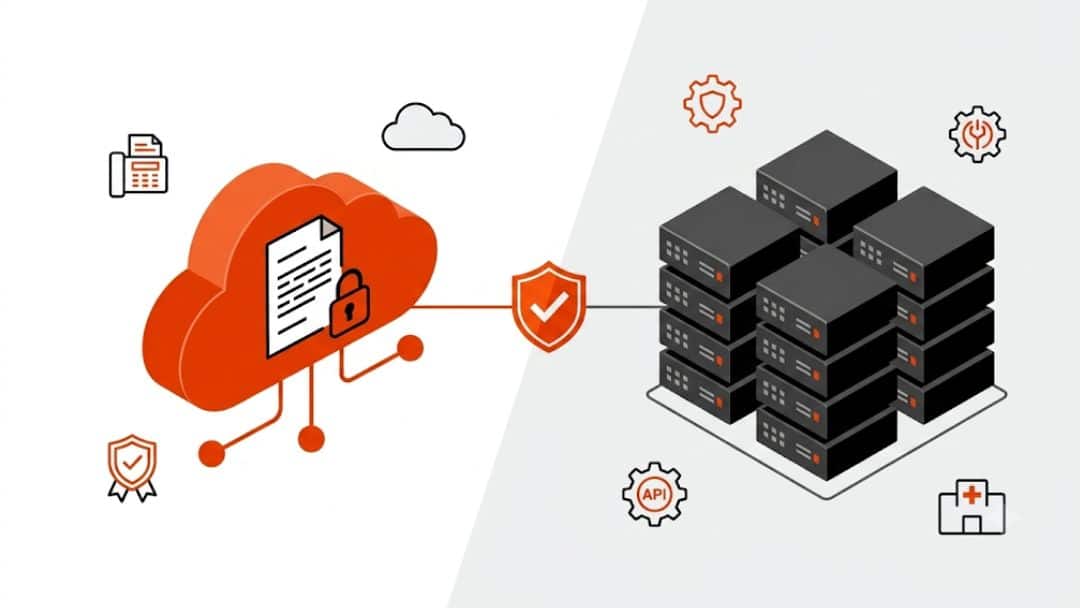
Hybrid approaches try to split the difference by keeping sensitive data on-site while using cloud infrastructure for actual transmission. This works well for organizations with compliance requirements but limited IT resources.
Security of the Email-to-Fax Transmission
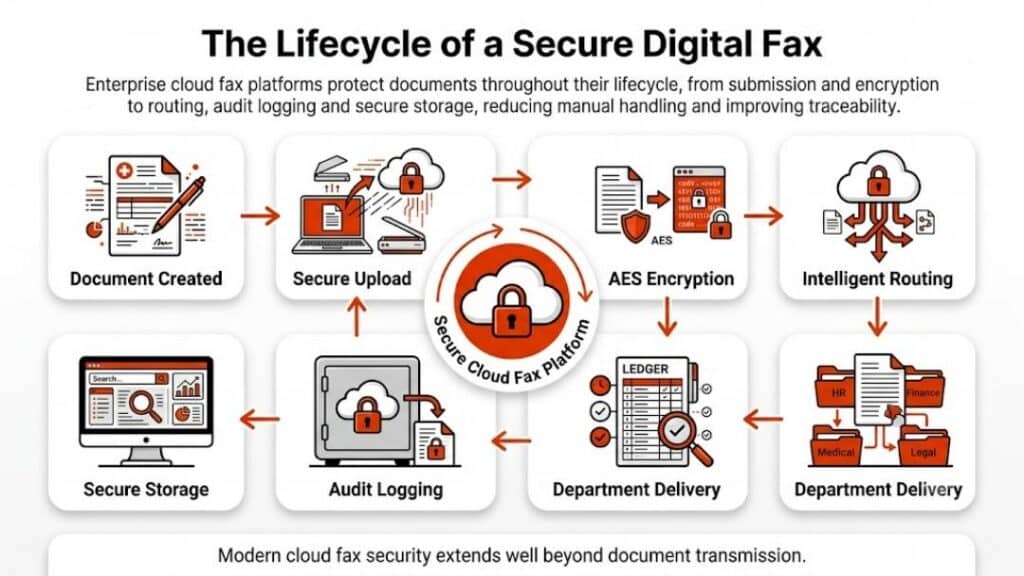
Email-to-fax transmission creates some interesting security challenges. The document travels through email servers, conversion systems, phone networks, and finally lands on a fax machine that might sit unattended in a busy office. That’s a lot of potential exposure points.
Most reputable services encrypt data during transmission and storage, but the final destination – that fax machine – probably isn’t secure at all. Anyone walking by can grab printed faxes, which is why some industries still prefer this method (ironically, they think paper is more secure than digital).
Compliance gets complicated because different industries have different rules. Healthcare organizations deal with HIPAA requirements, financial companies worry about SOX regulations, and government contractors have their own security standards to meet. This is one reason many providers invest in Healthcare Fax Solutions that support secure document exchange, audit trails, and regulatory compliance.
What to Do When Things Go Wrong
Fax transmission fails more often than most people expect. Phone lines get busy, numbers change, machines run out of paper or toner, and documents get formatted incorrectly. The good news is that most problems are fixable with some basic troubleshooting.
Document formatting causes the most headaches. Complex layouts, unusual fonts, or high-resolution images often don’t transmit properly. Keeping documents simple and using standard fonts prevents most formatting issues.
Common problems and quick fixes:
What Went Wrong
Why It Happened
How to Fix It
Fax never arrived
Wrong number or busy line
Use Arial/Times and a simple layout
Text looks terrible
Weird fonts or formatting
Try sending as a PDF
Only got half the pages
Connection dropped
Most services auto-retry
Double-check the number and retry
Their machine doesn’t like the format
Try sending as PDF
Making It Work with Other Business Tools
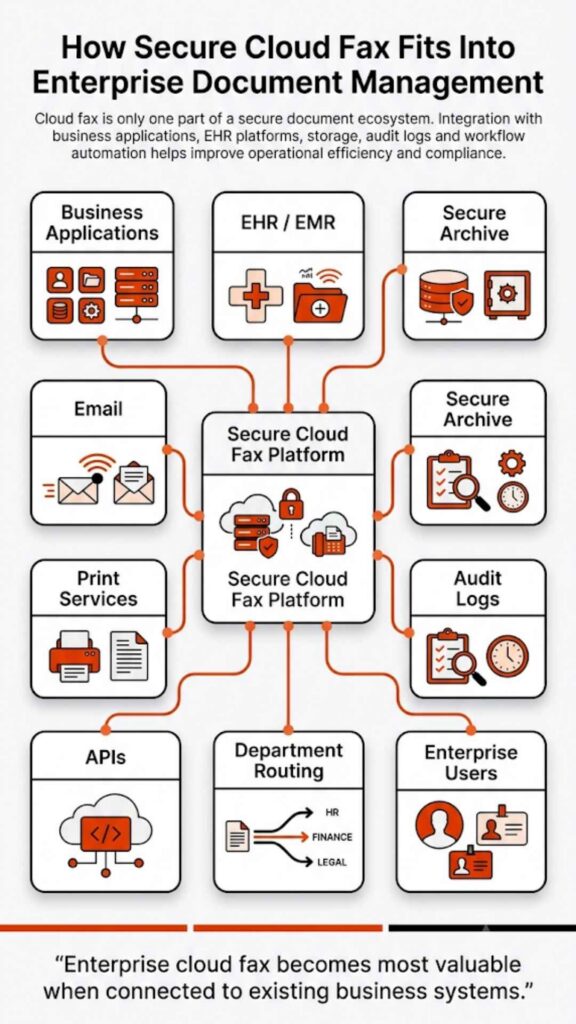
Modern email-to-fax services often integrate with popular business software. Customer management systems can automatically fax contracts, accounting software can send invoices, and document management platforms can fax stored files without manual intervention.
API access lets technical teams build custom integrations that automate fax sending based on specific business events. For example, when a contract gets approved in the system, it could automatically fax copies to all relevant parties.
These integrations save time and reduce errors compared to manual fax sending. They also create better records of what got sent when, which helps with compliance and customer service issues.
Stop Fighting with Fax Machines
Dealing with fax requirements doesn’t have to involve clunky machines, busy signals, and paper jams. Softlinx provides modern communication solutions that handle fax transmission through simple email interfaces while maintaining the security and reliability that businesses need.
Our platform works with existing email systems and business software, eliminating the hassle of traditional fax infrastructure while ensuring important documents reach their destinations reliably.
Softlinx vs OpenText: Which Enterprise Fax Solution Fits Your Team in 2026?
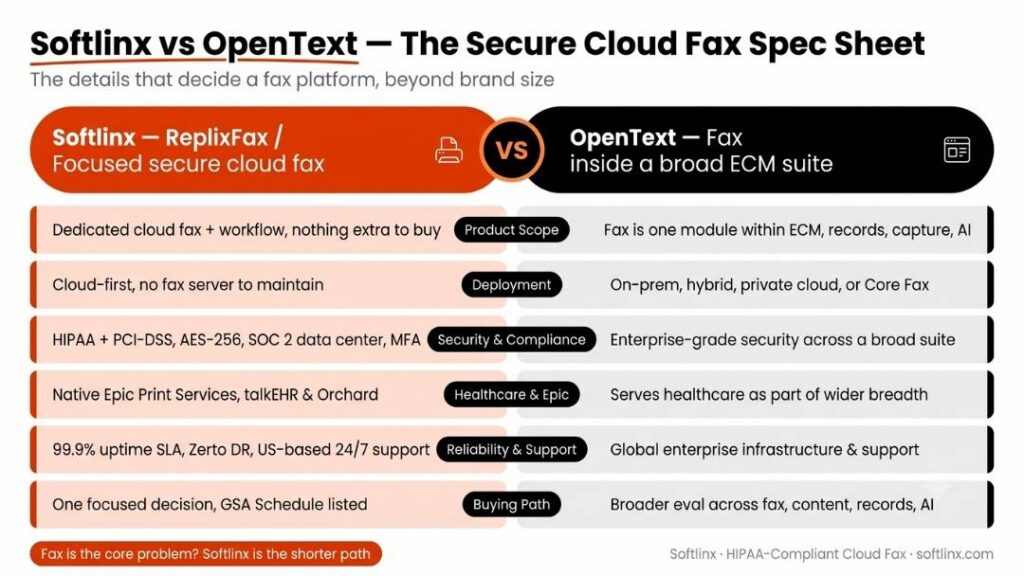
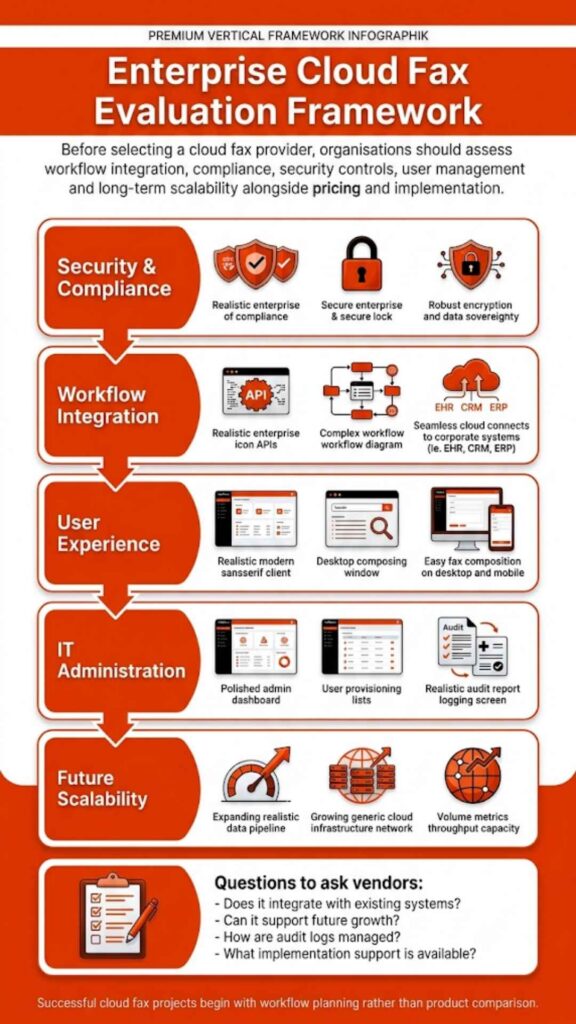
Softlinx vs OpenText is not a simple “which fax tool is better?” debate. It is a choice between a focused secure cloud fax platform built around regulated document delivery and a large enterprise information management vendor with fax, content management, AI, and document systems under one umbrella. For healthcare, finance, insurance, government, and high-volume teams, the better choice depends on how much fax control, workflow depth, deployment flexibility, and vendor ecosystem you need.
In this article, we explore how Softlinx vs OpenText compares for cloud fax, healthcare faxing, enterprise fax server migration, Epic workflows, APIs, OpenText DMS, OpenText Magellan, compliance, pros, cons, and best-fit use cases.
Softlinx vs OpenText
Softlinx vs OpenText matters most when fax is not a side task. In many organizations, fax still carries referrals, claims, lab results, signed forms, loan files, prior authorizations, student health records, and government paperwork. That is why the comparison should not stop at brand size or feature lists. The better question is this: which platform fits the way your team actually sends, receives, routes, audits, and stores sensitive documents?
Softlinx is best understood as a focused cloud fax and secure document delivery provider. Its ReplixFax platform supports secure cloud fax services, HIPAA-compliant healthcare faxing, email-to-fax, web fax, print-to-fax, production fax, APIs, workflow automation, and Epic-related fax workflows. The product is aimed at organizations that still need fax but want less dependence on fax machines, phone lines, local fax servers, and scattered manual handling.
OpenText is a much larger information management company. Its fax portfolio includes OpenText Fax, formerly known as RightFax, and OpenText Core Fax. OpenText Fax supports on-premises, hybrid, and private-cloud deployment, while OpenText Core Fax is positioned as a secure multi-tenant cloud fax platform. It also offers document management, content management, capture, AI, analytics, and automation products beyond fax.
Here’s the thing: OpenText can make sense when fax is one part of a wider enterprise content strategy. Softlinx can make more sense when the main problem is secure, compliant, cloud-based fax delivery for healthcare and regulated business workflows.
Comparison Point
Softlinx
OpenText
Best fit
Healthcare, finance, insurance, government, and enterprise teams that need secure cloud fax without a broad ECM purchase
Large enterprises that want fax as part of a wider OpenText information management ecosystem
Large IT, enterprise architecture, records management, content management, shared services
For healthcare teams, compliance context matters. The U.S. Department of Health and Human Services makes the baseline clear: “The HIPAA Privacy Rule permits physicians to disclose protected health information to another health care provider for treatment purposes. This can be done by fax or by other means.” That does not mean every fax workflow is safe by default. It means safeguards, access control, audit trails, secure transmission, and careful routing still matter.
Quick Verdict: Secure Cloud Fax or Broad Enterprise Information Management?
Softlinx vs OpenText comes down to scope. Softlinx is the cleaner fit when a team wants a dedicated fax service for healthcare, regulated business document exchange, high-volume faxing, and application-level fax integration. OpenText is the broader choice when the organization already uses OpenText systems or wants fax connected to a wider content, records, AI, or enterprise document strategy.
Softlinx should be on the shortlist when the buyer asks, “How do we replace manual fax work with secure cloud fax, APIs, and workflow controls?” OpenText should be on the shortlist when the buyer asks, “How do we modernize fax inside a much larger enterprise information management stack?”
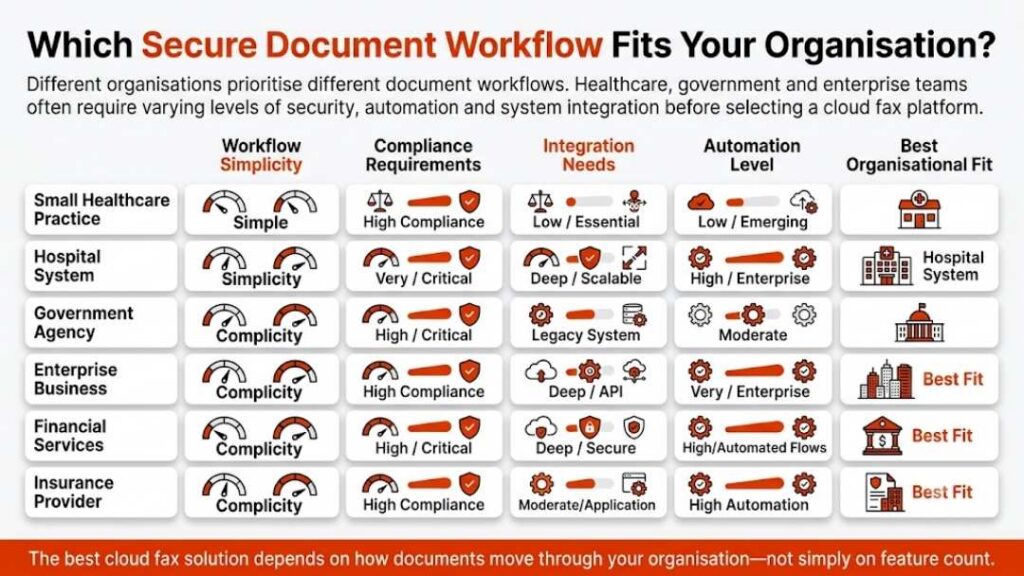
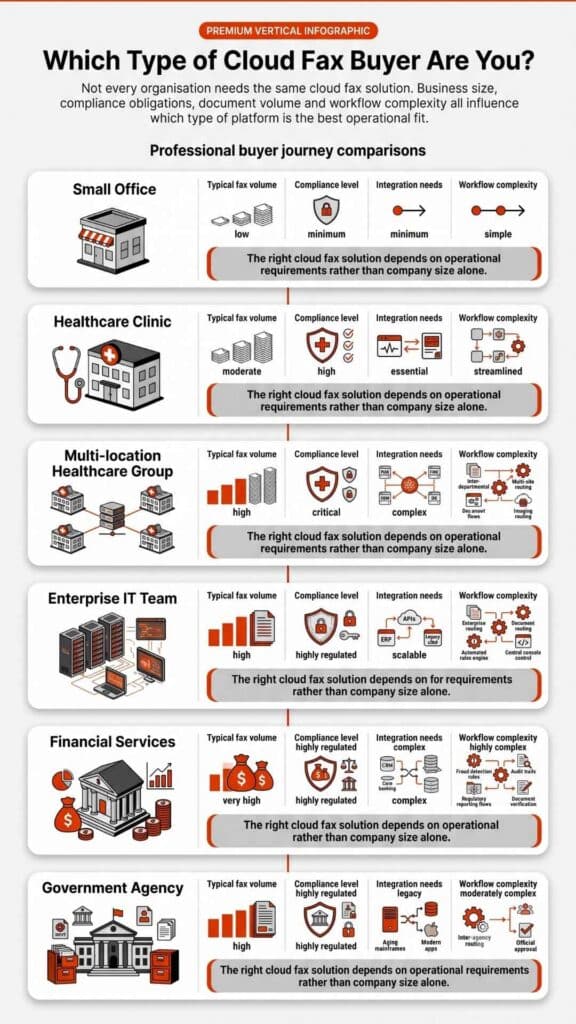
That difference sounds small, but it is not. A hospital clinic may need Epic cloud fax integration and automated delivery into folders or document workflows. A bank may need controlled fax delivery for loan files and sensitive customer records. An insurer may need cleaner claim document flow. A global enterprise may need a complex enterprise fax server that fits old systems, new systems, private cloud plans, and content governance. The buying path changes with each case.
In plain terms, Softlinx vs OpenText is not a brand popularity contest. It is a workflow fit test.
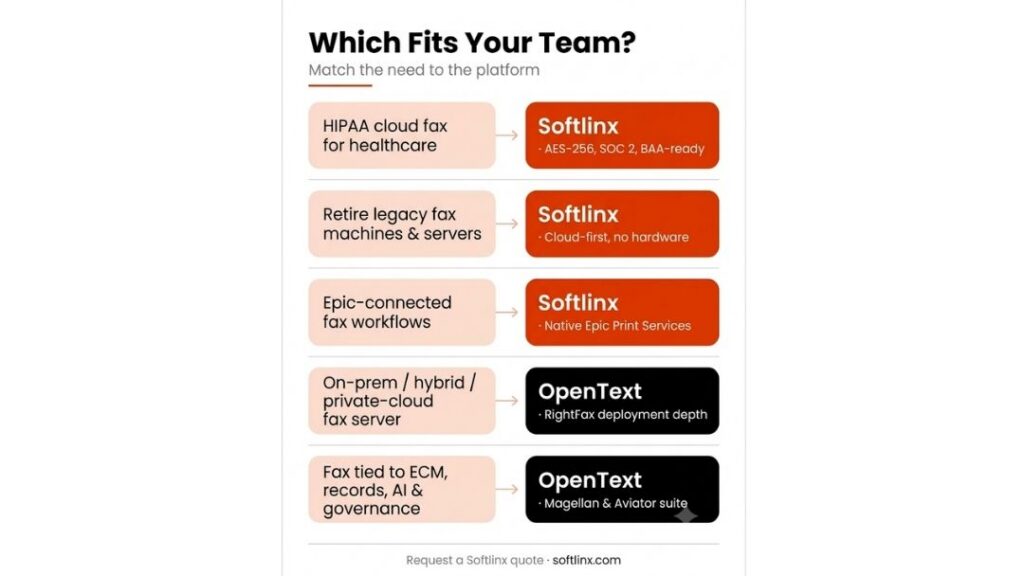
Choose Softlinx or OpenText Based on This
If your team needs…
Better fit
HIPAA-compliant cloud fax for healthcare teams
Softlinx
A replacement path for legacy fax machines and fax servers
Softlinx
On-premises, hybrid, or private-cloud enterprise fax server deployment
OpenText
Fax tied to document management, AI, records, and governance
OpenText
Epic-connected cloud fax workflows
Softlinx
A broad enterprise information management suite
OpenText
This is where the buying conversation should start. If your organization mainly needs secure fax delivery, routing, logs, APIs, and healthcare-ready workflows, Softlinx is easier to evaluate. If the project also includes enterprise content management, AI-driven document handling, capture, records, and governance, OpenText may fit the larger plan.
What Softlinx Does Best for HIPAA-Compliant Cloud Fax
Softlinx focuses on the work most teams still wrestle with every day: getting faxes in, getting faxes out, sending them from familiar tools, routing them to the right place, and keeping sensitive information protected. Its strongest positioning is in healthcare, where fax remains tied to referrals, orders, test results, authorizations, and medical records.
The company’s presents ReplixFax as a HIPAA-compliant cloud fax service for healthcare and enterprise businesses. It supports business users, ISVs, developers, IT service providers, and enterprise teams. That range matters because many organizations do not have one single fax use case. They have front desk users, back-office teams, software systems, EHR workflows, and high-volume outbound processes all mixed.
Softlinx also has a practical user-access advantage. Teams can fax through a web fax portal, send documents through email-to-fax, use print-to-fax, or connect business applications through a secure fax API. That mix helps when staff members have different comfort levels and departments do not all work the same way.
For regulated workflows, Softlinx also gives buyers a clear compliance story. Its industry compliance controls cover encryption, secure communication, HIPAA-related safeguards, and BAA-related requirements. For healthcare, that positioning is not window dressing. A fax platform may look simple on the surface, but once patient records, financial files, or legal documents move through it, the system needs strong controls behind the scenes.
Softlinx also fits high-volume and automated use cases. Its production faxing functionality highlights electronic fax delivery from applications, while its fax workflow automation supports electronic filing, delivery management, inbound and outbound routing, broadcast and mail merge fax, barcode workflows, and automated faxback acknowledgement. For teams stuck with manual review queues, this can help reduce friction without forcing users into a completely new document platform.
Where OpenText Fits: OpenText Fax, OpenText DMS, and OpenText Magellan
OpenText plays a different game. It is not only a fax vendor. It is a global enterprise software provider with information management, document management, cloud content management, AI, cybersecurity, analytics, and workflow tools. That makes the Softlinx vs OpenText decision broader than a fax feature checklist.
OpenText Fax, the product formerly known as RightFax, is a long-standing enterprise fax server solution. OpenText positions it as secure, scalable, and able to integrate with key business systems. It also supports on-premises, hybrid, and private-cloud deployment. That matters for organizations with legacy systems, strict infrastructure rules, or complex internal architecture.
OpenText Core Fax is different. It is OpenText’s secure cloud fax platform. It is meant to replace analog lines, fax hardware, and fax servers while supporting compliant fax across devices and applications. For companies that want OpenText but prefer a cloud-first fax model, Core Fax may be the more relevant product than traditional RightFax.
Then there is OpenText DMS. When people search for OpenText DMS, they are often looking at document management, enterprise content management, records, governance, search, capture, and process integration. That is not the same as buying fax software. A DMS manages content across its lifecycle. A fax platform sends, receives, tracks, and routes fax documents. The two can work together, but they solve different problems.
OpenText Magellan and newer OpenText Aviator tools add another layer. OpenText’s AI direction includes tools for summaries, extraction, routing, and analytics. For a large enterprise that wants AI-assisted handling of unstructured content, OpenText has a broader AI and content stack than Softlinx. But if the actual need is HIPAA-compliant cloud fax with familiar sending options and practical workflow control, that broader stack may be more than the team needs.
Comparison for Enterprise Fax Buyers
Softlinx vs OpenText should be judged by the kind of fax problem your organization has. A simple feature list can mislead buyers because both platforms can support secure fax, application faxing, and regulated workflows. The real difference is depth versus scope.
Feature Area
Softlinx Advantage
OpenText Advantage
Cloud fax simplicity
Strong fit for teams that want focused cloud fax, user tools, APIs, and workflow automation
Strong fit through OpenText Core Fax, especially for buyers already tied to OpenText
Enterprise fax server needs
Better when the goal is to move away from local fax infrastructure toward cloud fax
Better when the organization needs on-premises, hybrid, or private-cloud deployment
Healthcare workflows
Strong focus on healthcare cloud fax, HIPAA safeguards, EHR workflows, and Epic-related delivery
Strong regulated-industry fit, especially in complex enterprise environments
Document management
Focused on fax delivery, routing, logs, and workflow handoff
Stronger for full document management, records, ECM, content governance, and capture
AI and analytics
More focused on fax automation than broad AI
Stronger through OpenText Magellan, Aviator, and broader information management tools
API use cases
SOAP and REST fax APIs for developers and application fax
Strong enterprise integration ecosystem across fax, content, and business systems
Department adoption
Good fit for mixed users who need email, web, print, and application fax
Good fit for large enterprises with established IT governance and OpenText support models
Buying complexity
Usually easier to frame as a cloud fax decision
May require broader evaluation across fax, content, records, AI, and infrastructure
For most buyers, the practical question is not “Which company is bigger?” OpenText is clearly the larger software company. The practical question is, “Which system gives our team the fax workflow we need without unnecessary complexity?” For that reason, Softlinx vs OpenText is closer when the use case is secure cloud fax. OpenText pulls ahead when the buyer wants fax tied to a much wider content and information management program.
Need a focused cloud fax option before renewing or replacing OpenText? Compare your current fax volume, departments, integrations, and compliance needs with Softlinx’s secure cloud fax team before you commit to another enterprise fax server cycle.
Healthcare, Epic, and Compliance Workflows
Healthcare is where Softlinx has its sharpest argument. Its platform is built around healthcare cloud fax, HIPAA-aware document exchange, application faxing, audit trails, secure storage, and EHR-related workflows. For hospitals, clinics, medical centers, labs, pharmacies, and billing organizations, that focus can be valuable because fax is often tied to daily care coordination.
Softlinx’s Epic-related workflow is especially relevant for healthcare IT teams. ReplixFax can receive fax requests through Epic Print Services, send fax status back to Epic, and route inbound faxes through folders, DMS workflows, MFPs, or secure FTP file drops for review and patient-record attachment. This is not just “send a PDF by fax.” It is a workflow bridge between fax traffic and healthcare systems.
OpenText also serves healthcare and other regulated industries, but its stronger story is enterprise breadth. A large health system that already uses OpenText content, capture, or information governance tools may prefer to keep fax inside that broader vendor ecosystem. For another organization, that same breadth may add more evaluation steps than needed.
This is where Softlinx vs OpenText becomes a matter of fit. If the healthcare team wants a focused cloud fax partner for HIPAA-compliant delivery, EHR workflows, and daily fax operations, Softlinx has a direct path. If the healthcare enterprise wants fax, content services, records, AI tools, capture, and governance under a large software suite, OpenText deserves a serious look.
Enterprise Fax Server Migration and IT Control
The phrase enterprise fax server usually points to a very specific pain: old infrastructure that still works but demands maintenance, patches, telecom support, server knowledge, and user support. OpenText RightFax has a long history in that category, and many large companies still associate it with enterprise-grade fax control.
That legacy can be a strength. OpenText Fax supports deployment models that matter to large IT departments, including on-premises, hybrid, and private cloud. If your organization has complex back-end systems, old application dependencies, or policies that do not allow a simple cloud cutover, OpenText may fit the IT roadmap better.
Softlinx approaches the problem from a cloud fax and workflow angle. Its enterprise cloud fax services are built for teams that want secure online faxing, end-user tools, administrative control, APIs, and fewer fax infrastructure headaches. For teams that do not want to keep a fax server alive, that can be the cleaner path.
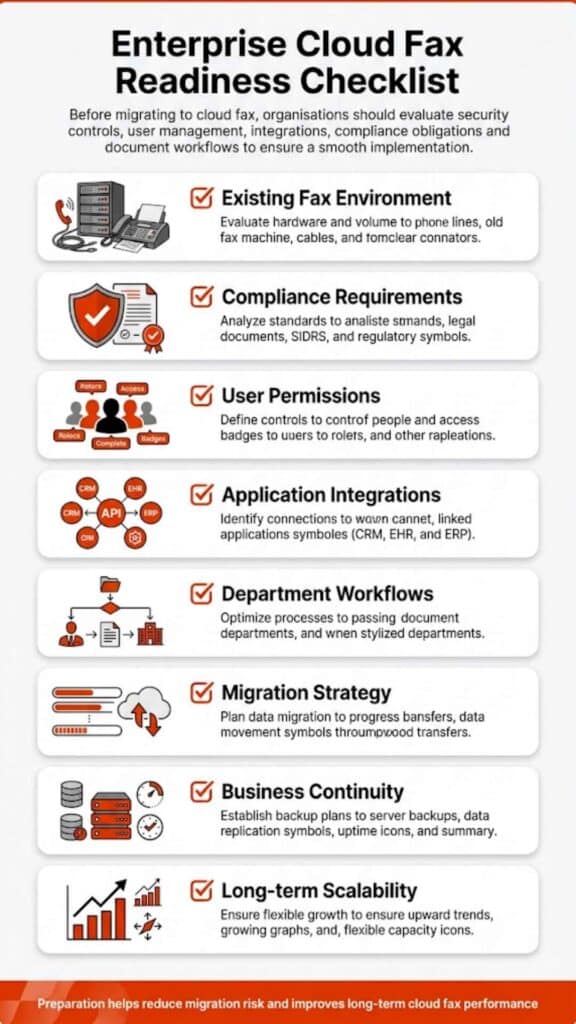
The migration question should be honest. Some organizations are not ready to move every fax workflow to a cloud model. Others are more than ready. Softlinx vs OpenText should be decided after IT maps fax numbers, users, departments, applications, routing rules, retention needs, audit requirements, EHR links, and peak volume periods. Without that map, any comparison turns into guesswork.
Before You Decide: Implementation Checklist
What to Review
Why It Matters
Fax volume by department
High-volume teams may need production fax, routing rules, or API-based sending.
Current fax numbers and ownership
A clean migration depends on knowing which numbers belong to which teams, sites, or workflows.
EHR, ERP, CRM, or claims-system connections
Application fax needs are different from simple user-to-user fax needs.
Inbound routing rules
Healthcare, insurance, finance, and government teams often need faxes routed by department, document type, or workflow.
Compliance and audit needs
HIPAA, financial records, claims documents, and public-sector data all require careful access control and traceability.
Internal IT preference
Some teams want cloud fax. Others need hybrid, private-cloud, or legacy enterprise fax server support.
This checklist helps keep the Softlinx vs OpenText decision grounded. It also prevents a common buying mistake: choosing a platform based on brand familiarity before the actual fax workflow has been mapped.
Pros and Cons of OpenText & Softlinx
Platform
Pros
Cons
Softlinx
Strong healthcare and regulated-industry focus. Supports cloud fax, web portal, email-to-fax, print-to-fax, APIs, production fax, workflow automation, and Epic-related fax workflows. Easier to evaluate when the main need is secure fax modernization. Clear fit for teams that do not want a full content management suite.
Not designed to replace a full OpenText DMS. May not be the best fit for enterprises that need broad records management, capture, AI analytics, and content governance from one vendor. Large organizations with deep OpenText contracts may need a more detailed migration review.
OpenText
Strong enterprise brand. Offers OpenText Fax, Core Fax, document management, content cloud, OpenText Magellan, and AI-related tools. Flexible deployment options can fit complex IT environments. Strong fit for companies already invested in OpenText.
Can feel too broad for teams that only need secure cloud fax. Evaluation may involve more products, more stakeholders, and a longer buying path. Some buyers may not need the full enterprise information management ecosystem.
The honest takeaway is that neither platform is “wrong.” Softlinx is more focused. OpenText is broader. That is the heart of the Softlinx vs OpenText decision.
When Softlinx Belongs on Your OpenText Competitors Shortlist
Softlinx belongs on an OpenText competitors shortlist when the buyer is comparing fax solutions, not full enterprise content suites. That distinction matters. If your team searched for OpenText competitors because RightFax feels heavy, on-premises fax has become harder to support, or users want simpler cloud fax access, Softlinx is highly relevant.
Softlinx is also a strong candidate when the organization wants to support several fax methods at once. A front desk user may prefer email-to-fax. A remote worker may prefer web fax. An application may need API fax. A high-volume operation may need production fax. A document team may need barcode fax workflow or automated routing. Softlinx puts those needs under a fax-centered platform rather than a large information management suite.
OpenText remains a strong competitor when the buyer needs more than fax. If the project includes enterprise content management, long-term records, AI-assisted content, discovery, capture, governance, and integration with large business platforms, OpenText may be the more complete enterprise vendor. But for fax-specific modernization, Softlinx gives buyers a more direct route.
Which Platform Should You Choose?
Choose Softlinx if your main goal is secure cloud fax for healthcare, finance, insurance, government, manufacturing, higher education, or enterprise teams that rely on regulated document exchange. It is especially suitable when you need HIPAA-aware workflows, application faxing, email-to-fax, web fax, print-to-fax, API access, Epic-related workflows, production fax, or automated routing without a full ECM project.
Choose OpenText if your organization already runs OpenText, still needs a complex enterprise fax server model, or wants fax tied to broader document management, capture, content governance, OpenText DMS, OpenText Magellan, AI, and enterprise information management. OpenText may also be the safer choice for large IT teams that need flexible deployment models and a broader software ecosystem.
For many mid-to-large organizations, the best path is to define the real problem first. If the problem is fax delivery, routing, auditability, and secure workflow, Softlinx may fit better. If the problem is enterprise information control across many content types and systems, OpenText may fit better. That is why Softlinx vs OpenText should not be framed as small vendor versus large vendor. It should be framed as focused cloud fax versus broad information management.
FAQs About Softlinx vs OpenText
Is Softlinx a good OpenText alternative?
Yes, Softlinx can be a strong OpenText alternative when the main need is secure cloud fax, healthcare faxing, workflow automation, API fax, and regulated document delivery. It is especially relevant for teams that want fax modernization without moving into a broad enterprise content management project.
Is OpenText better than Softlinx?
OpenText may be better for large enterprises that need fax as part of a wider information management stack, including OpenText DMS, capture, records, content governance, and AI tools. Softlinx may be better when the main priority is focused cloud fax for healthcare, finance, insurance, government, or other regulated workflows.
Does Softlinx support Epic fax workflows?
Yes. Softlinx supports Epic-related fax workflows through ReplixFax. Healthcare teams can use Softlinx for Epic-connected fax delivery, fax status workflows, and inbound document routing tied to patient-record processes.
Does OpenText include document management?
Yes. OpenText offers document management and enterprise content management products beyond fax. That is one of the biggest differences in the Softlinx vs OpenText comparison. Softlinx focuses on secure fax and fax workflow, while OpenText offers a broader information management ecosystem.
Which platform is better for healthcare faxing?
Softlinx is often the cleaner fit for focused healthcare cloud fax, HIPAA-aware workflows, Epic-related fax use cases, and day-to-day fax operations. OpenText can fit large healthcare enterprises that also need content management, records, capture, AI, and governance tools across many document types.
The Smarter Next Step
Softlinx vs OpenText is ultimately a workflow decision. OpenText gives enterprises a broad technology stack with fax as one important part of the portfolio. Softlinx gives regulated teams a focused cloud fax platform built around secure delivery, healthcare use cases, APIs, workflow automation, and practical user access.
If your team wants a direct way to modernize fax without a full content management overhaul, Softlinx is worth a closer look. Start with your fax volume, departments, compliance needs, EHR or application connections, and inbound routing rules. Then compare those needs against the platform, not the logo.
For healthcare, finance, insurance, government, and other regulated teams that need secure cloud fax built around real business workflows, request a Softlinx quote and compare it against your current OpenText setup, fax server plan, or cloud fax shortlist.
July 29, 2026
Softlinx vs Etherfax: Which Cloud Fax Fits Your Business?
Softlinx vs Etherfax is not a simple “which fax tool is better?” question. Both serve organizations that still depend on fax for secure document exchange, especially in healthcare and regulated industries. The better choice depends on whether your team wants a healthcare-focused cloud fax service with practical end-user tools, Epic support, APIs, barcode workflow, and U.S.-based support, or a broader secure exchange network with AI workflow features, in-network routing, device integrations, FedRAMP positioning, and a large fax ecosystem.
In this article, we explore how cloud fax providers compare across healthcare use cases, Epic workflows, security, APIs, automation, pricing, and buyer fit.
Softlinx vs Etherfax
Softlinx vs Etherfax is a close comparison because both companies address the same core problem: fax remains part of business communication, but traditional fax machines, phone lines, and on-premises fax server software can create operational friction for modern teams. For healthcare, finance, insurance, government, and enterprise IT teams, the question is not whether fax still matters. It does. The real question is which cloud fax service can fit into the way the organization already works.
Softlinx is a strong fit for organizations that want secure cloud fax services, healthcare faxing, enterprise faxing, production faxing, barcode fax workflow, Epic integration, email to fax, print to fax, web portal access, workflow tools, and developer APIs under the ReplixFax platform. Softlinx says its main customers are healthcare, financial services, and enterprise businesses primarily in the U.S., and its own site highlights HIPAA-compliant secure cloud fax, end-user fax methods, fax administration, workflow support, and market-proven fax APIs.
Etherfax, branded as ETHERFAX, is a strong fit for organizations that want a secure exchange network, AI-powered document workflows, in-network routing, secure document exchange, DirectFax, messaging app integrations, Epic integration, government cloud fax, and broad device or MFP support. ETHERFAX says it was founded in 2009 and provides cloud fax and intelligent document workflow solutions for healthcare, U.S. government agencies, and enterprise organizations.
Here’s the thing: the best answer in a Softlinx vs Etherfax comparison depends on workflow depth, not just feature count. If your priority is a practical, healthcare-ready fax solution that supports common fax habits such as email, print, web portal, Epic, APIs, and barcode-based routing, Softlinx deserves serious attention. If your priority is a large software-defined fax ecosystem with AI document workflow, in-network routing, Teams/Slack style collaboration, and FedRAMP-related public sector fit, Etherfax may be a better match.
What Is Cloud Fax, and Why Does This Comparison Matter?
Cloud fax is a digital fax solution that lets users send and receive fax documents through the internet instead of a standalone fax machine, analog line, or on-premise fax server. In business settings, a cloud fax solution may include a web portal, email to fax, print to fax, fax APIs, automated routing, audit logs, encryption, number porting, and integration with existing software.
That matters because many regulated organizations cannot simply remove fax overnight. Hospitals still exchange referrals, lab results, discharge records, prior authorization forms, and medical records. Financial teams still send private documents. Insurance teams still process claim files. Government agencies still exchange sensitive forms. The right cloud-based fax service should support secure document delivery while keeping the user experience familiar enough for staff to adopt.
For healthcare buyers, the baseline is not “can this platform fax?” The baseline is “can this platform support reasonable safeguards around PHI?” The U.S. Department of Health and Human Services states: “These treatment communications may occur orally or in writing, by phone, fax, e-mail, or otherwise.” The same HHS guidance says covered healthcare providers may share PHI for treatment without patient authorization as long as reasonable safeguards are used.
That quote is important because it keeps the Softlinx vs Etherfax discussion grounded. Fax itself is not the problem. Poor controls, wrong numbers, exposed machines, weak audit trails, and scattered workflows are the problem. HHS also says physician offices may fax PHI for treatment, but they need reasonable and appropriate administrative, technical, and physical safeguards.
Softlinx Overview
Softlinx provides HIPAA-compliant cloud fax services and enterprise fax solutions through ReplixFax. Its website positions the company around secure cloud fax for healthcare and enterprise businesses, with services for ISVs, enterprise businesses, developers, and IT service providers.
Softlinx highlights that ReplixFax includes AES 256-bit encryption for client data at rest, secure transmission over secure IP networks, MFA, centralized secure storage, intrusion detection and prevention, SOC 2 audit activity, penetration tests, vulnerability tests, and logs for faxes, inquiries, retrievals, and deletions.
Softlinx also has a clear Epic workflow story. Its Epic integration highlights how ReplixFax enables users to submit fax requests through Epic Print Services, return fax status to Epic, use a web portal for job details, and route inbound faxes through Delivery Manager, secure FTP file drops, or network folders for review and attachment to patient records.
That is where Softlinx becomes especially useful for healthcare teams. It does not only talk about secure fax. It shows how fax can move through the systems, folders, users, and workflows healthcare teams already depend on.
Etherfax Overview
Etherfax is a secure cloud fax and document exchange platform with a strong emphasis on its Secure Exchange Network, AI document workflows, direct integrations, in-network routing, and broad interoperability. Its homepage describes next-generation secure cloud fax with AI, AI-powered document workflows, cloud faxing, and software/device integrations.
Etherfax’s Secure Exchange Network is one of its strongest claims. ETHERFAX says SEN has more than six million connected endpoints, supports major fax servers, applications, and fax-enabled devices, and allows systems inside the ETHERFAX ecosystem to communicate without telephony. It also says SEN can send color, high-resolution documents and encrypted payloads while ETHERFAX services operate in a HIPAA- and SOC 2-compliant environment that is HITRUST CSF and PCI DSS certified.
Etherfax also presents a broad healthcare integration message. Its Epic-focused section highlights that ETHERFAX integrates with Epic’s EMR system, supports secure, encrypted document transmission, and enables users to send, receive, and track faxes directly within Epic workflows.
For government buyers, Etherfax has a clear edge in public sector positioning. It highlights a FedRAMP-authorized, software-defined network for digital faxing and supports secure document exchange through email, fax, and API connections to mission-critical applications.
Softlinx vs Etherfax Feature Comparison
Comparison point
Softlinx
Etherfax
Better fit
Core product focus
HIPAA-compliant cloud fax, enterprise fax, production fax, API fax, workflow automation
HIPAA/SOC 2 environment, HITRUST, PCI DSS, FedRAMP government positioning
Etherfax for public sector certification emphasis; Softlinx for healthcare fax workflow emphasis
Pricing visibility
Quote/demo-led
Contact-sales and enterprise-led
Neither is fully self-serve in public pricing
Best audience
Healthcare teams, enterprises, developers, ISVs, IT service providers, finance, insurance, education, government, manufacturing
Healthcare, government, enterprise, device ecosystems, AI workflow teams, organizations in ETHERFAX network
Depends on buyer environment
Need a healthcare-focused cloud fax option with Epic support, API access, and practical end-user fax tools? Softlinx gives teams a secure way to send, receive, route, and manage fax workflows without relying on fax machines or phone lines. Review the Softlinx cloud fax service or request details to compare it against your current fax workflow.
Security and Compliance: Where the Real Decision Starts
In a Softlinx vs Etherfax comparison, security should come before convenience. Both companies market secure cloud fax solutions, but they highlight different security strengths.
Softlinx places heavy emphasis on HIPAA-compliant fax for healthcare, AES 256-bit encryption at rest, secure transmission, MFA, centralized storage, IDS/IPS, annual SOC 2 audit activity, penetration tests, vulnerability tests, BAA support, and audit trails. Its healthcare page is very specific about the safeguards it uses for ReplixFax.
Etherfax places heavy emphasis on its secure network, HITRUST CSF, PCI DSS, SOC 2 environment, end-to-end encryption, two-factor authentication, secure exchange, and in-network delivery. Its official “Why Use ETHERFAX?” page says it connects to fax servers, MFPs, Epic, Hyland OnBase, Microsoft Teams, Slack, and its API library.
The best way to judge this category is to ask for current documentation during evaluation. A healthcare buyer should ask both vendors for BAA details, audit report availability, encryption details, access control options, retention controls, incident response process, uptime/SLA language, user activity reporting, and implementation requirements. For government use, Etherfax’s FedRAMP positioning may carry more weight. For healthcare fax operations that need a clear mix of email, print, portal, Epic, API, barcode, and routing, Softlinx may feel more direct.
Healthcare Faxing and Epic Workflows
Softlinx vs Etherfax becomes especially interesting for hospitals, clinics, labs, imaging centers, medical billing firms, and specialty practices. Both platforms understand healthcare. The difference is how they frame the workflow.
Softlinx frames healthcare fax as a secure, practical extension of existing clinical and administrative systems. Its ReplixFax healthcare fax service is geared toward healthcare and supports EMR, PM, and LIS application faxing. It also supports user tools such as email to fax, print to fax, web fax, MFP support, document workflow, barcode fax workflow, and integrated tracking.
Etherfax frames healthcare fax as secure document exchange inside a broader network. Its healthcare page says ETHERFAX lets organizations exchange clinical documents, lab results, and patient records without a fax machine, while integrating with EHR platforms, third-party systems, scanners, and multifunction devices.
For Epic, both companies have a credible story. Softlinx focuses on Epic Print Services, fax job status back into Epic, Delivery Manager, secure FTP drops, and inbound fax routing to folders or DMS workflows. Etherfax focuses on Epic EMR integration through DirectFax and the Epic Connection Hub, with encrypted exchange and tracking inside Epic workflows.
For a healthcare organization that wants a secure cloud fax service that keeps fax close to existing user habits, Softlinx may be easier to map to everyday fax needs. For a health system that wants network-based exchange, AI document handling, and broader device or collaboration integrations, Etherfax may be a stronger fit.
Fax APIs and Developer Fit
Softlinx vs Etherfax also matters for developers and software teams. A modern fax solution should not force every user into a separate portal. In many enterprise settings, fax has to sit inside EHR software, document management systems, billing systems, claims platforms, laboratory systems, or internal business applications.
Softlinx’s developer section highlights that its fax API includes SOAP and REST fax APIs, integration toolkits, online documentation, sample code, tutorials, technical support, and a test fax server. It also notes that users can send and receive faxes directly from their primary applications without a separate fax application.
Etherfax’s developer documentation includes a REST API developer hub for sending, receiving, and managing fax and document delivery through the ETHERFAX network. The developer API section notes that these APIs enable third-party applications to connect with SEN and support document exchange workflows.
The practical difference is this: Softlinx presents its API as a direct way to fax-enable business applications and support high-volume application faxing. Etherfax presents its API in the context of a broader secure exchange network. If your team needs a corporate fax solution embedded into a healthcare app, billing platform, or enterprise workflow, both deserve a technical review. Softlinx may feel more fax-application focused, while Etherfax may feel more network and interoperability focused.
Workflow Automation, Barcode Fax, and AI Document Handling
This is one of the clearest difference points in the Softlinx vs Etherfax comparison.
Softlinx has a specific barcode fax workflow product for claims processing, reimbursement processing, and application processing. It supports both single and multiple claim fax handling, along with cover page barcode generation through an API. The system enables barcode value capture and fax file delivery to a network folder, along with triage email alerts, web-based triage, multiple queue management, and detailed workflow status reporting.
Etherfax has a stronger AI workflow narrative. Its homepage says ETHERFAX Flow captures documents, enriches data with AI, and routes documents to the correct system of record. Its “Why Use ETHERFAX?” section also highlights data extraction, workflow automation, and the ability to transform unstructured documents into structured, searchable data.
So here’s the problem buyers need to solve. If your fax workflow already depends on barcodes, queues, folders, metadata, and claims triage, Softlinx has a practical and familiar path. If your team wants AI data extraction, classification, and document-to-system routing, Etherfax has more visible messaging around that direction.
Pros and Cons of Softlinx and Etherfax
Provider
Pros
Cons
Softlinx
Strong healthcare cloud fax focus. Supports web portal, email to fax, print to fax, Epic workflows, production fax, barcode fax, and SOAP/REST APIs. Good fit for organizations that need secure faxing tied to existing business applications. Responsive technical support is part of its buyer appeal.
Public pricing is not listed in a simple self-serve way. AI document workflow is not as prominent as Etherfax’s current messaging. Some website copy uses broad benefit language, so buyers should verify current SLA, audit, and implementation details during sales review.
Etherfax
Strong secure exchange network story. SEN has broad endpoint support. Strong public sector positioning with FedRAMP language. Supports Epic, MFPs, Teams/Slack-style collaboration, APIs, AI workflow, data extraction, and in-network routing.
May feel more enterprise/network-led than simple for teams that only need practical cloud fax tools. Public pricing is not simple to compare. Some capabilities may require deeper technical evaluation, partner support, or a more involved implementation path.
Pricing and Contract Evaluation
Neither provider should be judged by sticker price alone, especially because enterprise fax pricing often depends on volume, users, integrations, support model, retention needs, number porting, compliance needs, and implementation scope.
Softlinx uses quote and demo calls across its site rather than publishing a simple price grid. Etherfax also uses contact-sales style conversion paths. That means a buyer should compare both through the same checklist rather than assume one is less expensive or more expensive.
In a Softlinx vs Etherfax pricing review, ask each vendor for monthly platform fees, inbound and outbound page rules, overage terms, setup fees, number porting details, retention costs, API usage costs, support tier details, SLA language, BAA terms, audit report access, onboarding steps, and cancellation terms. Do not rely on generic “cloud fax costs less” claims. The right question is whether the total setup fits your compliance needs, IT resources, fax volume, user behavior, and document workflow.
Which Cloud Fax Service Fits Your Use Case?
Use case
Better short-list choice
Why
Hospital or clinic needs HIPAA-compliant fax with email, print, web portal, Epic, and audit trails
Softlinx
The platform is presented around healthcare faxing, end-user fax tools, Epic support, and audit-friendly ReplixFax workflows.
Government agency needs public sector cloud fax with FedRAMP positioning
Etherfax
Etherfax has clear government cloud fax language and FedRAMP-authorized positioning.
Claims or reimbursement team needs barcode-based routing and triage
Softlinx
Barcode fax workflow is a named Softlinx solution for claims, reimbursement, and application processing.
Enterprise wants AI document extraction and routing to systems of record
Etherfax
Etherfax places AI-powered document workflow and data extraction at the center of its current platform message.
Developer team wants to fax-enable a healthcare or enterprise application
Softlinx or Etherfax
Softlinx offers SOAP/REST APIs with sample code and a test fax server. Etherfax offers REST API access through its developer hub and SEN model.
Organization wants secure fax through Teams, Slack, MFPs, and broad device ecosystems
Etherfax
Etherfax has stronger public messaging around messaging apps, MFPs, network exchange, and device integrations.
Mid-to-large U.S. healthcare or enterprise business wants secure cloud fax with practical support
Softlinx
Softlinx says its key customers are healthcare, financial services, and enterprise businesses primarily in the U.S.
Softlinx vs Etherfax: Who Should Choose Softlinx?
Choose Softlinx when your team wants secure cloud fax without making fax feel like a new, separate burden. Softlinx is especially relevant for healthcare and enterprise teams that need fax through familiar methods: email, web portal, print to fax, Epic workflows, APIs, folders, MFPs, and production fax processes.
Softlinx may also be the better choice when the buyer journey or sales messaging needs to focus on practical fax challenges rather than broad platform transformation. It’s easier to position Softlinx around day-to-day operational fit: sending from email, faxing from applications, routing inbound files, handling high-volume jobs, using barcode triage, connecting with Epic, and maintaining clear audit visibility.
For teams that already have fax-heavy departments, Softlinx can be positioned as a secure cloud fax solution that helps replace scattered fax processes with centralized tools and stronger workflow control. That wording avoids pricing promises while still explaining the operational value.
Softlinx vs Etherfax: Who Should Choose Etherfax?
Choose Etherfax when your organization wants a larger secure exchange network, AI document processing, public-sector positioning, device integrations, and broad interoperability across systems. Etherfax is especially relevant for enterprise and public sector teams that want fax to sit inside a broader document exchange strategy.
Etherfax may also be better when the organization already works in device-heavy or partner-heavy environments. Its site highlights Epic, Hyland OnBase, Microsoft Teams, Slack, scanners, MFPs, email applications, APIs, and custom solutions.
For teams that want to move beyond fax transport and into AI-powered document workflow, Etherfax has the more visible market message. That said, buyers should still confirm implementation requirements, support model, contract terms, and how each AI or routing feature works with their current systems.
FAQS About Etherfax vs Softlinx
Is Softlinx better than Etherfax?
Softlinx may be better than Etherfax for healthcare and enterprise teams that want secure cloud fax with web, email, print, Epic, API, production fax, and barcode workflow support. Etherfax may be better for teams that want secure network exchange, AI workflow, in-network routing, messaging app integrations, MFP support, and government cloud fax positioning.
Which option is better for HIPAA-compliant fax?
Both vendors market HIPAA-compliant fax capabilities. Softlinx gives detailed healthcare fax safeguards such as AES 256-bit encryption at rest, MFA, secure transmission, audit logs, SOC 2 audit activity, penetration tests, and BAA support. Etherfax says its services operate in a HIPAA- and SOC 2-compliant environment with HITRUST and PCI DSS certification language. Buyers should request current compliance documentation from both before purchase.
Which option is better for Epic?
Both vendors support Epic workflows. Softlinx uses Epic Print Services, status updates, Delivery Manager, secure FTP drops, and inbound fax routing. Etherfax supports Epic through DirectFax and Epic Connection Hub with encrypted exchange and in-app fax capability. The better fit depends on your Epic setup, IT resources, inbound routing needs, and preferred support process.
Is there public Etherfax pricing?
Public Etherfax pricing is not simple to compare from the official site. Most enterprise buyers should expect to contact sales and request a quote based on use case, volume, integrations, and support needs. The same practical advice applies to Softlinx because Softlinx also pushes buyers toward quote or demo conversations rather than a public price grid.
A Clear Way to Decide
Softlinx vs Etherfax comes down to the kind of fax problem your organization has. If the problem is “we need secure, compliant faxing that works with healthcare users, Epic, email, print workflows, web access, APIs, high-volume fax, and barcode-based routing,” Softlinx is the stronger short-list choice. Its value is in practical, secure fax operations for healthcare and enterprise teams.
If the problem is “we need secure document exchange across a large network, AI document workflow, in-network routing, government-ready cloud fax, MFPs, messaging apps, and broad interoperability,” Etherfax is the stronger short-list choice. Its value is in the network and the broader document exchange layer.
For most healthcare and enterprise buyers, the right next step is not to ask which name sounds bigger. The right next step is to map your real fax journey: who sends, who receives, where documents land, which system needs the file, who audits the activity, and what happens when a fax fails. Once that map is clear, compare Softlinx and Etherfax against your actual workflow.
For healthcare providers, enterprise teams, and regulated organizations that need secure cloud fax without forcing users into a complicated new process, Softlinx is the practical place to start. Review Softlinx’s cloud fax options, compare them with your current fax workflow, and request a quote when you are ready to evaluate secure faxing, Epic support, API access, and workflow automation in one conversation.
July 24, 2026
Softlinx vs SRFax: Secure Cloud Fax Comparison for 2026
Softlinx vs SRFax is not just a question of which online fax service can send a document from a computer. That is the easy part. The harder question is whether your business needs a simple email fax account or a secure cloud fax system that fits into daily operations, compliance reviews, EHR workflows, user permissions, and high-volume document handling.
SRFax is a well-known online fax service with healthcare plans, email fax, web fax, printer tools, and API access. Softlinx, through ReplixFax, is built more around enterprise cloud fax, healthcare workflows, EHR connectivity, high-volume fax needs, and regulated document routing.
For a solo office or smaller team that wants a straightforward fax service online, SRFax may be easier to evaluate at first glance. For healthcare groups, enterprise teams, financial institutions, insurance organizations, government departments, and other regulated businesses that need deeper workflow control, Softlinx deserves a closer look.
In this article, we compare Softlinx vs SRFax across security, healthcare fit, APIs, workflows, pricing visibility, and buyer use cases so you can choose the right fax service without guesswork.
Softlinx vs SRFax: Quick Verdict for Secure Online Fax Buyers
Softlinx is the stronger fit when fax is part of a larger business workflow, not just a one-off way to send a fax from a computer. Its ReplixFax platform supports cloud fax, enterprise faxing, production faxing, API-based fax, web portal fax, email-to-fax, print-to-fax, barcode fax workflow, and healthcare-focused integrations. Softlinx describes its service as a secure cloud fax platform for healthcare and enterprise businesses, with specific support for ISVs, developers, enterprise businesses, and IT service providers.
SRFax is the stronger fit when a business wants a more traditional online fax account with clear public plans, email-to-fax, fax-to-email, web access, basic API use, and healthcare-specific HIPAA plans. SRFax says its plans serve businesses in the U.S. and Canada, with standard features such as web application access, email use, printer driver access, API integration, unlimited storage, SSL, and optional PGP encryption.
Office manager, small business owner, clinic admin, remote office team
Need fax to do more than send and receive documents? Softlinx’s ReplixFax is built for healthcare, enterprise, API, and workflow-based fax use cases. Review Softlinx’s healthcare cloud fax service or explore enterprise faxing to see whether the platform fits your organization’s daily workflow.
How Softlinx and SRFax Approach Online Fax Services
Softlinx treats fax as part of business infrastructure. That matters because many organizations still do not use fax as a standalone tool. A hospital may need inbound faxes routed to a patient record. A financial services firm may need audit trails. An insurance team may need secure document routing by department. A manufacturer may need production faxing from a business application. Softlinx’s own site points to cloud fax services for ISVs, enterprises, developers, IT service providers, healthcare, insurance, manufacturing, financial services, government, and higher education.
SRFax takes a more account-based online fax approach. Users can send a fax through email, receive faxes in email, use a web application, access a printer driver, and use API tools. Its public plan page states that SRFax serves every type and size of business in the U.S. and Canada, with options for healthcare organizations and standard business users.
That difference is the heart of Softlinx vs SRFax. SRFax works well when the buyer asks, “How can I send a fax without a fax machine?” Softlinx becomes more relevant when the buyer asks, “How do we manage secure faxing across departments, applications, EHR workflows, users, audit trails, and high-volume document processes?”
Secure Cloud Fax, HIPAA Compliance, and Audit Readiness
For healthcare and other regulated industries, compliance is not a marketing label. It affects access control, transmission security, audit history, vendor agreements, and internal policy. The U.S. Department of Health and Human Services explains that “The Security Rule requires regulated entities to implement reasonable and appropriate administrative, physical, and technical safeguards” for ePHI. That quote matters because choosing a HIPAA-compliant online fax service is only one part of a larger compliance program.
Softlinx says its healthcare fax solution uses a HIPAA-compliant, SOC 2-audited data center, AES 256-bit encryption, and TLS protocols over a secure communication link. The same healthcare page references annual SOC 2 audits, penetration testing, vulnerability testing, Business Associate Agreements, MFA, audit trails, delivery confirmation, and user activity reports.
SRFax says its healthcare plans are fully HIPAA compliant, with PHIPA support for Canada. It also says it signs a Business Associate Agreement, uses SSL encryption and firewalls, and offers optional PGP encryption. SRFax’s security describes SSL encryption, firewalls, a dedicated cybersecurity team, optional PGP encryption, data center practices, backups, continuity management, authorization systems, and monitoring.
In plain English, both providers speak to secure online fax needs. The difference is how the buyer evaluates risk. A smaller clinic may value SRFax’s clear healthcare plans and simple email fax setup. A larger organization may need Softlinx’s broader controls around enterprise cloud fax, department administration, routing, EHR integration, and reporting.
Fax API, EHR Integration, and Workflow Automation
The API comparison is where Softlinx vs SRFax becomes more interesting. SRFax does offer a developer path. Its developer section says the SRFax API helps developers add email-to-fax capability to projects and provides downloadable classes in PHP, Ruby, C#, and VB. SRFax also says its API can support large hospitals, healthcare institutions, enterprise organizations, and small businesses.
Softlinx, however, places API and workflow deeper into the center of its platform story. Its enterprise faxing says ReplixFax supports both SOAP and REST fax APIs, sample code, tutorials, out-of-the-box integration toolkits, metadata handling, folder-based outbound fax automation, and inbound or outbound fax filing.
Softlinx also has dedicated healthcare integration positioning. Its Epic integration says ReplixFax allows Epic users to send and receive faxes directly from Epic, sends fax status back to Epic, gives administrators access to a ReplixFax web portal, and supports inbound fax delivery through folders or secure FTP drops for document management workflows.
That makes Softlinx a stronger candidate for businesses where fax must connect to EHR, EMR, PM, LIS, document management, finance, insurance, or internal workflow systems. SRFax still has API value, but Softlinx presents a more enterprise-heavy story around electronic fax workflow and application-level faxing.
Sending Fax From Computer, Email, Web, and Print
Both platforms support the basic question many buyers still ask: can you fax from a computer? Yes, with both Softlinx and SRFax, fax can move through digital tools instead of a physical fax machine.
SRFax explains that users can send and receive documents from a desktop computer, phone, tablet, or laptop, with email-to-fax and fax-to-email workflows. Its “How SRFax Works” says users can open an email program, create a message, and enter the destination fax number followed by the SRFax domain.
SRFax also offers a Windows printer driver that lets users send a fax from printable programs. For Mac users, SRFax provides a Mac client that can send or receive faxes directly from the desktop client.
Softlinx also supports multiple user methods. Its highlight web portal, email-to-fax, print-to-fax, workflow, and developer API options. Its enterprise section says users can send and receive faxes by email, ReplixFax Printer Driver, or web interface on PC and mobile devices.
The practical difference is not whether each service can send an electronic fax. Both can. The difference is whether your team needs simple online faxing services or a broader faxing solution with department control, routing logic, application integration, usage reporting, and compliance documentation.
Pricing Model and Buying Fit
SRFax has public pricing, which makes it easier for smaller buyers to estimate an account before a sales conversation. Its healthcare plans include Healthcare Lite at 200 combined sent and received pages per month and Healthcare Basic at 500 combined pages per month, with listed monthly rates and additional page charges.
Softlinx is better approached as a quote-based enterprise cloud fax provider. For buyers with high-volume faxing, EHR integration, production faxing, API needs, multiple departments, or regulated workflows, a quote-based review can be more useful than a small-business price grid. That does not mean Softlinx will be right for every budget. It means the evaluation should include workflow complexity, compliance requirements, user roles, number porting, application integration, fax volume, support expectations, and implementation needs.
SRFax is easier to price quickly from public plans, while Softlinx is easier to justify when fax is part of a larger secure document workflow.
Softlinx Pros and Cons vs SRFax Pros and Cons
Provider
Pros
Cons
Softlinx
Strong fit for healthcare and enterprise fax workflows. Supports web, email, print, API, and workflow-based fax. Better positioned for EHR integration, production faxing, barcode workflow, and regulated document routing. References HIPAA, PCI-DSS, BAA, AES-256, TLS, MFA, SOC 2 audit practices, audit trails, and detailed reporting.
Pricing is not as instantly visible as SRFax public plans. May be more than a very small team needs for occasional faxing. Some buyers may need a sales conversation before they can judge fit.
SRFax
Clear public healthcare plans. Strong fit for email fax, fax-to-email, web fax, basic online fax, and healthcare office use. Offers HIPAA healthcare plans, PHIPA references, BAA, SSL, optional PGP, API access, printer driver, and Mac client.
Less visibly focused on complex enterprise workflow than Softlinx. HIPAA positioning is strongest around healthcare plans, so non-healthcare buyers should review plan details carefully. Direct EHR workflow depth appears less central than it is with Softlinx.
Best Use Cases for Each Online Fax Service
Use Case
Better Fit
Why
Small business that needs to send fax online from email
SRFax
Public plans and simple email-to-fax setup make the buying path straightforward.
Healthcare clinic with routine fax volume
SRFax or Softlinx
SRFax may fit simpler use; Softlinx may fit if routing, audit, EHR workflow, or department management matters.
Hospital, medical group, or health system
Softlinx
Stronger fit for EHR integration, audit trails, centralized administration, and enterprise fax workflow.
Financial services, insurance, or government workflow
Softlinx
Better match for regulated document routing, reporting, and enterprise administration.
Developer adding fax into an application
Softlinx or SRFax
SRFax has a RESTful API; Softlinx supports REST and SOAP APIs with broader enterprise workflow positioning.
High-volume production fax
Softlinx
Production faxing, workflow automation, and enterprise controls are part of the Softlinx positioning.
Buyer who wants public pricing before any call
SRFax
SRFax publishes plan details, while Softlinx is quote/demo oriented.
Team replacing fax machines across departments
Softlinx
Department management, web portal control, application faxing, and workflow tools are more central to Softlinx.
Which Fax Service Is Better for Healthcare?
For healthcare, Softlinx vs SRFax comes down to workflow depth. SRFax is a credible HIPAA-compliant online fax service for clinics, physicians, pharmacies, remote teams, and healthcare offices that want secure email fax and web fax tools. It publishes healthcare plans and clearly explains its BAA and encryption posture.
Softlinx is stronger when healthcare faxing touches EHR integration, multiple departments, inbound routing, patient-document workflows, audit trails, and enterprise oversight. Its healthcare fax page references SOC 2 audit practices, AES 256-bit encryption, TLS, BAA support, MFA, audit trails, and user activity reporting, while its Epic integration adds a deeper EHR workflow layer.
So, for a small healthcare office, SRFax may be enough. For a hospital, medical center, lab, imaging center, billing company, or multi-location practice, Softlinx may offer a better long-term fit.
If your healthcare team needs fax tied to EHR workflows, routing rules, audit trails, and secure document handling, Softlinx is worth reviewing before you choose a basic online fax account.
Which Fax Service Is Better for Enterprise Teams?
Enterprise teams usually need more than a fax inbox. They need administration, reporting, permissions, routing rules, uptime expectations, user management, and support for business applications. Softlinx’s enterprise fax offering highlights features like self-service fax administration, user accounts, departments, retries, notifications, fax usage reports, custom cover pages, high-volume faxing, API integration, workflow tools, and secure cloud fax hosting.
SRFax can still serve enterprise-level users, especially when the organization wants account-based online fax with API access. Its developer section highlights support large hospitals, healthcare institutions, enterprise-level organizations, and small businesses.
The difference is emphasis. SRFax is easier to understand as an online fax provider. Softlinx is easier to understand as an enterprise cloud fax and workflow platform.
FAQs About Softlinx vs SRFax
Can you fax from a computer with Softlinx and SRFax?
Yes. Both services allow users to send faxes from a computer without a physical fax machine. SRFax supports email-to-fax, web fax, a Windows printer driver, and a Mac client. Softlinx supports web portal fax, email-to-fax, print-to-fax, API-based fax, and workflow-based fax.
Is online fax secure enough for healt3hcare?
Online fax can support healthcare workflows when the provider and the healthcare organization use the right safeguards. HIPAA compliance depends on more than the fax service name. Buyers should review BAA availability, encryption, audit logs, access controls, authentication, user permissions, routing, storage, and internal policies.
Is SRFax HIPAA compliant?
SRFax says its healthcare plans are HIPAA compliant and include safeguards such as BAA support, SSL encryption, firewalls, and optional PGP encryption. Healthcare buyers should still confirm plan terms, user permissions, retention settings, and internal policies before sending PHI through any fax online service.
Does Softlinx support EHR fax workflows?
Yes. Softlinx positions ReplixFax for healthcare workflows and EHR-related fax use cases, including Epic integration, inbound fax routing, fax status updates, secure FTP delivery, web portal administration, and workflow support for healthcare organizations.
Is SRFax better than Softlinx?
SRFax may be better for small businesses, individual offices, or clinics that want quick pricing and standard online fax functionality. It is less likely to be the stronger choice when the buyer needs a more complex faxing solution across departments, applications, and regulated workflows.
Which service is better for HIPAA-compliant cloud fax?
Both providers publish HIPAA-related information. SRFax has dedicated healthcare plans and BAA language. Softlinx has broader healthcare cloud fax and enterprise compliance positioning, with references to BAA support, AES-256, TLS, SOC 2 audit practices, MFA, audit trails, and EHR workflow support. The better choice depends on the organization’s size, workflow, and compliance review process.
The Better Choice Depends on the Fax Job You Need Done
Softlinx vs SRFax is really a comparison between two different types of buyers. SRFax works well for teams that want a secure online fax service, public plan details, email-to-fax, web fax, and a familiar path for sending faxes from a computer. It is a practical choice for many small businesses and healthcare offices.
Softlinx is better suited for organizations where fax is still mission-critical and tied to larger systems. If your team needs secure cloud fax across healthcare, insurance, finance, government, manufacturing, higher education, or enterprise workflows, Softlinx offers a more workflow-focused route. Its ReplixFax platform is especially relevant when you need web portal fax, email-to-fax, print-to-fax, API faxing, EHR integration, production faxing, barcode fax workflow, audit trails, and compliance-focused administration.
For a simple online fax account, SRFax may do the job. For regulated teams that need fax to fit the way the business actually works, Softlinx is the stronger option to evaluate.
Ready to compare your current fax setup with a secure cloud fax workflow? Review Softlinx’s healthcare cloud fax service, explore enterprise faxing, or request a Softlinx quote to see how ReplixFax fits your organization.