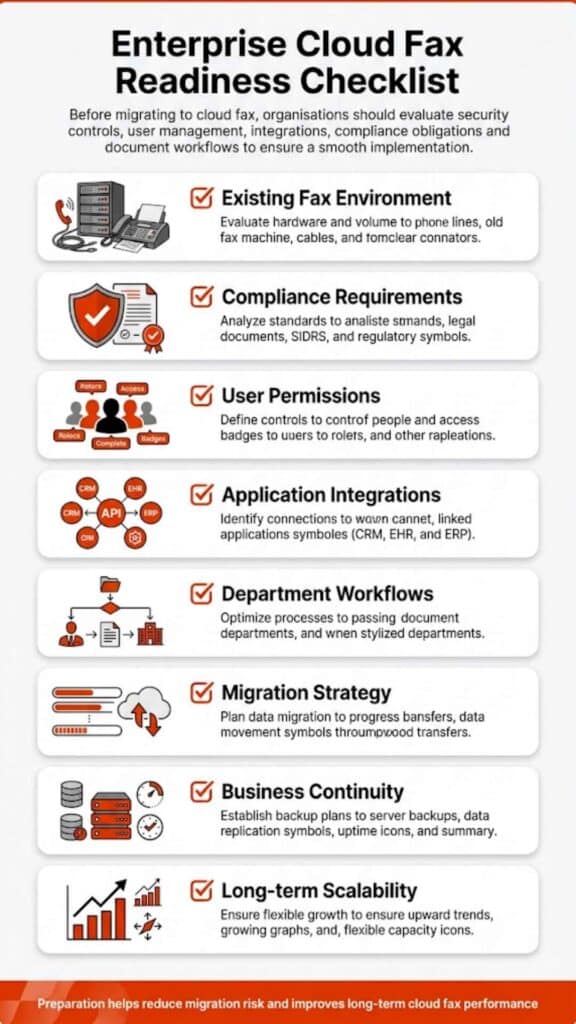
How can I automate my electronic fax workflow for my business?

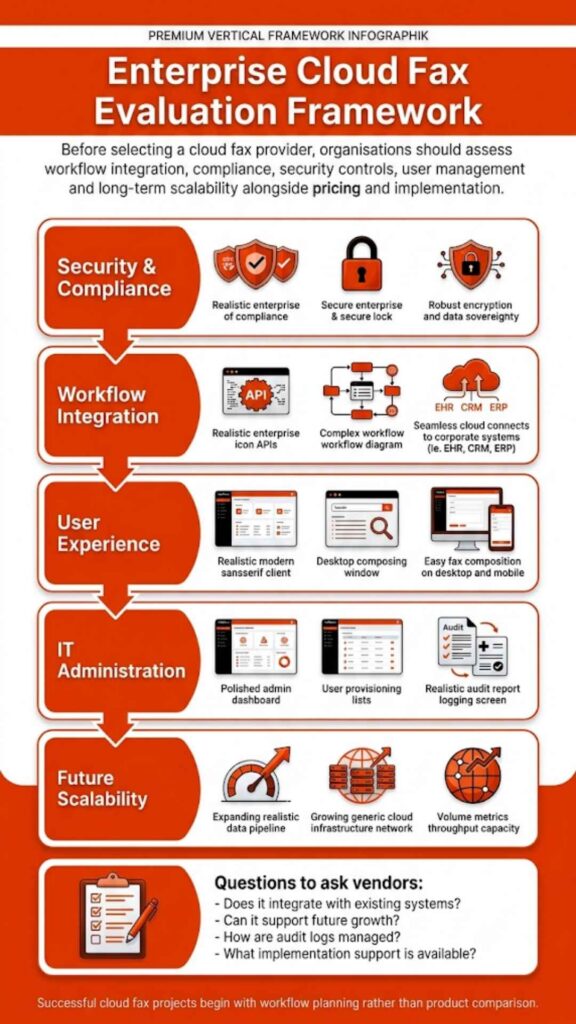
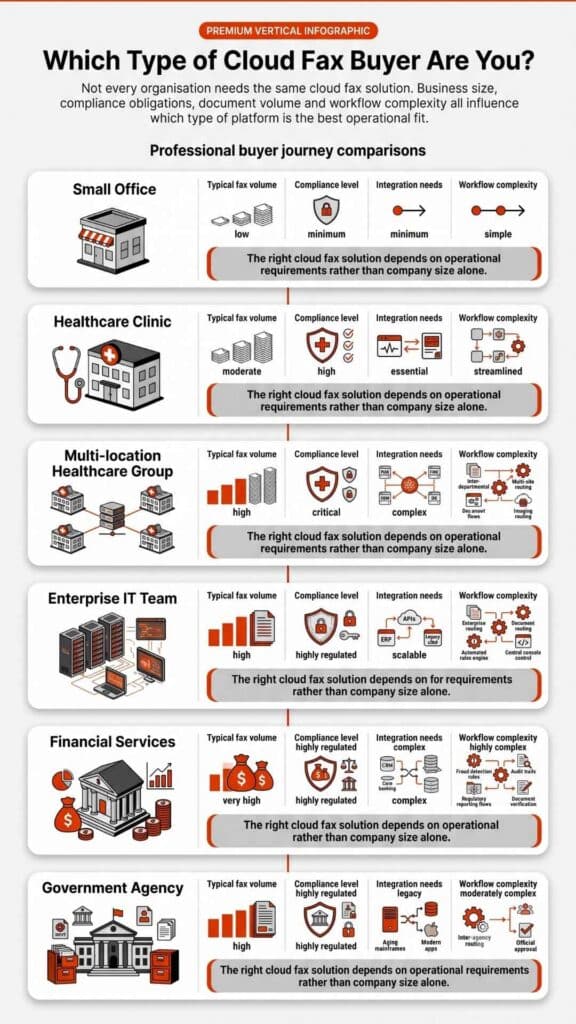
Across industries like healthcare, insurance, finance, education, and government, faxing remains one of the most reliable channels for secure document exchange. Yet the process is often manual, slow, and error-prone. Businesses looking for speed, compliance, and traceability now ask one question: how can I automate my electronic fax workflow for my business?

This guide delivers that answer in practical, measurable terms. It explains how automation converts fragmented fax systems into seamless digital workflows with clear routing, compliance assurance, and full visibility. 

You will learn about the market forces driving this change, the differences between pre-automation and automated workflows, step-by-step deployment strategies, and the key performance metrics that define success. 

Each section includes factual benchmarks, industry growth figures, and architecture details drawn from leading enterprise fax solutions like Softlinx Cloud Fax Service.

By the end, you will know how to build a workflow that scales to thousands of documents per day, supports HIPAA-compliant security, and integrates directly with your existing systems, without reinventing your business operations.

What are electronic fax services?

Electronic fax services, often called digital fax or online fax, are cloud-based systems that send and receive faxes using the internet instead of a traditional phone line or physical fax machine.

Here’s how it works in simple terms: 

When you send a fax through an electronic fax service, your digital document (for example, a PDF or Word file) is converted into a secure fax format and transmitted over encrypted internet channels to the recipient’s fax number. The receiver doesn’t need to be using the same software; they’ll get the fax on their machine or through their own digital fax service.

Core Features of Electronic Fax Services

FunctionDescription
Transmission MethodUses secure internet protocols (like HTTPS or TLS) instead of analog phone lines
Format SupportHandles digital files such as PDF, DOCX, XLSX, TIFF, and JPG
Access PointsWeb portals, email-to-fax, print drivers, or API integrations
StorageCloud-based archiving for sent and received faxes with searchable logs
ComplianceHIPAA, SOC 2, and PCI-DSS compliant for industries handling sensitive data
SecurityEnd-to-end encryption, role-based access, and full audit trails
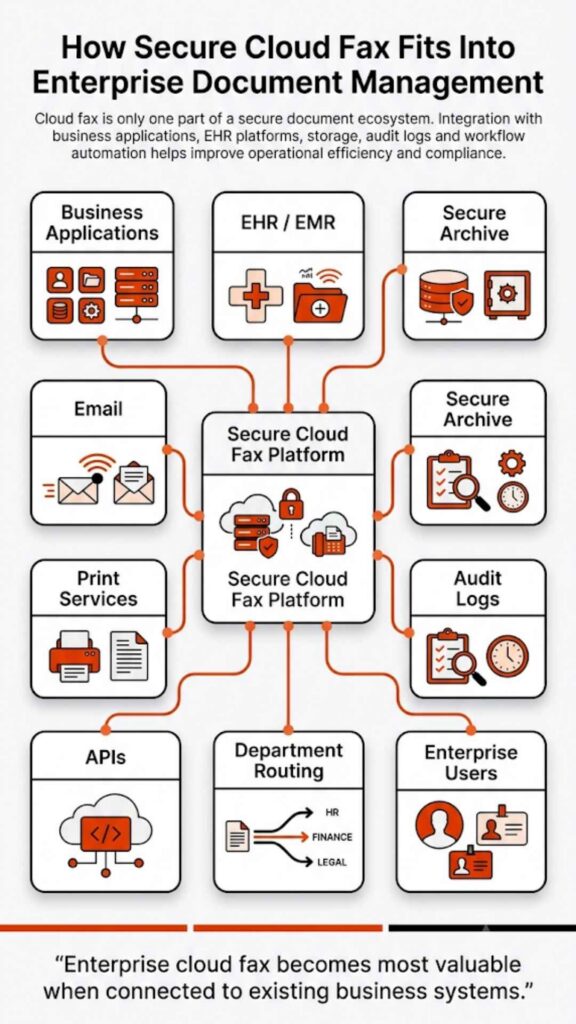
IntegrationConnects directly with EHR, ERP, or CRM systems for automated routing
ScalabilityCapable of handling thousands of faxes daily with automated retries and delivery reports

In short, electronic fax services replace physical machines with a digital workflow, allowing you to send, receive, and manage faxes from any device with internet access. They preserve the legal and regulatory acceptance of fax while eliminating paper, toner, phone line costs, and manual routing.

For example, platforms like Softlinx Cloud Fax Service provide enterprise-grade electronic faxing built for compliance-sensitive industries such as healthcare, finance, and government, combining automation, encryption, and system integrations into one centralized fax environment.

Market context and opportunity

The fax industry has quietly evolved into a key part of global digital transformation. Even as paper-based communication declines, electronic fax services have grown sharply, driven by healthcare, finance, and public-sector compliance. Automation and cloud adoption are reshaping how documents move inside organizations.

Market Segment2022–2024 Baseline ValueProjected Value (2030–2033)CAGRPrimary Growth Factors
Global Fax ServicesUSD 3.31 billion (2024)USD 4.47 billion by 20305.15 %Continued reliance by the healthcare and government sectors
U.S. Faxing MarketUSD 2.65 billion (2023)USD 4.57 billion by 20316.9 %Federal and HIPAA compliance, state record retention laws
Global Cloud Fax MarketUSD 0.53 – 1.2 billion (2024 est.)USD 2.8 billion by 20339–12 %Migration to cloud infrastructure and API-based automation
Online Fax / Internet FaxUSD 4.7 billion (2022)USD 12.3 billion by 203012.7 %Remote work, SaaS integration, and cross-platform use
Average Enterprise Labor Reduction Post-AutomationBaseline labor hours: 100 %60–75 % retained workloadWorkflow automation reduces repetitive routing by 25–40 %

Before the table, we recognize that digital faxing isn’t dying, it’s adapting. After the table, the meaning becomes clear.

These figures show a structural shift from hardware-dependent fax servers to cloud-based systems capable of handling millions of pages annually with near-instant routing and audit-level compliance. 

The steady CAGR in both U.S. and global markets underscores demand not just for faxing, but for automated, rule-driven fax systems that integrate with enterprise applications. Organizations now treat fax as part of their data architecture, not as peripheral equipment.

Automation within this market directly translates to measurable efficiency. Companies that process over 10,000 faxes monthly report staff time reductions between 30 % and 50 %, while maintaining 99 % or greater delivery accuracy. 

The combination of rising compliance standards and shrinking tolerance for delays has made fax automation both a necessity and a competitive edge.
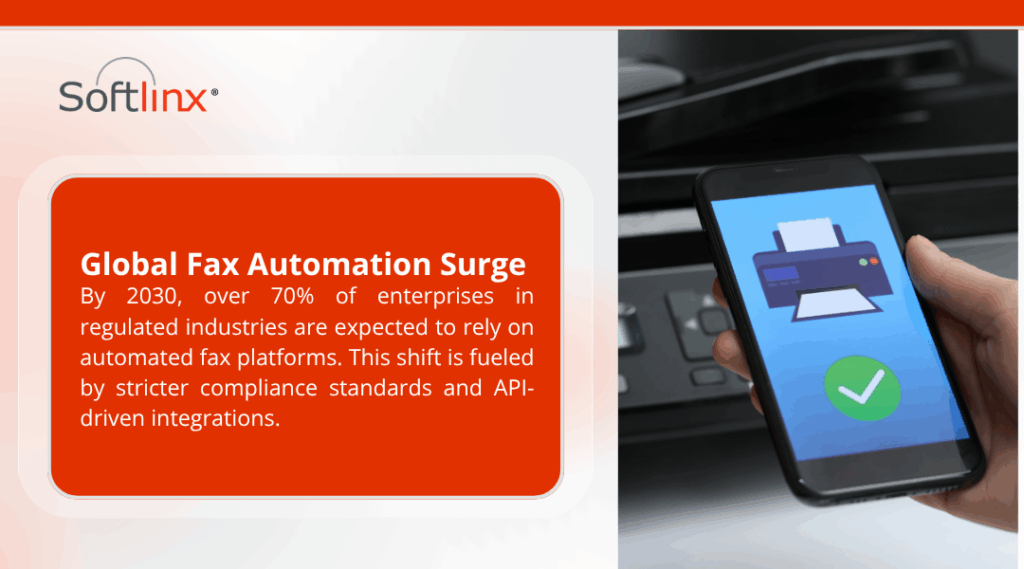
How can I automate my electronic fax workflow for my business? - A hand holding a smartphone displaying a fax icon with a green checkmark, next to a fax machine, with text about a global fax automation surge by 2030, highlighting enterprise reliance on automated fax platforms.

Pre-automation challenge vs post-automation state

Before automation, fax systems often operated as silos. Each department maintains its own machine, server, or mailbox. Employees manually check cover pages, decide destinations, and forward documents to the right people. This introduces delays, errors, and compliance gaps. There is rarely any consolidated reporting, and audits depend on individual diligence.

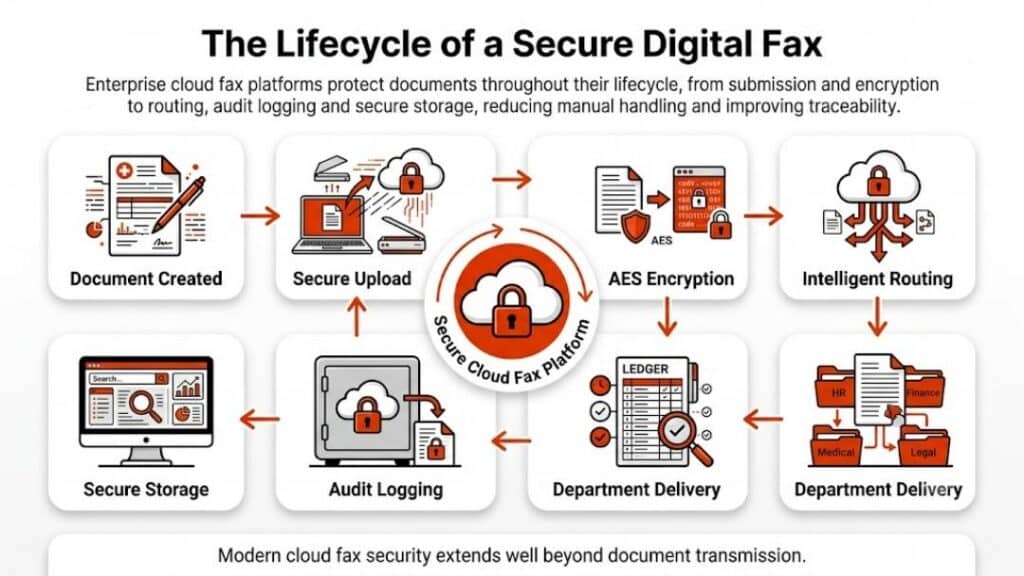
An automated electronic fax workflow centralizes all fax channels, applies logic for routing and delivery, and automatically syncs with other business systems. Staff no longer sort documents by hand, delivery confirmations are instant, and administrators can track every transaction in real time.

The table below illustrates this transformation clearly.

AspectPre-Automation EnvironmentAutomated Environment
Workflow controlDecentralized across machines and mailboxesCentralized through a single platform
RoutingManual, staff-drivenRule-based using DIDs, barcodes, and keywords
VisibilityLimited, often no consolidated reportingReal-time tracking and searchable logs
ComplianceDependent on staff behaviorEnforced by a system with audit trails
Error handlingResend and manual confirmationAutomatic retries, alerts, and delivery receipts
ScalabilityRestricted by staff capacityScales to thousands of faxes daily
IntegrationMinimal or manual file transfersDirect API connections with EHR, ERP, and CRM
Cost impactLabor-intensive, high time costMeasurable reduction in staff time and rework

Automation replaces fragmentation with governance. Once you consolidate all channels into one platform, operational noise falls away and measurable efficiency rises.

Common automation patterns

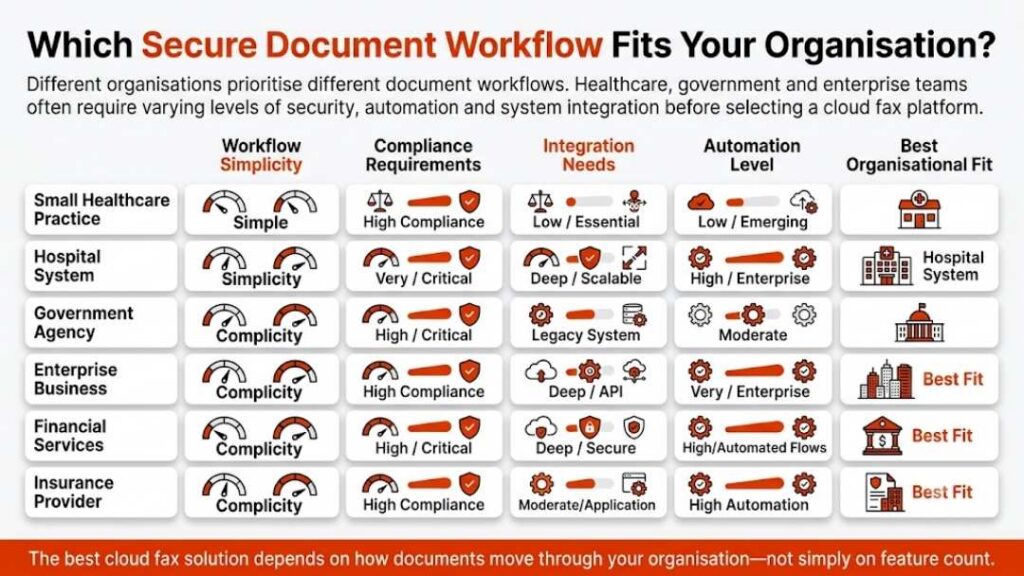
Automation can follow several tested patterns. Before exploring the table, it’s useful to understand why pattern choice matters. A midsized clinic may need routing by department, while a financial institution might depend on barcode-based document matching. These patterns help balance automation with business specificity.

Automation PatternIdeal Use CaseKey Benefit
Direct-inward-dial (DID) routingLarge organizations with many departments or branchesEach number automatically routes to the correct queue, removing manual sorting
Barcode or QR code routingHealthcare, insurance, logisticsAutomatically links faxed forms to patient or claim records for error-free indexing
Keyword and content routingLegal, administrative, claimsRoutes documents based on recognized text like “authorization” or “contract”
Batch or production faxingEnterprises sending high volumes nightlyHandles thousands of faxes in queues with retry logic and status reports
Watched-folder ingestionOffices with scanning equipment or shared drivesDrops files into folders that the system automatically processes and sends

When these patterns are combined inside one rules engine, you can automate more than 90 % of routine fax traffic while preserving manual oversight for exceptions only. This hybrid approach aligns perfectly with operational realities.
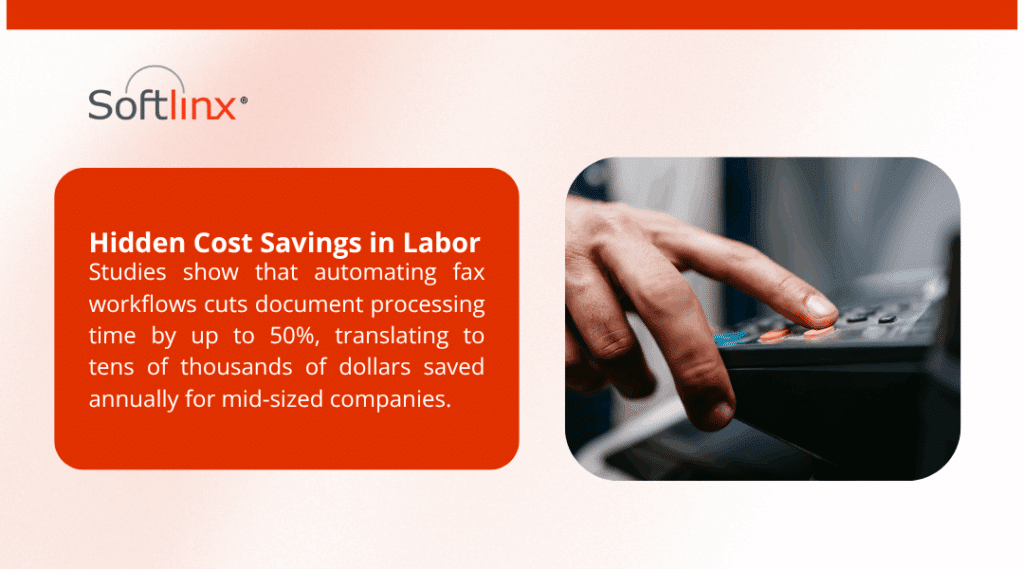
A hand pressing a button on a device, with text highlighting hidden cost savings in labor from automating fax workflows, cutting processing time by up to 50% and saving tens of thousands annually for mid-sized companies.

Phased deployment strategy

Implementing fax automation should occur in deliberate phases so each stage delivers results without overwhelming staff.

The first phase focuses on establishing a foundation. Organizations start with email-to-fax for outbound communication, assigning a limited set of direct-inward-dial (DID) numbers for inbound traffic. Routing rules for key departments such as billing, records, or claims are defined, and delivery confirmations flow back into primary systems. Typical outcomes include an immediate jump in routing accuracy from below 70 % to above 90 %.

Phase 1 Key MetricsTarget
Correct routing rate≥ 90 %
Staff interventionReduced by 40–50 %
Average delivery latency< 30 seconds

In the second phase, expansion begins. Desktop applications, EHRs, and MFP devices are configured to send via the print-to-fax driver, while the web portal provides a unified dashboard for manual operations. Routing logic becomes richer, using barcode and keyword recognition. Automation at this point can process 80–90 % of all fax traffic independently.

Phase 2 MetricsTarget
Automated volume80–90 %
Failed delivery rate< 1 %
Routing latency< 1 second

The third phase integrates the platform deeper into enterprise systems. APIs or direct connectors, such as Softlinx’s Epic integration, allow automatic synchronization between faxes and records. Bulk transmissions shift to production faxing modules that queue, batch, and retry without user input.

Phase 3 MetricsTarget
System integrations completeEHR / ERP / CRM
Retry success> 99 %
Manual intervention< 5 % of volume

The final phase strengthens governance. Role-based access controls, retention policies, and audit trails are locked down. Dashboards monitor throughput, alert administrators of failures, and provide full compliance visibility. At this point, the system functions as a digital fax engine capable of handling millions of pages annually.

Phase 4 MetricsTarget
Uptime (SLA)≥ 99.9 %
Compliance violations0
Searchable audit records100 % retention

These phases turn the concept of how I can automate my electronic fax workflow for my business. into a measurable implementation roadmap.

Platform fit: How Softlinx supports this

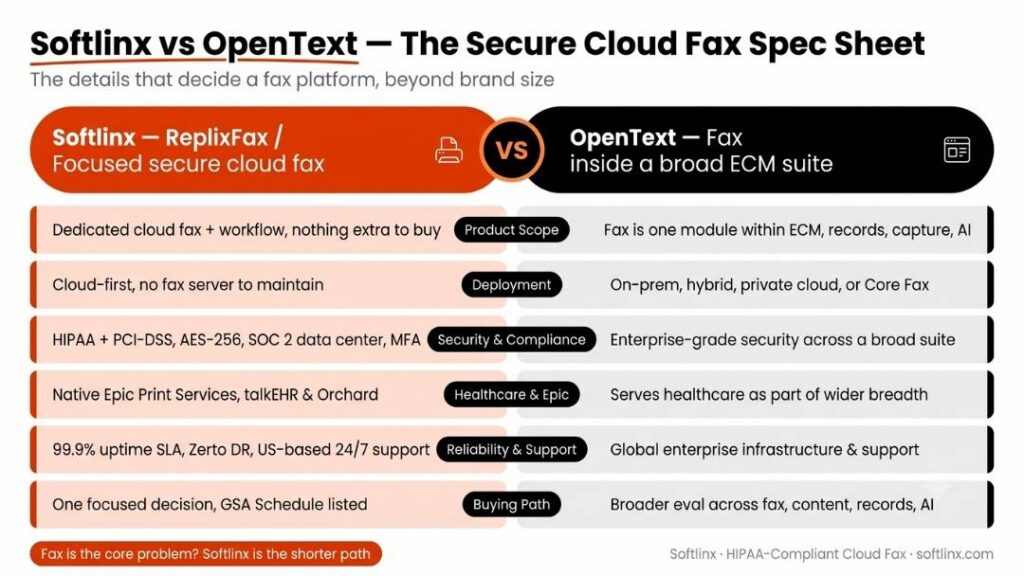
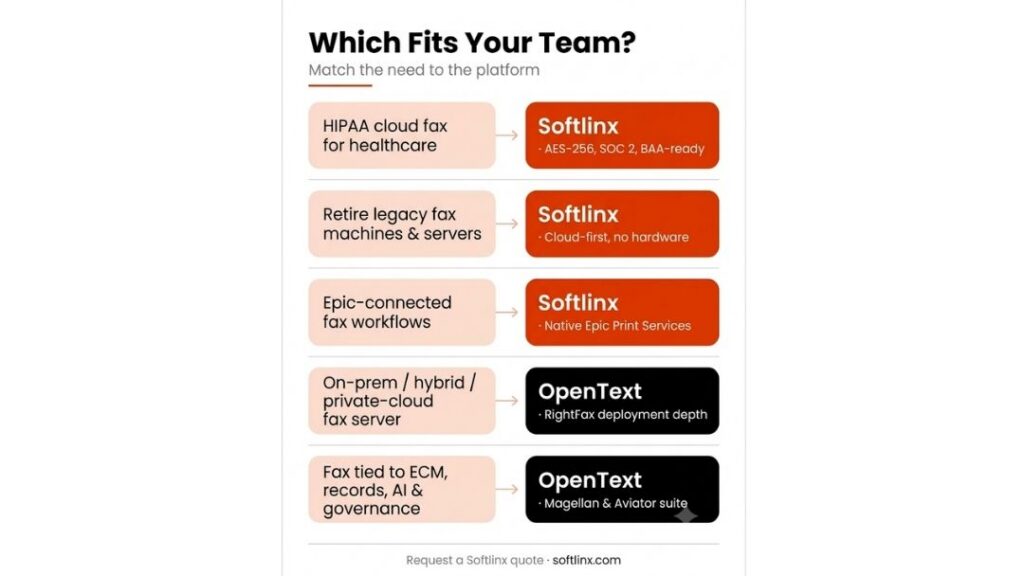
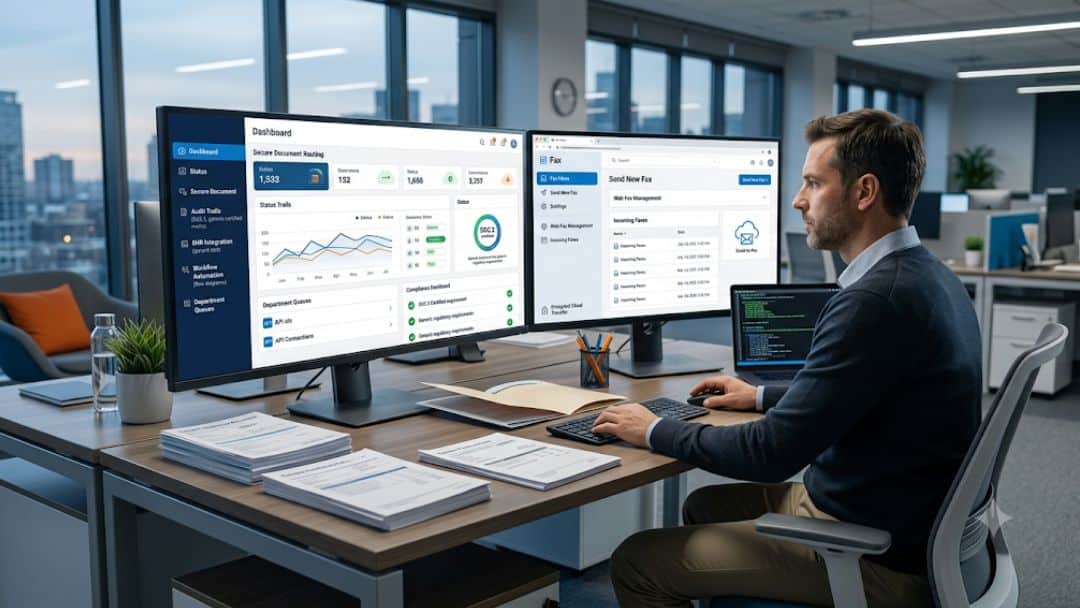
Softlinx delivers every component required to execute the architecture described above. The Cloud Fax Service combines a web portal, email-to-fax, and print-to-fax capabilities so teams transition without retraining. Integration options extend from standard APIs to Epic integration, letting healthcare providers link directly with patient records.

Security underpins the platform. Data at rest is protected with AES-256 encryption, while all transmissions use TLS. Facilities are SOC 2-audited, and services maintain HIPAA and PCI-DSS compliance. Softlinx signs Business Associate Agreements (BAAs) and offers role-based access with comprehensive audit logging. Reported uptime is 99.9 %, supported by 24/7 U.S.-based support teams.

Operational scale is another advantage. High-volume clients rely on production faxing and barcode fax modules to send or receive thousands of pages per hour. Industry-specific solutions exist for healthcare, finance, insurance, and public sector entities, aligning compliance and routing logic with sector regulations.

With this foundation, the platform directly answers the question of how can I automate my electronic fax workflow for my business? by delivering the infrastructure that turns policy into performance.

Implementation risks and mitigation

No transformation is risk-free. The most frequent risk is data misrouting due to misread metadata or poorly trained OCR models. This can be mitigated through confidence-based routing, where documents with uncertain recognition scores are flagged for manual review before release.

Another risk involves overload during volume spikes. Automated queuing and elastic scaling of channels prevent congestion. The service’s 99.9 % SLA already limits downtime to less than nine hours annually, but redundancy across multiple transmission paths can reduce the effective outage impact to minutes.

Compliance risk is also critical. HIPAA-regulated entities must demonstrate end-to-end encryption, controlled access, and full auditability. Using a platform certified for HIPAA, SOC 2, and PCI-DSS, with verifiable audit logs, closes that gap.

A smaller yet real risk is change resistance among staff. Training on the web portal interface and clear communication that automation handles routine work, not replaces jobs, usually resolves adoption issues within the first month.

Measuring progress

Progress should be tracked quantitatively. The essential metrics include: automation percentage, routing accuracy, delivery success, average latency, manual interventions per thousand faxes, and compliance audit pass rate. 

Over three months, organizations commonly see automation increase from 40 % to over 85 %, routing accuracy stabilize above 95 %, and manual intervention drop below 10 %. Cost per fax, when accounting for labor and failure overhead, can decline by 30–50 %.

Softlinx’s dashboard and reporting functions visualize these metrics in real time. Administrators can filter by department, sender, or day, viewing both the raw numbers and trends. Continuous improvement cycles become data-driven rather than anecdotal, making it easier to justify further automation investments.
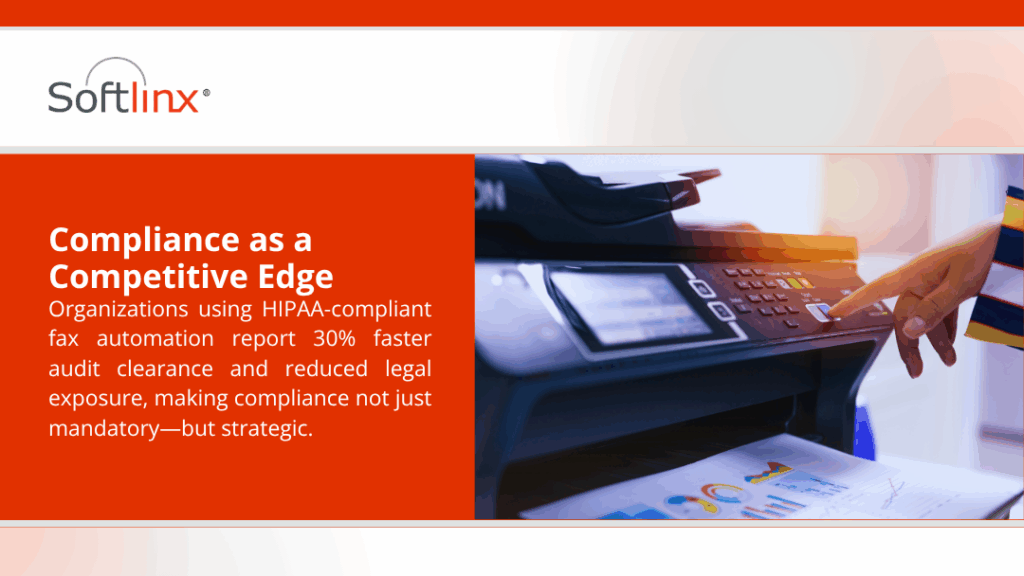
Conclusion

Automating your electronic fax workflow is a strategic upgrade that replaces fragmented communication channels with an intelligent, compliant, and traceable infrastructure. The transition moves your organization from manual triage and uncertain delivery into a world of rules, logs, and measurable outcomes. 

With the documented growth of the cloud fax market and proven reductions in manual overhead, automation delivers both operational efficiency and regulatory confidence.

If your next step is to transform legacy fax operations into a secure digital backbone, the logical starting point is a platform built for that purpose. Softlinx combines reliability, compliance, and integration depth to convert vision into measurable results. 

Explore how this can work in your environment through the Softlinx Cloud Fax Service and see how an automated fax workflow can redefine how your business handles critical documents.

Security & Compliance

HIPAA-Compliant Since 1999 25+ years of secure, encrypted fax transmission for healthcare organizations.

HIPAA
PCI-DSS
Encrypted
Audit Trail
25+ Years Experience
100% HIPAA Compliant
Learn About Our Compliance

Industries We Serve

Healthcare Cloud Fax Solutions

Healthcare & Medical

Financial Services

Insurance Companies

Government Agencies

Manufacturing

Higher Education

Trusted by Fortune 1000 companies including State Street, IBM, HSBC, and United Nations.

Explore Industry Solutions

Why Choose Softlinx

No Hardware Required Eliminate costly fax servers and infrastructure. Cloud-based solution accessible anywhere, anytime.

Seamless Integration Easy API integration with your EHR, EMR, or business applications. Epic-certified integration available.

Enterprise Reliability 99.9% uptime SLA. No busy signals. Disaster recovery in real-time with automatic failover.

Superior Support U.S.-based technical support team. Dedicated account management for enterprise clients.

Cost Savings Reduce IT overhead by up to 60%. Pay only for what you use with flexible, scalable pricing.

Ready to Go Cloud?

Join healthcare leaders, financial institutions, and Fortune 1000 companies who trust Softlinx for secure, compliant faxing.

(978) 881-0560

Headquarters: 19321 US Highway 19 N, Suite 607
Clearwater, FL 33764 | help@softlinx.com

Trusted By Industry Leaders

"For over 25 years, Fortune 1000 companies and healthcare organizations have relied on Softlinx for mission-critical document transmission."

State Street
IBM
HSBC
Ericsson
Fannie Mae
United Nations
500+ Clients Worldwide
4.8★ Capterra Rating

Latest Articles By Softlinx

Insurance office staff processing claims faxing workflows digitally, combining secure document management systems with physical records.

Insurance Claims Faxing: Secure Workflows for Modern Insurance Processing

Insurance claims faxing hasn’t disappeared the way many expected. If anything, it has quietly adapted. Insurers, healthcare providers, and claims processors still rely on fax to move sensitive documents securely across systems that don’t always talk to each other. What has changed is how those faxes move. Instead of noisy machines in back offices, today’s workflows rely on secure, cloud-based systems that keep records traceable, compliant, and easier to manage.

Insurance claims faxing remains a critical link in regulated document exchange. This article explains how modern secure faxing improves accuracy, compliance, and workflow efficiency across insurance operations while replacing outdated systems.

Insurance Claims Faxing: Why It Still Drives Critical Workflows

Insurance claims faxing sits right in the middle of a complicated ecosystem. Claims don’t move in a straight line. They pass through providers, billing teams, insurers, and sometimes third-party administrators. Each step involves documents. A lot of them.

And here’s the thing, those documents don’t always live in the same system. That’s where insurance claims faxing still holds its ground. It gives organizations a way to send a fax securely without worrying about compatibility issues. Whether it’s a claim form, a referral, or supporting medical records, faxing insurance documents keeps everything moving when digital systems hit a wall.

You won’t hear people say it out loud, but in regulated industries, reliability matters more than trendiness. Faxing delivers that reliability.

Why the Insurance Industry Still Relies on Faxing

It’s easy to assume faxing should have disappeared by now. But that assumption doesn’t hold up in real-world insurance operations.

Regulations are a big reason. Sensitive information, especially healthcare-related claims, needs protection. According to the U.S. Department of Health & Human Services, organizations must ensure secure transmission of protected data. Faxing, when handled through secure systems, still meets those expectations.

Then there’s interoperability. Insurance companies don’t operate in isolation. They exchange data with hospitals, clinics, labs, and external vendors. Not all those systems integrate neatly. Insurance claims faxing fills that gap without forcing system changes.

There’s also a practical angle. Faxed documents remain widely accepted as official records. That alone keeps faxing relevant, especially in audits or disputes. So while technology evolves, faxing sticks around, not because it’s outdated, but because it still works where it counts.

How Insurance Claims Faxing Works in Real Workflows

Claims processing isn’t just about sending documents. It’s about how those documents move, where they land, and who handles them next.

StageWhat Happens with Insurance Claims Faxing
SubmissionProviders (Clinics, labs, hospitals, doctors) send fax claims (CMS-1500 or UB-04 forms) and attachments via fax number
IntakeSystems receive incoming faxes and log them
RoutingDocuments are directed automatically or manually
ReviewClaims teams evaluate faxed records
StorageDocuments are archived with timestamps and logs

A provider might send a claim from their billing system. That document travels through a secure faxing service and lands in an intake system. From there, it gets routed (via OCR), sometimes automatically, to the right department.

That routing step matters more than most people realize. Without it, documents pile up, delays creep in, and errors multiply. Modern systems don’t just receive faxes. They organize them. And that’s what makes insurance claims faxing still usable at scale.

Key Challenges in Traditional Faxing for Insurance Claims

Traditional setups don’t hold up well under pressure. Manual processes introduce mistakes. A single digit off in a fax number can send sensitive documents somewhere they shouldn’t go. That’s not just inconvenient, it’s risky.

Volume is another issue. Insurance companies process thousands of claims every day. A standard fax machine can’t keep pace with that kind of demand.

Tracking also becomes a problem. Once a document is sent, there’s often no clear visibility into whether it was received or processed. Security concerns linger, too. Paper sitting in a fax tray isn’t exactly protected. Anyone nearby can see it. These issues don’t always show up immediately. But over time, they slow everything down.

Secure Faxing and Compliance in Insurance Claims Processing

Security isn’t optional in insurance claims faxing. It’s built into the process. Sensitive documents need protection at every stage, from transmission to storage. Modern secure faxing systems use encryption to ensure documents travel safely. Access controls limit who can view or handle those documents.

Audit trails add another layer. Every action gets recorded. Who sent the fax, when it was received, and who accessed it, it’s all logged. For organizations navigating compliance requirements, understanding HIPAA-compliant fax processes helps clarify what secure faxing actually looks like in practice.

And that’s where modern systems stand apart. They don’t just send documents. They prove that those documents were handled correctly.

Cloud Fax vs Fax Machine for Insurance Claims

The shift from fax machines to cloud-based systems didn’t happen overnight. But it’s happening.

FeatureFax MachineCloud Fax
SecurityBasicEncrypted, controlled access
CapacityLimitedScales easily
TrackingMinimalReal-time tracking
IntegrationNoneConnects with systems
AccessPhysical locationRemote access

Cloud fax allows organizations to send a fax without relying on physical hardware. Documents move through secure online platforms instead.If you’re weighing options, comparing on-premise vs cloud fax systems can highlight the operational differences. The change isn’t just technical. It’s operational.

Healthcare and insurance office staff using fax machines, reflecting 70%+ fax usage in regulated industries due to compliance requirements.

Benefits of Online Faxing for Insurance Companies

Online faxing doesn’t change the nature of insurance claims faxing; it refines how it works behind the scenes. One noticeable improvement is consistency. Documents reach the intended recipient without the guesswork that often comes with manual processes. That reduces rework and follow-ups.

Another advantage is visibility. Teams can track whether a fax was delivered, received, and processed. That alone removes a lot of uncertainty from claims handling. Operational flexibility improves as well. Staff can send a fax from anywhere without being tied to a specific device or location. That becomes especially useful for distributed teams.

There’s also better control over document handling. Digital storage makes it easier to locate records, which supports audits and internal reviews. Security strengthens, too. Modern systems protect sensitive documents through encryption and controlled access, which helps organizations handle insurance claims with greater confidence.

And over time, these improvements tend to reduce administrative friction. Not dramatically overnight, but steadily.

Integrating Faxing Solutions into Insurance Workflows

Integration is where insurance claims faxing starts to feel less like a separate task and more like part of a continuous process. In many organizations, faxing now connects directly with claims platforms or healthcare systems. That connection allows documents to move without manual uploads or downloads. It simply becomes part of the workflow.

For example, when fax integrates with clinical systems, documents can move directly between systems without extra handling. Understanding how fax connects with EHR environments shows how this works in practice.

Automation adds another layer. Incoming documents can be routed automatically based on predefined rules. That reduces delays and helps teams avoid manual sorting.

There’s also the API side. Some organizations embed faxing directly into their applications. That way, users don’t even think about faxing; they just complete a task, and the system handles the rest.

When these elements come together, faxing doesn’t disappear. It just becomes quieter and more efficient.

How to Send Insurance Claims via Secure Online Fax

The process has become more structured and predictable with secure online faxing. It begins with document preparation. Claims and supporting records are converted into digital formats that are clear and readable. Quality at this stage matters because poor documents slow down the review later.

Next comes access to the faxing platform. Users log into a secure system that manages document transmission. The recipient’s fax number is entered carefully. Accuracy here is critical. A small error can lead to misdirected documents.

Documents are then attached or uploaded into the system. Many organizations rely on email-based workflows for this step.  Understanding how email-to-fax works in business environments helps clarify how messages, attachments, and routing are handled within the process.

Before sending, details are reviewed. This includes verifying the recipient, confirming document completeness, and checking for any missing pages. Once sent, the system processes the transmission through secure channels. Unlike traditional machines, modern systems provide delivery status updates.

Finally, confirmation is logged. This creates a record that the fax was delivered, which becomes important for compliance and tracking. Each step may seem simple on its own. But together, they create a process that reduces errors and improves reliability.

Stressed office worker overwhelmed by manual fax handling delays, increasing claim processing times by 20–30% without automation.

Managing High-Volume Insurance Claims: Faxing Efficiently

Handling a few documents is one thing. Handling thousands is another. Insurance claims faxing at scale requires systems that can manage simultaneous transmissions without slowing down. Without that capability, queues build quickly.

Load distribution plays a role here. Modern systems balance traffic to avoid bottlenecks. That keeps documents moving even during peak periods. Reliability matters just as much. If the system goes down, claims processing can stall. That’s why many organizations look closely at uptime guarantees when evaluating solutions.

Incoming document management is another piece of the puzzle. High volumes mean nothing if documents aren’t routed properly. Automated routing helps ensure that each document reaches the right team without delay.

Organizations that explore high-volume fax management strategies often find that efficiency improves not through one change, but through several small adjustments working together.

Common Mistakes When Faxing Insurance Documents

Even with modern tools, mistakes still happen. And in insurance claims faxing, small errors can create larger issues down the line.

MistakeImpact on Claims Processing
Incorrect fax numberDocuments sent to unintended recipients
Missing cover informationDelays in routing and identification
Poor document claritySlower review and possible resubmission
Incomplete submissionsAdditional follow-ups required
Lack of verificationNo proof of delivery or receipt

Each of these issues adds friction. Some slow down processing. Others introduce compliance risks. Reducing these mistakes often comes down to improving verification steps and using systems that support tracking and validation.

Future of Insurance Claims Faxing

Insurance claims faxing is shifting, but not disappearing. The change is gradual and tied to how organizations adopt new systems.

TrendWhat It Means for Insurance Claims Faxing
Cloud adoptionReduced reliance on physical machines
Workflow automationFaster document routing and processing
System integrationSeamless data exchange between platforms
Enhanced securityStronger protection for sensitive data
Hybrid environmentsFax and digital tools working together

These trends point toward a more integrated future. Faxing becomes less visible but remains part of the workflow. Organizations aren’t replacing it entirely. They’re reshaping how it operates.

Choosing the Right Faxing Solution for Insurance Claims

Choosing a solution isn’t just about features. It’s about how well that solution fits into existing operations. Security should be evaluated first. Systems need to protect sensitive documents at every stage, transmission, storage, and access.

Integration capability follows closely. A solution that connects with existing platforms reduces manual work and improves efficiency. Exploring modern cloud fax platforms can provide insight into what integration looks like today.

Scalability is another factor. As claim volumes grow, systems must handle increased demand without affecting performance. Reliability matters too. Consistent uptime ensures that workflows continue without interruption.

And then there’s usability. A system that’s difficult to use often leads to workarounds, which can introduce risks. The right solution doesn’t stand out because it’s flashy. It works because it fits.

FAQs

What is insurance claims faxing?

Insurance claims faxing is the process of sending claim-related documents between providers and insurers using fax technology, often through secure online systems.

Is faxing still used in the insurance industry?

Yes, insurance claims faxing remains widely used because it supports compliance, interoperability, and secure document exchange.

Is faxing insurance documents secure?

It can be secure when handled through encrypted systems with access controls and audit trails.

Can I send insurance claims without a fax machine?

Yes, modern systems allow you to send a fax through the internet without physical hardware.

Why do insurers prefer fax over email?

Faxing provides a more controlled and traceable method for handling sensitive documents.

How do cloud fax systems improve insurance workflows?

They reduce manual errors, improve tracking, and support high-volume document processing.

Can insurance claims faxing handle large volumes?

Yes, cloud-based systems are designed to manage high-volume faxing efficiently.

What happens if a fax is sent to the wrong number?

Misdirected faxes can lead to compliance risks, which is why verification and secure systems are critical.

Compliance professional reviewing fax logs on screen for audit readiness, using timestamped records to validate document transmission.

Strengthening Your Claims Workflow with Smarter Faxing

Insurance claims faxing continues to support critical communication across the insurance ecosystem. What’s changed is how organizations approach it. Modern systems bring structure, visibility, and security into a process that once relied heavily on manual effort. That shift reduces risk while improving efficiency.

For organizations still relying on outdated setups, there’s an opportunity to move toward something more reliable and scalable. If improving document security, workflow efficiency, and compliance is a priority, exploring how Softlinx approaches secure cloud faxing can help you take the next step with confidence.

Professional using dual-monitor digital fax management system to reduce faxing overhead without disrupting business workflows.

How to Reduce Faxing Overhead Without Disrupting Business Workflows

Fax hasn’t disappeared. In fact, in healthcare, finance, and government environments, it still handles a large share of sensitive document exchange. That continued reliance is especially visible in healthcare: an MGMA Stat poll found that 89% of healthcare leaders said their organization uses a fax machine, which helps explain why reducing fax overhead still matters in real-world operations.

The problem isn’t the fax itself; it’s how it’s managed. Older systems quietly introduce delays, manual effort, and compliance concerns. This article explains how to reduce faxing overhead by shifting how fax communication operates, without forcing organizations to abandon the workflows they depend on.

How to Reduce Faxing Overhead in Modern Business Environments

Ask any operations team where time disappears, and fax rarely shows up at the top of the list. Yet it’s often sitting in the background, slowing processes, creating bottlenecks, and requiring constant attention. That’s usually where the issue starts.

Understanding how to reduce faxing overhead begins with recognizing that fax remains part of mission-critical communication. It’s still used to exchange health information, process insurance documents, and move regulated data between systems that don’t always speak the same language.

But here’s the problem. Most organizations still rely on workflows built around traditional fax machines. Those workflows weren’t designed for real-time operations or integrated environments. So instead of supporting efficiency, they quietly work against it.

The Hidden Costs of Traditional Fax Systems

The following are the hidden costs of a traditional fax system.

Infrastructure Expenses and Maintenance Burden

Traditional fax machines come with a footprint that extends beyond the device itself. There are dedicated phone lines, hardware maintenance, supplies, and the occasional service call when something breaks at the wrong time.

Individually, these costs don’t always raise alarms. Together, they create a steady operational drain. A closer look at the hidden costs of traditional fax often reveals expenses that go unnoticed because they’re spread across departments.

Labor-Intensive Document Processing

Now consider how documents move through the system. Someone prints a file. Someone dials a number. Someone waits for confirmation. If the line is busy, they try again. If a page fails, they resend. Multiply that by hundreds, or thousands, of faxed documents each week, and the time adds up quickly. And that’s before errors enter the picture.

Compliance Risks in Regulated Industries

In industries like healthcare, fax is still tied to compliance. But the way it’s handled matters more than the method itself. Misdirected faxes, unsecured storage, or incomplete audit trails can create risk. That’s why understanding how to prevent HIPAA violations when faxing medical records has become part of day-to-day operations rather than a one-time checklist.

Traditional Fax vs Cloud Fax Cost Comparison

Before moving forward, it helps to compare how traditional systems and cloud-based approaches differ in day-to-day operations.

Cost FactorTraditional Fax MachinesCloud Fax Service
HardwarePhysical equipment requiredNo hardware
MaintenanceOngoing servicingManaged remotely
Phone LinesRequiredNot needed
LaborManual handlingReduced involvement
ScalabilityLimitedFlexible

This comparison reflects more than cost differences. It highlights how infrastructure decisions shape operational efficiency.

What Is a Digital Fax and Why Does It Change Everything

So what is a digital fax, really? At its core, it’s still fax communication, but without the physical layer. Documents move through secure internet-based systems instead of phone lines. This is where terms like virtual fax or online faxing come into play.

A secure online fax setup allows users to send and receive faxed documents through email, applications, or web portals. No printing. No dialing. No waiting by a machine.

For organizations transitioning from older systems, exploring a cloud fax environment often marks the point where fax stops being a bottleneck and starts fitting into modern workflows.

How Cloud Fax Technologies Reduce Operational Overhead

The shift from traditional fax to cloud-based systems changes how documents move, how systems interact, and how teams operate.

Eliminating Physical Infrastructure

One of the most immediate changes comes from removing physical dependencies. No fax machines. No dedicated phone lines. No maintenance schedules. For organizations still comparing options, understanding a fax server setup versus a cloud-based model often highlights how much infrastructure can be simplified.

Centralized Document Management

Instead of paper trails, documents are stored digitally. That changes how teams access, track, and manage information. Audit trails become easier to maintain. Retrieval becomes faster. And document management shifts from reactive to structured.

Real-Time Fax Communication

With cloud fax technologies, transmission doesn’t rely on the availability of lines or physical devices. Documents move in real time, and delivery status is visible immediately. That removes a layer of uncertainty that traditional fax systems often introduce.

Frustrated office staff experiencing fax downtime, highlighting the true cost of outages increasing processing times by up to 20%

Operational Efficiency Gains with Cloud Fax

When workflows shift to cloud-based systems, the operational impact becomes more visible.

Workflow ElementLegacy Fax SystemsCloud Fax Technologies
RoutingManual sortingAutomated
TrackingLimitedReal-time visibility
StoragePaper-basedDigital
Error RateHigherLower

These changes are not limited to speed. They affect accuracy, accountability, and overall process reliability.

Automating Fax Workflows to Reduce Overhead

Automation addresses one of the biggest contributors to overhead: manual handling.

Automating the Routing of Incoming Faxes

Manual sorting slows everything down. Automation changes that. Instead of someone reviewing each incoming fax, systems can route documents based on predefined rules. A structured approach to automating incoming fax routing reduces delays and keeps documents moving where they need to go.

API-Based Fax Integration

This is where things start to scale. APIs allow fax systems to connect directly with business applications. That means documents don’t just arrive; they flow into workflows automatically. Organizations looking into cloud fax APIs for bulk and broadcast faxing often do so because manual processes can’t keep up with volume.

Reducing Human Intervention

Less manual input usually means fewer errors. It also means fewer delays. When systems handle repetitive steps, staff can focus on exceptions instead of routine processing.

Integrating Fax with Business Systems and EHR Platforms

Integration plays a central role in reducing fax overhead, especially in healthcare environments.

Connecting Fax to Electronic Health Records

Healthcare workflows depend heavily on electronic health records. When fax operates outside those systems, inefficiencies appear. Integration changes that. Understanding how to connect a fax to EHR helps align document flow with clinical workflows.

Improving Fax Interoperability in Healthcare

Interoperability has become a requirement rather than a goal. The Office of the National Coordinator for Health Information Technology reported that, by 2023, between 78% and 92% of hospitals said they at least sometimes engaged in each core interoperability domain, find, send, receive, and integrate, showing how strongly healthcare workflows now depend on connected information exchange.

Systems need to exchange data reliably, even when they weren’t designed to work together. Understanding fax interoperability in healthcare shows how modern faxing solutions support that exchange.

Streamlining Insurance and Claims Faxing

Insurance processes often involve large volumes of documents moving between organizations. Integrated faxing reduces delays and keeps processing consistent.

Secure Online Fax and Compliance Considerations

Compliance remains one of the most critical aspects of fax communication, especially in healthcare and financial sectors.

Is Fax HIPAA Compliant in 2026?

Fax can meet compliance standards, but only when proper safeguards are in place. The question of whether fax is HIPAA compliant depends on encryption, access controls, and monitoring capabilities.

Features of HIPAA Compliant Fax Services

Modern systems include encryption during transmission and storage, role-based access controls, and detailed audit trails. That approach lines up with HHS guidance on the HIPAA Security Rule, which requires regulated entities to apply administrative, physical, and technical safeguards to protect electronic protected health information. These features help organizations maintain consistent compliance across workflows.

Organizations relying on HIPAA-compliant fax services benefit from built-in safeguards that reduce risk without complicating operations.

Protecting Health Information During Transmission

Protecting health information involves more than secure transmission. It requires visibility into who accessed data, when it was accessed, and how it was handled. Cloud fax technologies provide this level of oversight.

Compliance Comparison

FeatureTraditional FaxCloud Fax Solution
EncryptionLimitedAdvanced
Audit TrailsBasicDetailed
Access ControlMinimalRole-based
Compliance SupportManualBuilt-in

How to Reduce Fax Errors and Improve Accuracy

Errors in fax communication often stem from small issues that compound over time. Incorrect fax numbers, incomplete documents, and failed transmissions all contribute to inefficiencies.

Reducing these errors requires both process improvements and technology support. Systems that validate fax numbers, confirm delivery, and track document status reduce uncertainty.

A closer review of how to reduce fax errors shows that automation plays a key role in maintaining accuracy, especially in high-volume environments where manual oversight becomes difficult.

Office workers sorting paper fax waste into recycling bins, illustrating the environmental costs of high-volume paper-based faxing.

Managing High-Volume Faxing Without Increasing Costs

Handling large volumes of faxed documents presents a unique challenge. Traditional systems often require additional hardware and staff as volume increases.

Cloud-based solutions approach this differently. They scale without requiring additional infrastructure, allowing organizations to manage demand more efficiently.

Managing high-volume faxes in healthcare demonstrates how organizations maintain performance while keeping operational demands stable. Real-time monitoring, automated routing, and centralized management all contribute to handling volume without increasing overhead.

How to Switch from Legacy Fax to Cloud Fax Without Disruption

Transitioning from traditional fax systems does not require immediate replacement. Many organizations adopt a phased approach.

Transition Strategy: A full replacement isn’t always necessary. Many organizations move in stages, maintaining existing workflows while gradually introducing new systems.

Retaining Existing Fax Numbers: Keeping existing fax numbers is often possible. Businesses can review whether existing fax numbers can be retained during migration.

Understanding On-Premise vs Cloud Fax: Choosing the right model requires understanding trade-offs. An on premise vs cloud fax comparison can help clarify the differences.

Benefits of Cloud Fax for Long-Term Cost Control

Cloud fax technologies influence cost control by changing how resources are used rather than simply reducing expenses.

Operational AreaTraditional Fax ImpactCloud Fax Impact
Resource AllocationDistributed and manualCentralized and controlled
Maintenance EffortOngoingMinimal
Document HandlingLabor-intensiveStreamlined
ScalabilityLimitedFlexible
VisibilityFragmentedUnified

These improvements often support better planning, improved workflow consistency, and reduced operational strain over time.

Industry-Specific Use Cases for Reducing Fax Overhead

Healthcare Organizations

Healthcare environments depend on fax for patient records, referrals, and coordination between providers. Solutions such as hospital cloud fax systems help reduce administrative workload while supporting compliance requirements.

Financial and Insurance Institutions

Financial organizations rely on secure document exchange. Cloud fax systems provide controlled environments that align with regulatory expectations while improving efficiency.

Government and Education

Public sector organizations often deal with strict documentation requirements. Modern fax solutions help manage large volumes of documents while maintaining compliance standards.

FAQs

What is the fastest way to reduce faxing overhead?

The fastest improvement usually comes from removing manual steps. Moving to a cloud fax service and automating document routing reduces delays immediately.

Do I need new equipment for digital faxing?

No. Digital faxing works through existing devices such as computers or integrated systems, without dedicated hardware.

How does virtual fax improve document management?

Virtual fax allows documents to be stored, organized, and accessed digitally, which reduces manual filing and improves retrieval speed.

How to stop receiving unwanted faxes?

Unwanted faxes can be reduced by controlling who can send to your fax number and how inbound traffic is managed. With older fax setups, that often means manual blocking or telecom-level changes. With a cloud fax platform, administrators can apply routing rules, restrict unknown senders, and direct inbound fax traffic more precisely. That helps reduce spam without interrupting legitimate business fax communication.

What must never be sent by fax?

Sensitive information should never be sent by fax unless the system is secure and appropriate controls are in place. That includes protected health information, financial records, passwords, payment details, and other confidential documents sent through unsecured workflows. In regulated environments, documents should only move through secure, monitored fax systems with access controls and audit trails.

What has replaced faxing?

Faxing has not been fully replaced in industries that still depend on secure, documented information exchange. What has changed is the delivery method. Cloud fax technologies, secure digital workflows, encrypted file exchange, and system integrations now handle many of the functions once tied to traditional fax machines. In healthcare, finance, and government, fax often remains part of the workflow, but the infrastructure behind it has become more modern.

Which countries still use fax?

Fax is still used in several countries, especially in sectors with strict documentation and compliance requirements. The United States, Germany, Japan, and other parts of Europe continue to use fax in healthcare, legal, government, and financial workflows. Usage levels vary by industry, but fax remains active where reliability, formal records, and legacy interoperability still matter.

Who is the cheapest to fax?

The lowest-cost fax option depends on the full operating model, not just the monthly service fee. Traditional fax machines carry costs tied to hardware, maintenance, paper, toner, and phone lines. Cloud fax services often reduce those overhead costs by removing physical infrastructure and simplifying administration. For business users, the better question is usually which fax solution delivers the best operational value, security, and reliability.

Why is faxing safer than email?

Faxing can be safer than email in certain regulated workflows because it offers a more controlled transmission path, especially when used through a secure cloud fax platform. Email can be exposed to phishing, misdelivery, and forwarding risks. Secure fax systems can provide direct delivery, access controls, transmission records, and audit trails, which help organizations protect sensitive information and support compliance requirements.

Is virtual fax secure for healthcare use?

When implemented correctly with encryption and access controls, virtual fax solutions can meet healthcare compliance requirements.

Can existing fax numbers be used with cloud fax?

In most cases, organizations can retain their existing fax numbers during the transition.

Employee juggling fax machine, phone and dual monitors, illustrating productivity loss from manual fax handling interrupting daily workflows.

Modernizing Fax Without Disrupting What Works

Reducing faxing overhead does not require abandoning fax. It requires changing how it operates within the organization.

When fax becomes part of a connected system, integrated with workflows, supported by automation, and aligned with compliance, it stops creating friction. Instead, it supports efficiency.

For organizations evaluating next steps, solutions built around secure cloud fax, integration, and workflow automation, like those offered by Softlinx, can provide a practical path forward without disrupting existing operations.

Office professional organizing incoming faxes efficiently using dual-monitor digital document management system for modern businesses.

How to Organize Incoming Faxes Efficiently (Complete Guide for Modern Businesses)

If incoming faxes feel scattered, delayed, or hard to track, the issue usually isn’t volume; it’s structure. This guide breaks down how to organize incoming faxes using real-world workflows, automation, and secure cloud systems, with a strong focus on healthcare and regulated industries where accuracy and compliance matter most.

How to Organize Incoming Faxes (Step-by-Step Framework)

Most teams don’t actually organize faxes. They react to them. A document comes in. Someone prints it. Maybe it gets handed off. Maybe it sits there for a while. Then someone asks, Did we receive that fax? and that’s where the trouble starts.

So here’s what I’ve seen work in real environments. Every reliable fax workflow follows a simple path. First, the fax arrives. Then it gets identified. After that, it’s routed. Finally, it’s stored somewhere people can actually find it later.

That sounds obvious, but the breakdown usually happens in the middle. Classification and routing are where things fall apart. That’s exactly why learning how to organize incoming faxes isn’t about folders; it’s about control.

What Is the Best Way to Organize Incoming Faxes?

The best way to organize incoming faxes isn’t a single tool or method. It’s a combination of structure, automation, and visibility. At a basic level, every fax should follow a defined path. It arrives, gets identified, moves automatically to the right destination, and is stored in a searchable format.

But in practice, the best way depends on how the system handles complexity. Here’s a simplified comparison:

ApproachOutcome
Manual handlingInconsistent and slow
Basic digital setupImproved storage, limited workflow
Automated cloud systemConsistent, scalable, and traceable

Modern organizations, especially in healthcare, tend to rely on automated cloud-based workflows. Not because they’re newer, but because they remove uncertainty.

What matters most is predictability. When every document follows the same process, teams don’t have to stop and think about what to do next. And that’s where organization truly starts to work.

Why Fax Organization Still Matters in 2026

You might expect fax to disappear by now. It hasn’t. In healthcare alone, 9 billion pages still move through fax systems every year. That’s not slowing down anytime soon. And here’s why.

Fax is still trusted for regulated communication. Especially when patient data is involved. If you’ve ever looked into HIPAA fax compliance, you’ll know the rules aren’t flexible.

So organization isn’t just about efficiency. It’s about staying compliant, avoiding exposure, and making sure information lands exactly where it should. And that’s why it matters.

Common Problems with Incoming Fax Management

If you walk into most offices, the problems look familiar. Documents go missing. Not permanently, but long enough to cause issues. Sometimes they’re sitting on a machine. Sometimes they’re scanned but never routed. Sometimes they land in the wrong department entirely.

Then there’s a delay. A fax comes in at 9 a.m. but doesn’t get processed until the afternoon. Multiply that across dozens of documents, and it adds up quickly. Security is another concern. If a document contains sensitive data and sits unattended, that’s already a risk.

Most of these issues come back to one thing. No clear system for how to organize incoming faxes.

Manual vs Digital Fax Organization Systems

There’s a noticeable gap between older methods and newer ones. It shows up in speed, accuracy, and how easy it is to scale.

MethodSpeedAccuracyScalabilityCompliance
Paper-basedSlowInconsistentLimitedRisk-prone
Fax serverModerateBetterModerateControlled
Cloud faxFastHighStrongSecure

A traditional fax server gives more control than paper, but it still needs maintenance. A cloud fax system shifts everything into a centralized environment where documents can be tracked and managed without physical limitations.

Traditional Methods to Organize Incoming Faxes

Even now, some organizations still depend on physical workflows. Not because they prefer them, but because that’s what has always been in place. If you look closely, most manual systems follow a few recognizable patterns.

One common method involves time-based sorting, where incoming faxes are grouped by date and time, then distributed later in batches. Another approach uses department trays, where each unit, billing, referrals, and administration, has a designated inbox.

There’s also the logbook method, where every fax gets recorded before it moves anywhere else. This creates a paper trail, but it slows things down. To make it clearer, here’s how these methods typically operate in practice:

Method TypeHow It WorksWhere It Breaks Down
Time-based sortingFaxes are grouped and processed in batchesDelays build quickly
Department traysDocuments are manually placed per teamMisplacement risk
Logbook trackingEntries recorded before routingTime-consuming
Individual handlingStaff distribute faxes directlyNo consistency

The issue isn’t that these methods don’t work. They do at low volume. But once activity increases, the cracks start to show. That’s usually when teams begin searching for better ways to handle how to organize incoming faxes without relying on manual steps.

Office worker manually sorting fax documents taking 5–15 minutes each, compared to seconds with automated fax processing systems.

Digital Fax Management Systems Explained

Digital fax systems don’t just replace paper. They change how documents move entirely. Instead of receiving a fax and deciding what to do next, the system already knows.

Faxes arrive directly into a centralized interface. That could be a browser portal, an email inbox, or a connected application. From there, documents become immediately visible, not just to one person, but to the right people.

One detail that often gets overlooked is indexing. Digital systems don’t just store documents; they tag them. Sender details, timestamps, and even content identifiers allow teams to search instead of sift.

That’s a major shift. In many environments, especially healthcare, teams rely on fax through the internet because it removes physical bottlenecks entirely. No machine. No waiting. No dependency on location.

Another advantage is audit visibility. Every action leaves a trace. That matters when accountability is required. So while traditional systems depend on memory and manual effort, digital systems rely on structure and traceability.

Automating Routing of Incoming Faxes

Routing is where most workflows either hold together or fall apart. In a manual setup, someone has to decide where each fax goes. That decision gets repeated dozens, sometimes hundreds of times per day. It’s not sustainable.

Automation changes that. Instead of reacting to each document, rules are set in advance. These rules can be simple, like sending all lab results to one department. Or more refined, such as identifying specific providers, document types, or keywords.

In more advanced setups, routing becomes layered. A document might first be categorized, then prioritized, then assigned. To understand how structured routing works in real environments, automating incoming fax routing demonstrates how incoming documents can be directed automatically based on predefined rules, improving efficiency and reducing manual handling.

What stands out isn’t just speed, it’s predictability. Every fax follows a defined path. No guesswork involved.

How Fax Automation Improves Organization

Once automation is active, the workflow starts to feel different. There’s less waiting. Less checking. Fewer follow-ups asking where a document ended up.

What actually improves is flow. Documents move continuously instead of sitting in queues. Teams don’t need to monitor intake constantly because the system handles distribution. And errors, while never eliminated, become far less frequent.

Another aspect worth mentioning is consistency. Manual workflows depend on people remembering steps. Automated systems don’t forget. This is where fax automation stops being an upgrade and becomes part of the foundation.

It also supports accountability. When something goes wrong, you can trace exactly where the process broke.

Organizing High-Volume Fax Workflows (Healthcare & Enterprise)

High-volume environments operate under different conditions. In healthcare, for example, incoming faxes don’t arrive evenly. There are spikes. Morning surges. End-of-day backlogs. Without structure, those patterns create bottlenecks.

That’s why systems designed for handling high-volume fax workflows rely on separation. Not all faxes are treated the same. Urgent referrals move immediately. Routine updates follow standard queues. Administrative documents can wait without affecting patient care.

Queue visibility becomes important here. Teams need to see what’s pending, what’s processed, and what requires attention. Without that visibility, volume turns into noise.

Integrating Fax with Business Systems

At a certain point, organization alone isn’t enough. Systems need to connect. When fax workflows remain isolated, teams end up re-entering information manually. That introduces delays and increases the chance of error.

Integration removes that gap. When a fax arrives, it can flow directly into an internal system, such as an EHR, without manual input. That means data moves once, not twice.

When connecting fax to EHR systems, organizations typically focus on how they approach integration in real settings. What changes isn’t just efficiency. Its reliability. Data stays consistent across systems.

Security and Compliance in Fax Organization

Security isn’t optional. Especially in healthcare. Understanding whether a fax is HIPAA compliant depends on how the system is set up. Encryption, access controls, and audit logs all play a role.

There’s also the human side. Processes need to be clear and consistently followed. Preventing HIPAA violations when faxing depends on reducing common errors, improving staff awareness, and ensuring that sensitive information is handled with proper safeguards at every step. An organization without security doesn’t hold up. Both need to work together.

Best Practices to Reduce Fax Errors and Improve Accuracy

Errors don’t usually come from complex issues. They come from small inconsistencies repeated over time. One practical approach is standardization. When documents follow the same naming and classification structure, they’re easier to track.

Another factor is verification. Confirming receipt and delivery reduces uncertainty. It sounds simple, but many workflows skip this step. Automation also plays a role here. Systems that flag incomplete or misrouted documents help teams catch issues early.

Organizations aiming to improve accuracy often adopt structured approaches similar to those used in reducing fax errors. It’s less about adding steps and more about removing unnecessary ones.

Transitioning from Fax Machines to Organized Cloud Systems

Moving away from fax machines doesn’t happen overnight. But once it starts, the benefits show quickly.

FeatureFax MachineCloud Fax
AccessibilityLimitedRemote
StoragePhysicalDigital
AutomationNoneAdvanced
IntegrationNoneFull

If you’re considering the shift, moving from fax machines to cloud fax highlights what to expect during the transition.

Misrouted fax labelled 'misplaced for billing' in office tray, showing how misrouted faxes disrupt healthcare and finance operations.

Key Features to Look for in a Fax Organization Solution

Not every system supports proper organization. Some only handle transmission. When evaluating solutions, a few capabilities tend to make the biggest difference.

FeatureWhy It Matters
Automated routingEnsures documents reach the right place
Centralized dashboardProvides visibility across all faxes
Audit trackingSupports compliance and accountability
Role-based accessControls who can view or manage documents
API integrationConnects fax workflows to business systems
High-volume handlingMaintains performance under load
Secure encryptionProtects sensitive data

Reliability also needs attention. Systems that fail under pressure create more problems than they solve. This is why organizations often review uptime considerations through enterprise fax reliability before making decisions.

Real-World Use Cases Across Industries

Fax workflows don’t look identical across industries, but the purpose remains consistent: secure, trackable document exchange. Here’s how different sectors typically apply structured fax organization:

IndustryTypical Use CaseKey Requirement
HealthcarePatient records, referralsCompliance, accuracy
InsuranceClaims processingSpeed, traceability
FinanceSecure document exchangeConfidentiality
GovernmentOfficial communication and documentationAudit readiness
ManufacturingOrders and supplier communicationReliability

What ties these together is the need for consistency. Without structure, even simple workflows become difficult to manage.

Benefits of an Organized Fax Workflow

Once a system becomes structured, the difference is noticeable, not just operationally, but across teams.

BenefitImpact on Workflow
Faster processingDocuments move without delay
Reduced manual handlingLess time spent sorting or searching
Improved complianceClear audit trails and controlled access
Better visibilityTeams know where documents are at all times
Lower error ratesFewer misrouted or lost faxes

Organizations that shift toward structured systems often begin to see these improvements quickly, especially when exploring the broader benefits of cloud fax.

Healthcare office fax machine overloaded with documents, illustrating high average daily fax volume causing backlogs and processing delays.

FAQs

How do I organize incoming faxes without paper?

You can receive faxes digitally through cloud-based systems. Documents are stored electronically, which makes them searchable and easier to manage.

What is the easiest way to route incoming faxes?

Rule-based automation works best. Faxes can be routed automatically based on sender details, keywords, or document type.

Is cloud fax better for an organization?

In most cases, yes. Cloud systems provide visibility, automation, and integration that traditional methods lack.

Can I integrate fax with my existing systems?

Yes. Many platforms support integration with EHR, CRM, and other business tools, which reduces manual entry.

How do healthcare organizations manage fax volume?

They rely on automation, queue management, and prioritization to handle large volumes efficiently.

Where This Leaves Your Fax Workflow

If your current setup feels inconsistent, that’s usually a sign the system needs structure, not just effort.

Once you understand how to organize incoming faxes properly, the next step becomes clearer. Build a workflow that reduces manual steps, improves visibility, and supports compliance from the ground up.

And if your organization is still relying on outdated methods, it might be time to rethink how those faxes move through your system today.

If you’re reviewing how to organize incoming faxes in your organization, it may be worth looking at how modern platforms handle routing, integration, and compliance from the ground up. Solutions like Softlinx’s cloud fax platform are built specifically for high-volume, secure environments where fax still plays a critical role, and where getting it right actually matters.

Skip to content