Softlinx vs eFax is not a simple “which online fax service is better?” question. The better choice depends on how your team sends, receives, routes, stores, audits, and secures faxed documents. eFax is a well-known digital fax service for online fax access, while Softlinx focuses on secure cloud fax, healthcare fax solutions, enterprise fax workflows, and business-grade integrations.
Fax has not vanished from business communication. It still sits inside healthcare referrals, insurance claims, lab reports, financial records, government forms, purchase orders, student files, and other document-heavy processes. The question has changed, though. Most teams are no longer only asking, “Can you fax from a computer?” They are asking whether a cloud fax service can protect sensitive files, support HIPAA workflows, integrate with internal systems, and provide IT teams with sufficient control to manage faxing at scale.
That is where Softlinx vs eFax becomes a more serious comparison. This article explores Softlinx vs eFax for healthcare, enterprise, and regulated teams that need more than basic online fax. It compares security, HIPAA support, APIs, workflow automation, EHR fit, pricing questions, pros, cons, and the best use case for each provider.
Softlinx vs eFax
Softlinx vs eFax comes down to workflow depth. If the goal is to send online faxes from a browser, email account, or mobile device, eFax may feel familiar and easy to shortlist. If fax is tied to healthcare operations, enterprise document flow, department routing, audit trails, API access, Epic integration, or high-volume production faxing, Softlinx deserves closer attention.
Softlinx was founded in 1993 and was acquired by Valsoft in February 2025. Valsoft describes Softlinx as a provider of secure, HIPAA-compliant cloud fax services, integration, and automation solutions with a focus on healthcare, finance, and government. That background matters because buyers comparing Softlinx vs eFax are usually not choosing a one-time fax tool. They are choosing a fax service provider that may sit inside daily operations for years.
| Comparison Area | Softlinx | eFax |
| Best fit | Healthcare teams, enterprises, regulated industries, developers, ISVs, high-volume fax operations | Individuals, small businesses, mobile users, general business fax buyers, eFax Corporate buyers |
| Main strength | Secure cloud fax, HIPAA-focused workflows, API support, Epic/EHR integration, production faxing, fax workflow automation | Brand familiarity, online fax access, mobile fax use, email fax service, enterprise fax options |
| Healthcare value | Strong fit for PHI-heavy workflows, audit trails, routing, encryption, and BAA-based cloud fax needs | HIPAA-focused plans and eFax Corporate options are available for healthcare and regulated users |
| Integration depth | Fax APIs, documented RESTful API use, Epic integration, inbound routing, department workflows | eFax API, cloud fax API, CRM/ERP/EHR use cases, enterprise admin features |
| Best choice when | Fax is part of a secure business process, not just a document send task | The buyer wants a known online fax service with broad access options |
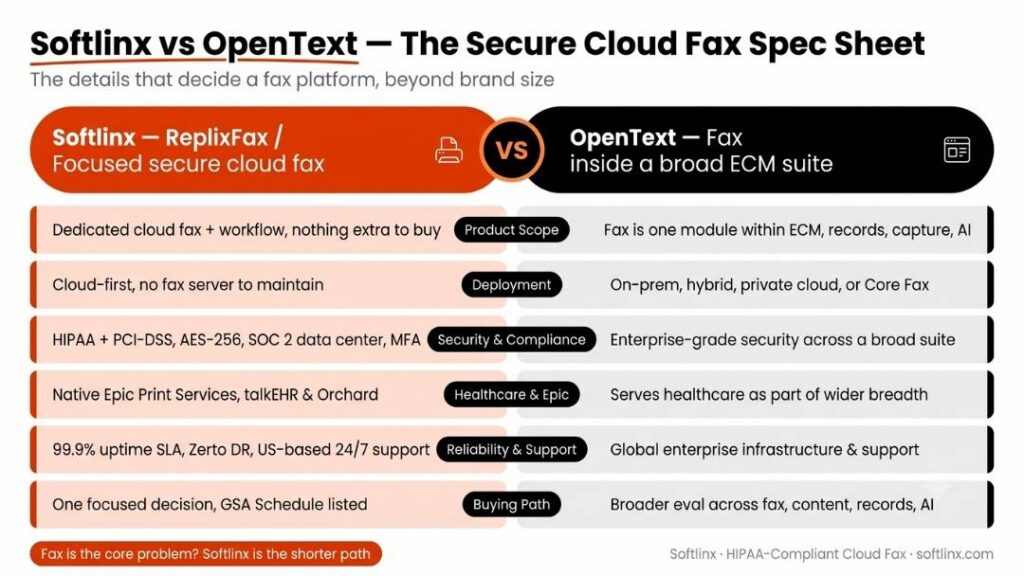
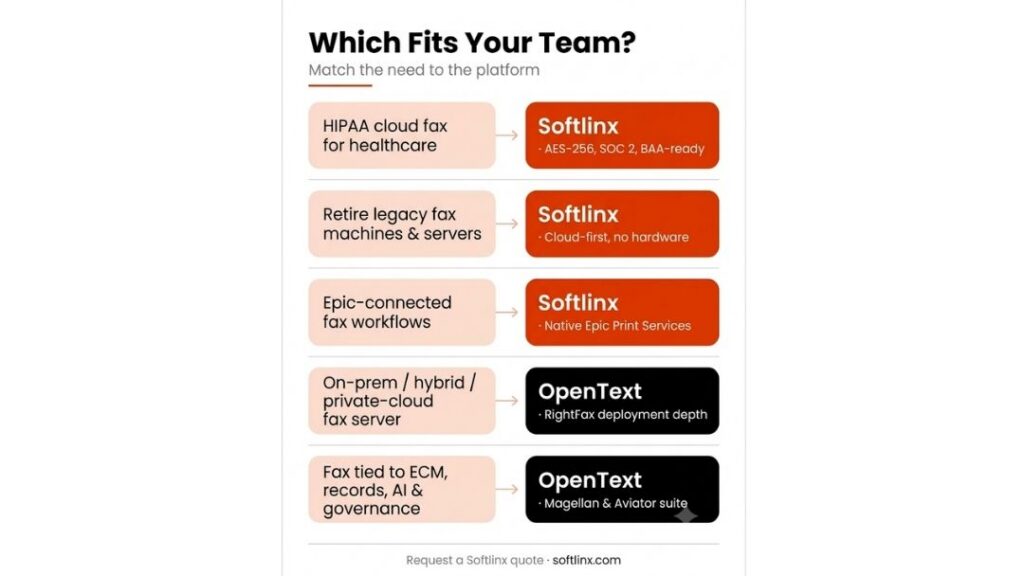
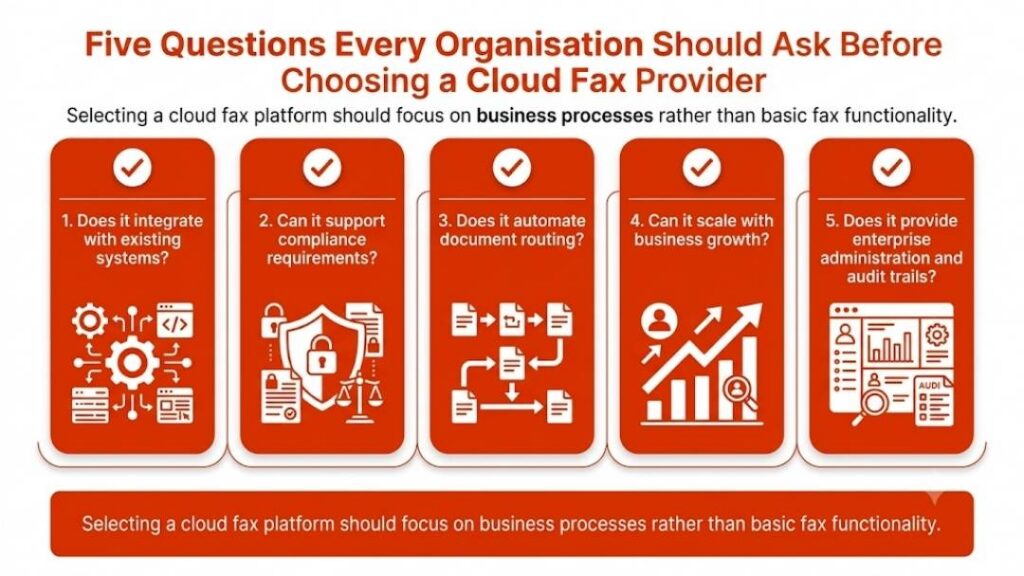
For healthcare, finance, insurance, government, and enterprise teams, the right fax provider should match the workflow behind the fax. If your team needs secure cloud fax, HIPAA-focused controls, API support, or EHR-connected workflows, Softlinx is worth reviewing before you choose a general online fax service.
What Softlinx Is Built For
Softlinx is not positioned as a free fax app or a light faxing app for occasional personal use. Its strongest fit is business fax service for organizations that need secure online fax, workflow control, and reliable document exchange. The company’s ReplixFax platform supports cloud fax, web fax, email to fax, print to fax, production faxing, API-based fax, and workflow automation.
That makes Softlinx a strong option for teams that still depend on fax but no longer want disconnected fax machines, isolated fax servers, manual routing, or paper-heavy processes. A healthcare clinic may need a HIPAA-compliant online fax service that routes records to the right team. A hospital may need fax inside Epic. A financial services team may need secure electronic fax for account files. A government office may need a cloud-based fax service with stronger controls than a basic fax online service. These are the types of use cases where Softlinx’s secure cloud fax service fits naturally.
Softlinx also gives business users several ways to send and receive faxes. Teams can use an email-to-fax service, a web fax portal, print-to-fax workflows, and application-based fax through its fax API for developers. That matters because enterprise fax solutions rarely depend on one user path. One department may prefer email fax service, another may use a browser portal, and a healthcare software vendor may need fax built into its own application.
What eFax Is Built For
eFax is one of the better-known names in online fax services. Its core appeal is convenience. Users can send faxes online, receive documents as digital files, and work from a computer, tablet, or phone. For many users, that is enough. If the buyer needs a familiar e-fax service for basic business fax, eFax is easy to understand and easy to compare against other online fax providers.
The larger eFax ecosystem also extends into enterprise fax. eFax Corporate says it supports email, web portal, mobile app use, number portability, admin controls, API connections, and compliance features. Its corporate section also states that eFax Corporate supports EMR integration through the eFax API and is used by large organizations.
That said, Softlinx vs eFax is not only about whether both companies can send an online fax. They can. The sharper question is whether the service fits the buyer’s actual fax environment. A small office may only need a virtual fax service. A hospital, lab, insurance claims team, or enterprise IT group may need secure cloud fax, automated routing, fax server replacement, audit records, and integration support.
Security, HIPAA, and BAA Support Matter More Than the Fax Button
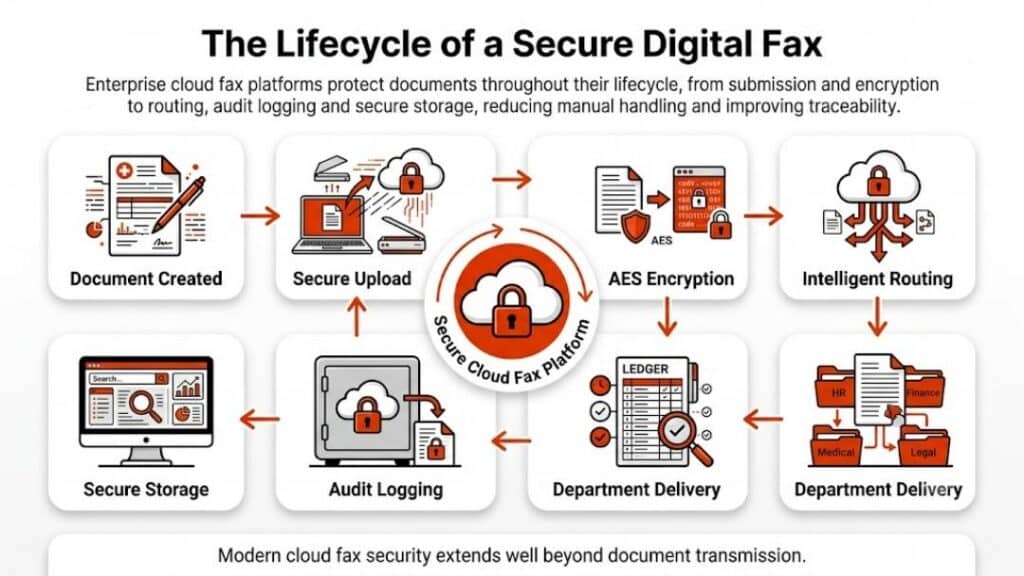
For healthcare and regulated industries, fax security cannot be treated as a checkbox. A secure online fax service must support the way sensitive documents move through real departments, not just the moment a file leaves the screen. That includes user access, encryption, audit logs, storage, routing, authentication, business associate agreements, and administrative oversight.
The U.S. Department of Health and Human Services says regulated entities must use “reasonable and appropriate administrative, physical, and technical safeguards” to protect ePHI. That standard is the reason buyers should look past generic claims such as “secure fax” and ask how the fax service handles access, transmission, storage, records, and accountability.
Softlinx states that its healthcare fax solution is HIPAA- and PCI-DSS-compliant, hosted at a HIPAA-compliant SOC 2 audited data center, uses AES 256-bit encryption, and uses TLS protocols over a secure communication link. These details support the company’s fit for healthcare fax solutions and HIPAA-compliant cloud fax needs.
eFax also has HIPAA-focused options. eFax Business says it provides HIPAA-compliant cloud faxing with 256-bit AES encryption, BAA coverage, online cloud storage, a secure admin portal, and user permission controls. eFax Corporate also references HIPAA, BAA, HITRUST, TLS, and 256-bit encryption across its enterprise pages.
So, is Softlinx vs eFax a security win for only one side? Not exactly. Both providers publish security and compliance messaging. The difference is how each one fits the buyer’s workflow. Softlinx’s brand voice is more specific to healthcare fax, workflow automation, Epic/EHR integration, and secure cloud fax operations. eFax has a broader online fax brand with enterprise products layered on top.
Softlinx vs eFax Feature Comparison
Both platforms can help businesses move away from a physical fax machine. Both can support online faxing services. Both can serve regulated users through certain products and plans. The real separation appears when you compare everyday use, integration needs, administrative control, and workflow depth.
| Feature | Softlinx | eFax | What It Means for Buyers |
| Online fax | Yes, through cloud fax tools and end-user fax options | Yes, through web, email, and mobile access | Both can support fax from a computer without a traditional fax machine. |
| Email to fax | Yes, built for business accounts and department use | Yes, widely used as part of eFax services | Good for teams that want a fax email service without extra hardware. |
| Web fax service | Yes, via secure portal access | Yes, via online account access | Useful for browser-based fax send and receive tasks. |
| Print to fax | Yes, helpful for EHR, office, and Windows-based workflows | Available in corporate workflows depending on setup | Important when staff still work inside existing business applications. |
| Fax API | Strong Softlinx angle for developers, ISVs, EHR apps, and enterprise systems | eFax API supports CRM, ERP, and EHR fax use cases | API depth matters for software teams and high-volume fax operations. |
| Healthcare fax | Strong fit for HIPAA-compliant faxing, PHI, BAA, audit trails, and EHR workflows | Strong HIPAA-focused business and corporate options | Healthcare buyers should compare plan details, BAA terms, access controls, and workflow fit. |
| Epic/EHR integration | Strong Softlinx positioning with Epic and EHR workflow support | eFax Corporate supports EMR/EHR integration through API | Hospitals and health systems should test routing, status updates, and implementation support. |
| Workflow automation | Strong fit for production fax, barcode fax, routing, and department workflows | Enterprise workflow options are available | Softlinx has a clearer workflow automation angle for complex fax environments. |
| Best buyer | Regulated organizations with secure, high-volume, workflow-based fax needs | Users who want a known online fax service, plus enterprises that prefer eFax Corporate | The right choice depends on whether fax is a simple task or a business process. |
Email to Fax, Web Fax, Print to Fax, and Fax From a Computer
A good Softlinx vs eFax comparison should answer the practical questions buyers actually type into Google. Can you fax from a computer? How do I fax from my computer? Can I send a fax online securely? Do I need a digital fax machine? What is cloud fax? Which fax online service works for business?
The short answer is that both providers can help users fax without a standard fax machine. eFax’s public messaging emphasizes the ability to send and receive faxes from a computer, tablet, or phone. Softlinx supports multiple business fax paths, including email to fax, web portal fax, print to fax, and API-based fax.
For a small team, this may look simple. A user opens a web fax service, uploads a file, enters a fax number, and sends the document. For a larger healthcare or enterprise environment, it is more layered. One department may need inbound fax routing. Another may need faxes stored in a specific folder. A developer may need fax software tied into a patient record system. A compliance manager may need audit trails and user activity reports.
That is where Softlinx’s email-to-fax for business accounts, web-based fax portal, and print-to-fax workflow add a stronger enterprise angle to the overall positioning. These are not flashy features, but they matter in real offices where staff need a fax solution that fits the way they already work.
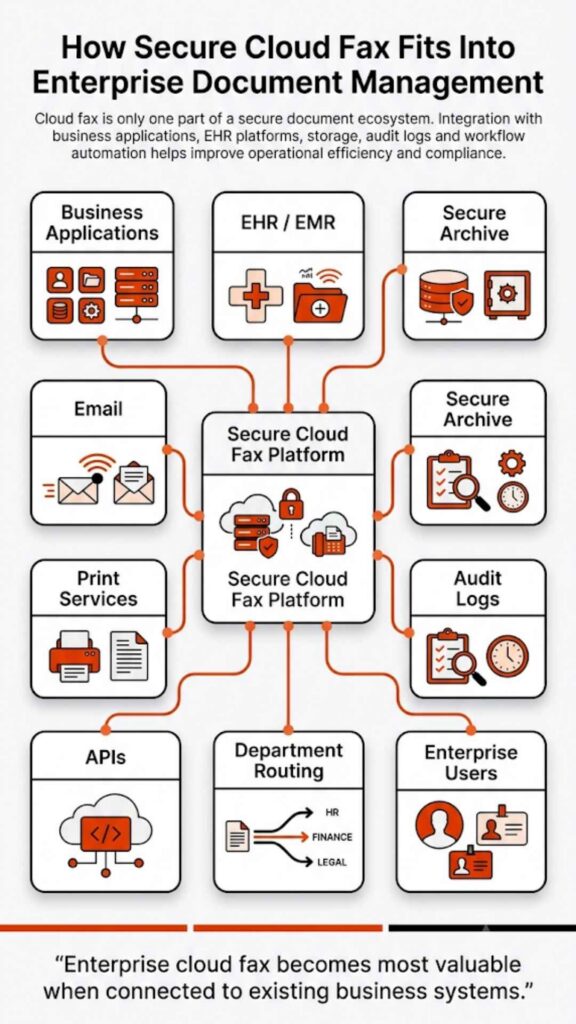
Workflow Automation and Department Routing
Here is the problem with many online fax service reviews: they compare apps, not workflows. That may work for a one-time fax or a simple office use case. It does not work as well for healthcare, insurance, finance, education, government, and manufacturing teams that process high volumes of sensitive documents every week.
A medical group may receive referrals, lab reports, prior authorizations, signed forms, and discharge summaries. An insurance team may process claims, appeals, adjustments, and benefits documents. A financial institution may handle account paperwork, loan files, and signed forms. In these settings, fax is not one task. It is part of a document chain.
Softlinx has a clearer story here because its site includes fax workflow automation, barcode fax workflow, and production faxing for high-volume workflows. Those features are especially relevant when the buyer needs fax routing, electronic filing, metadata, auditability, department queues, or large batch fax processes.
eFax Corporate also supports enterprise workflows, admin controls, and API-based fax use. Its corporate product describe enterprise cloud fax, compliance features, administration tools, and integration with existing systems.
Still, the Softlinx vs eFax decision should ask a plain question: does the team need an online fax account, or does it need a fax solution that sits inside business operations? When the second answer is true, Softlinx’s workflow-first positioning becomes more valuable.
API, Epic, and EHR Integration
The API and EHR section is one of the most important parts of the Softlinx vs eFax comparison because it separates basic online fax from enterprise cloud fax. A small business may never care about a fax API. A healthcare software company, hospital, lab, or large medical group may care a lot.
Softlinx says ReplixFax connects directly with Epic EHR so clinical and administrative staff can send and receive HIPAA-compliant faxes without leaving their workflow. Its Epic page also states that ReplixFax connects through a documented RESTful API, supports sandbox testing access, and can route inbound faxes to department queues or patient records.
That makes Softlinx a practical fit for organizations that need Epic fax integration, EHR fax integration, or a way to connect fax to EHR. These use cases matter because healthcare teams often want fax to appear inside the tools staff already use, not as a separate tab, inbox, or manual workaround.
eFax also offers a fax API. Its API section says users can fax directly from CRM, ERP, or EHR systems, with TLS 1.2 encryption for fax transmissions and AES 256-bit encryption for fax storage.
So, again, the comparison is not “one has API, and one does not.” It is about fit. Softlinx’s API story is closely tied to healthcare fax solutions, Epic workflows, high-volume fax, and secure cloud fax operations. eFax’s API story fits buyers that want an enterprise-grade online fax provider with recognizable brand reach and corporate options.
Best Fit by Industry
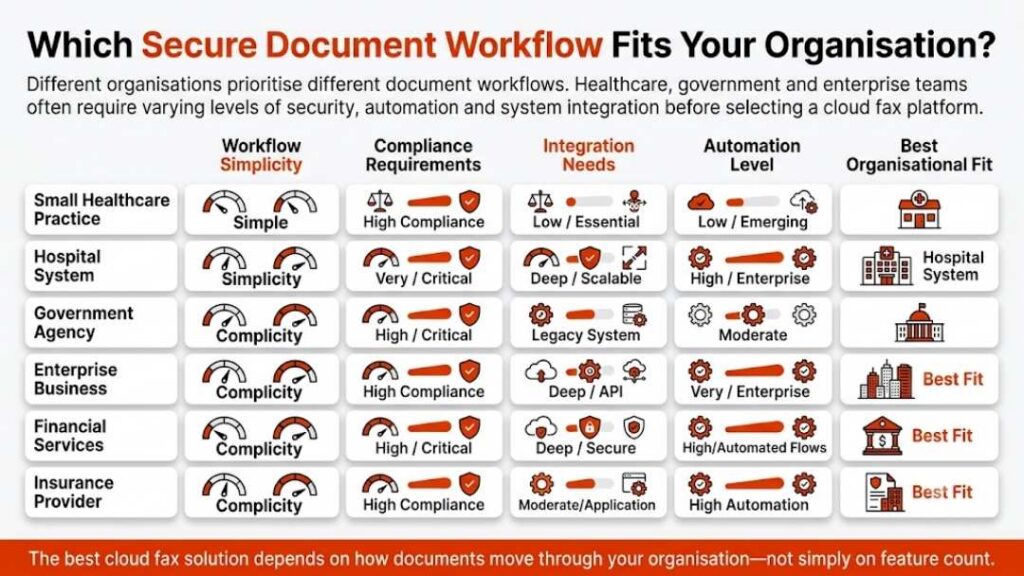
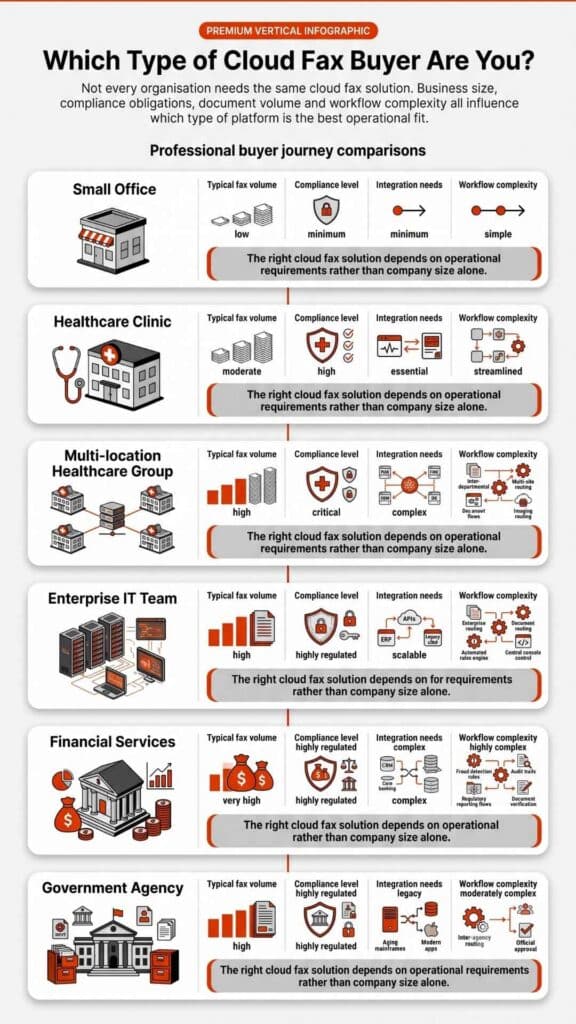
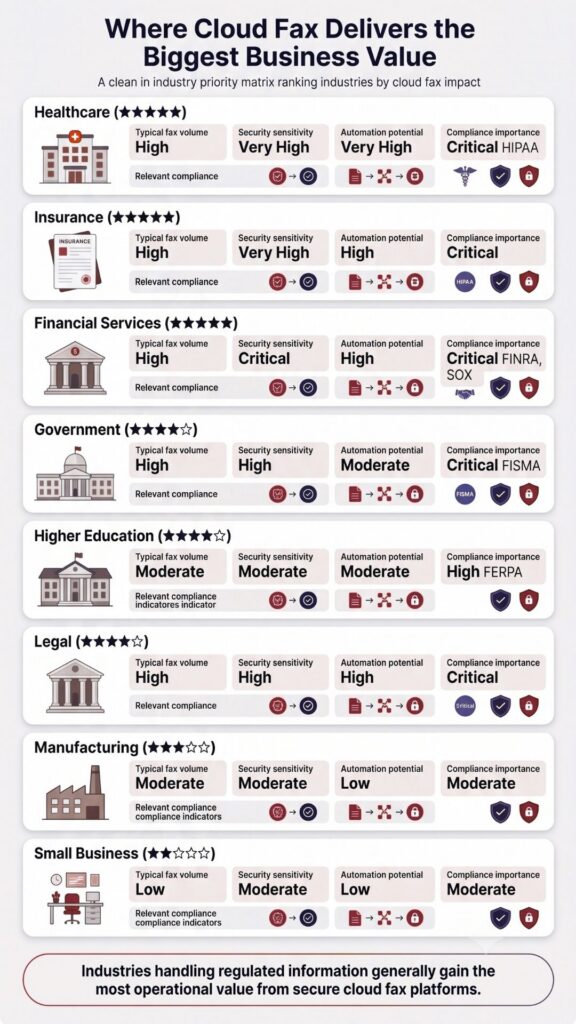
Softlinx vs eFax becomes easier to judge when buyers compare by industry instead of feature lists alone. The same fax service online may feel perfect for one team and too limited for another. A solo consultant may want the best online fax service for occasional documents. A hospital may need HIPAA-compliant digital fax, department routing, Epic integration, BAA support, and clear audit trails.
| Buyer or Use Case | Better Fit to Consider First | Why This Fit Makes Sense |
| Individual user or solo professional | eFax | A known online fax service may be enough for simple send-and-receive needs. |
| Small office with basic fax needs | eFax | If the team mainly needs fax from computer, email fax, and mobile access, eFax may be simple to assess. |
| Healthcare clinic | Softlinx | HIPAA-compliant cloud fax, PHI workflows, BAA support, audit trails, and routing are central to the use case. |
| Hospital or health system | Softlinx | Epic/EHR integration, high-volume fax, department routing, and secure cloud fax controls matter more. |
| Insurance claims team | Softlinx | Claims workflows often need secure routing, reliable records, and controlled document access. |
| Financial institution | Softlinx | Sensitive financial documents require a secure fax service with business-grade controls. |
| Government agency | Softlinx | Secure document exchange, records, department routing, and compliance-sensitive workflows are often part of the need. |
| Developer, ISV, or healthcare software vendor | Softlinx | Fax API, sandbox-style technical support, and embedded fax workflows are more important than basic online fax access. |
| Enterprise that already prefers eFax ecosystem | eFax Corporate | Existing vendor preference, corporate admin tools, and eFax API may make eFax easier to shortlist. |
Softlinx can also support industry-specific needs for buyers that want a closer fit, such as healthcare fax solutions, financial services cloud fax, insurance fax workflows, government fax solutions, and higher education fax solutions.

Which Provider Is Better for Regulated Teams?
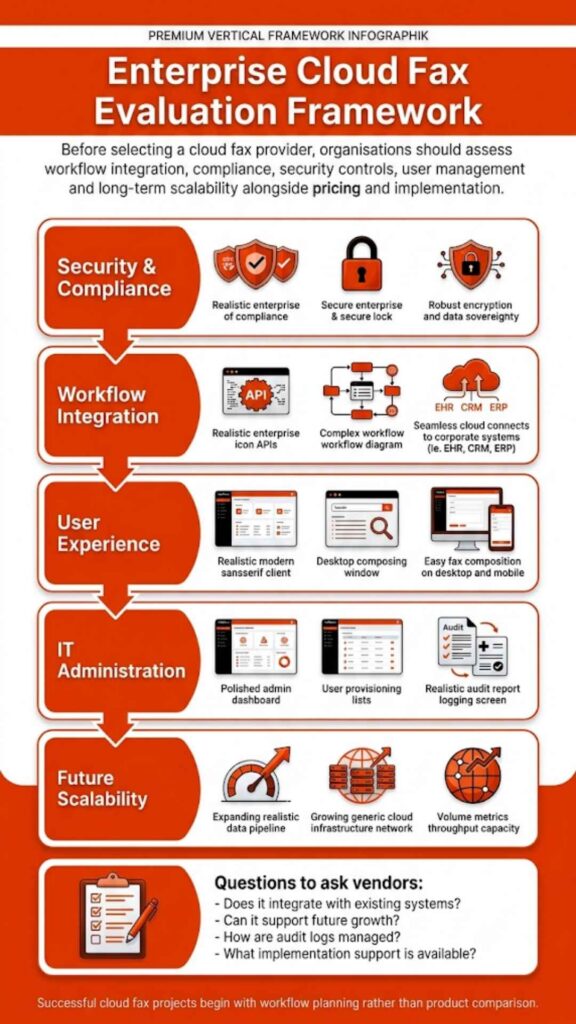
Regulated teams should compare more than send limits, mobile access, or whether a service can fax from a computer. The real checklist is deeper: BAA availability, encryption in transit and at rest, user permissions, audit trails, secure storage, department routing, API needs, EHR fit, number porting, uptime expectations, and implementation support.
Softlinx is the stronger fit when fax touches protected health information, claims documents, financial records, government forms, or other sensitive files that must move through defined workflows. Its value is not only that users can send an electronic fax. Its value is that healthcare and enterprise teams can connect fax to the systems, departments, and controls they already depend on.
eFax can still be a good option for regulated buyers, especially those evaluating eFax Business or eFax Corporate. But buyers should confirm exactly which plan includes the BAA, admin portal, user permission controls, storage terms, API access, and security features they need. For HIPAA-heavy or workflow-heavy teams, those details matter more than brand familiarity.
Pricing, Plans, and Contract Questions
Pricing is where comparison often go wrong. It is tempting to say one fax service is cheaper, faster, or more cost-effective. The pricing depends on fax volume, number of users, fax numbers, support needs, compliance requirements, integrations, storage, admin controls, and contract structure.
eFax publishes plan and product details across its site, and its healthcare section shows separate paths for personal, business, and corporate HIPAA-focused needs. eFax Business mentions HIPAA-compliant cloud faxing with BAA coverage, while eFax Corporate is positioned for larger organizations with custom plans, API access, HITRUST certification, dedicated account management, and an admin portal.
Softlinx should not be framed as the cheapest eFax alternative or a low-cost fax service unless the client gives verified pricing evidence. Instead, it should be presented as a secure cloud fax provider for organizations that need the right operational fit. A buyer should request a Softlinx quote when they need pricing based on their fax environment, not a generic plan chart.
A careful pricing paragraph can still convert by guiding buyers to compare setup needs, fax volume, support expectations, compliance terms, API requirements, and migration needs before making a decision. This approach provides more value than relying on a weak claim about cost savings.
Migration, Existing Fax Numbers, and Support
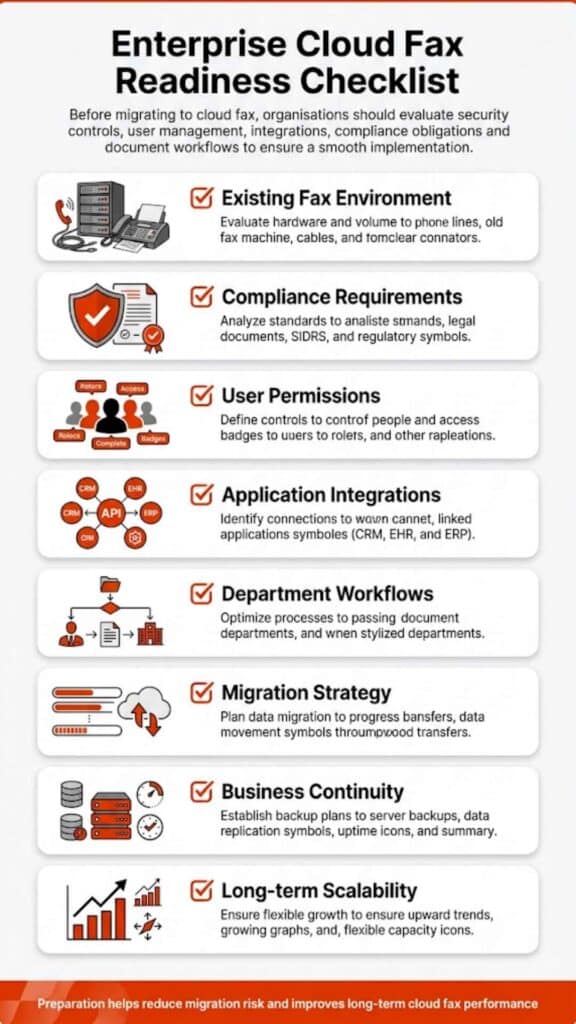
A Softlinx vs eFax buyer may not be starting from zero. Many teams already use fax machines, fax server software, hosted fax, online fax providers, or another cloud-based fax service. That means the real concern is not only the product itself. It is the move.
Buyers often want to know whether they can keep existing fax numbers, whether staff need new equipment, whether departments can share a cloud fax system, whether high-volume fax will work, and whether old workflows need to be rebuilt. These questions matter because fax often touches customers, patients, vendors, clinics, labs, payers, agencies, and outside partners.
Softlinx supports this stage of the buyer journey with guidance on how to switch from a fax machine to cloud fax, how to use an existing fax number with a cloud fax service, and how to follow cloud fax migration steps. For larger teams, it also addresses whether cloud fax can handle high-volume sending.
eFax Corporate also says it supports number portability and that users do not need to buy or maintain fax hardware for its enterprise cloud fax solution.
For a fair comparison, it should not suggest that migration is always easy or instant. It should say that the best provider is the one that can map the current fax setup, protect continuity, help staff adapt, and support the workflow after go-live.
Pros and Cons of Softlinx and eFax
Pros and cons help make the decision easier.
Softlinx pros and cons
| Pros | Cons |
| Strong healthcare and enterprise fax focus | Not ideal for one-time fax users |
| HIPAA-focused cloud fax positioning | Pricing usually requires a quote |
| API, Epic, and EHR integration support | More advanced than basic online fax needs |
| Workflow automation and production fax support | May require setup planning for complex teams |
eFax Pros and Cons
| Pros | Cons |
| Well-known online fax brand | Plan details can be confusing for regulated buyers |
| Web, email, and mobile fax access | HIPAA/BAA features depend on the product or plan |
| Business and Corporate options available | Less workflow-specific than Softlinx |
| API and enterprise features available | Buyers must verify storage, admin, and compliance needs |
FAQs About Softlinx vs eFax
Is Softlinx better than eFax?
Softlinx may be the better choice if the buyer needs HIPAA-compliant cloud fax, healthcare fax solutions, Epic/EHR integration, fax API support, department routing, production faxing, and secure cloud fax workflows. eFax may be the better choice if the buyer mainly wants a familiar online fax service for basic fax from computer, mobile fax, or email fax use. Softlinx vs eFax is not an absolute winner-takes-all comparison. It is a use-case decision.
Is eFax HIPAA compliant?
eFax offers HIPAA-focused services on certain products. eFax Business says it provides HIPAA-compliant cloud faxing with 256-bit AES encryption and BAA coverage. eFax Corporate also describes HIPAA, BAA, HITRUST, TLS, and 256-bit encryption features for enterprise buyers. Buyers should verify the exact plan, agreement, and compliance terms before they use any fax service for PHI.
Is Softlinx HIPAA compliant?
Softlinx states that its healthcare fax solution is HIPAA- and PCI-DSS-compliant, hosted at a HIPAA-compliant SOC 2 audited data center, uses AES 256-bit encryption, and uses TLS protocols over a secure communication link. For healthcare buyers, Softlinx’s HIPAA-compliant cloud fax for healthcare is one of its strongest product angles.
Can you fax from a computer with Softlinx and eFax?
Yes. Both providers support ways to fax from a computer. eFax highlights online fax from a computer, tablet, or phone. Softlinx supports web fax, email to fax, print to fax, and application-based fax through APIs. The best choice depends on whether the user needs a simple online fax tool or a business fax service tied to secure workflows.
Which is better for healthcare faxing?
Softlinx is especially strong for healthcare teams that need HIPAA-focused fax workflows, Epic/EHR integration, audit trails, department routing, API support, and high-volume secure cloud fax. eFax is also a recognized healthcare fax option through certain HIPAA-focused business and corporate services. The right choice depends on the healthcare organization’s document volume, system environment, compliance needs, and support expectations.
Which is better for a free fax app or one-time fax?
Neither provider should be judged mainly as a free virtual fax or one-time fax option. A user who only needs to fax a PDF online once may prefer a simpler, low-cost, or free fax app. Softlinx is a better fit for business, healthcare, and enterprise fax. eFax can serve lighter users, but plan details should be checked before sign-up.
A Secure Fax Decision Should Match the Workflow
Softlinx vs eFax is not only a feature checklist. It is a question of operational fit. eFax is a strong, familiar name for online faxing, digital fax access, email fax, mobile fax, and enterprise cloud fax products. Softlinx is a stronger fit when fax is tied to secure business workflows, HIPAA-sensitive documents, department routing, API use, Epic/EHR integration, production faxing, and regulated-industry communication.
For a small office that sends occasional online faxes, eFax may be enough. For a healthcare provider, hospital, insurance group, financial institution, government office, developer, or enterprise team, Softlinx may offer a better path because it treats fax as part of the document workflow, not just a send button.
The best next step is not to guess from a feature chart. It is to map how fax works inside your organization today, then compare each provider against that process. If your team needs secure cloud fax with HIPAA-focused workflows, API support, routing, and enterprise controls, talk to Softlinx about secure cloud fax and review the setup that fits your business environment.