Softlinx vs SRFax is not just a question of which online fax service can send a document from a computer. That is the easy part. The harder question is whether your business needs a simple email fax account or a secure cloud fax system that fits into daily operations, compliance reviews, EHR workflows, user permissions, and high-volume document handling.
SRFax is a well-known online fax service with healthcare plans, email fax, web fax, printer tools, and API access. Softlinx, through ReplixFax, is built more around enterprise cloud fax, healthcare workflows, EHR connectivity, high-volume fax needs, and regulated document routing.
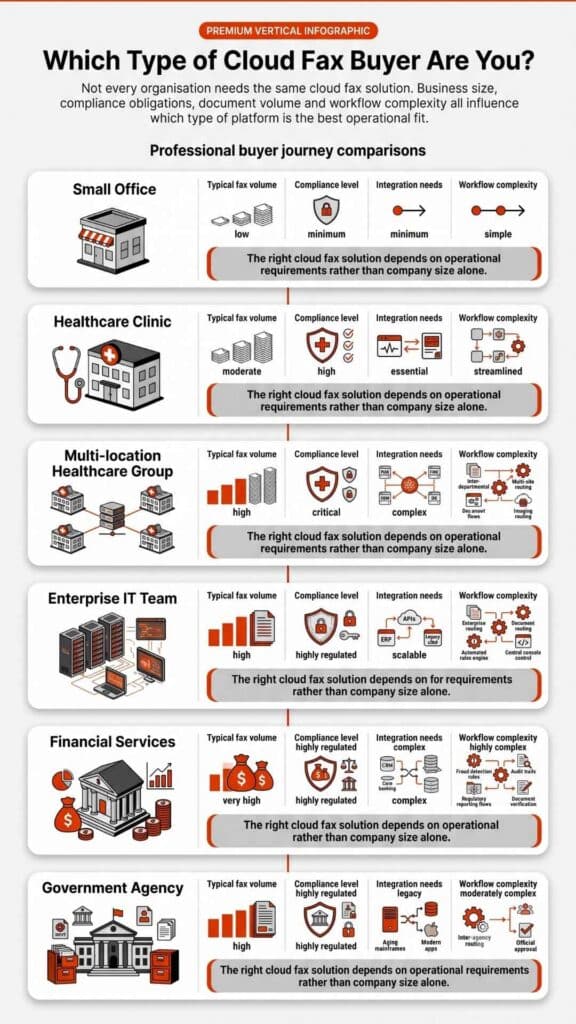
For a solo office or smaller team that wants a straightforward fax service online, SRFax may be easier to evaluate at first glance. For healthcare groups, enterprise teams, financial institutions, insurance organizations, government departments, and other regulated businesses that need deeper workflow control, Softlinx deserves a closer look.
In this article, we compare Softlinx vs SRFax across security, healthcare fit, APIs, workflows, pricing visibility, and buyer use cases so you can choose the right fax service without guesswork.
Softlinx vs SRFax: Quick Verdict for Secure Online Fax Buyers
Softlinx is the stronger fit when fax is part of a larger business workflow, not just a one-off way to send a fax from a computer. Its ReplixFax platform supports cloud fax, enterprise faxing, production faxing, API-based fax, web portal fax, email-to-fax, print-to-fax, barcode fax workflow, and healthcare-focused integrations. Softlinx describes its service as a secure cloud fax platform for healthcare and enterprise businesses, with specific support for ISVs, developers, enterprise businesses, and IT service providers.
SRFax is the stronger fit when a business wants a more traditional online fax account with clear public plans, email-to-fax, fax-to-email, web access, basic API use, and healthcare-specific HIPAA plans. SRFax says its plans serve businesses in the U.S. and Canada, with standard features such as web application access, email use, printer driver access, API integration, unlimited storage, SSL, and optional PGP encryption.
| Comparison Area | Softlinx | SRFax |
| Best fit | Healthcare, enterprise, high-volume, regulated workflows | Small businesses, healthcare offices, remote teams, general online fax users |
| Core product style | Cloud fax and enterprise fax workflow platform | Online fax service with healthcare and standard plans |
| Main fax methods | Web portal, email-to-fax, print-to-fax, API, workflow tools | Email-to-fax, fax-to-email, web app, printer driver, Mac client, API |
| Healthcare focus | Strong healthcare and EHR workflow positioning | Strong healthcare plan positioning |
| API depth | REST and SOAP APIs, business application integration, EHR workflow support | RESTful API with downloadable classes and developer support |
| Compliance positioning | HIPAA, PCI-DSS, BAA, AES-256, TLS, SOC 2 audit references, MFA, audit trails | HIPAA healthcare plans, PHIPA references, BAA, SSL, firewalls, optional PGP |
| Pricing visibility | Quote/demo style evaluation | Public monthly healthcare and standard plans |
| Best buyer type | IT, compliance, operations, healthcare admin, enterprise procurement | Office manager, small business owner, clinic admin, remote office team |
Need fax to do more than send and receive documents? Softlinx’s ReplixFax is built for healthcare, enterprise, API, and workflow-based fax use cases. Review Softlinx’s healthcare cloud fax service or explore enterprise faxing to see whether the platform fits your organization’s daily workflow.
How Softlinx and SRFax Approach Online Fax Services
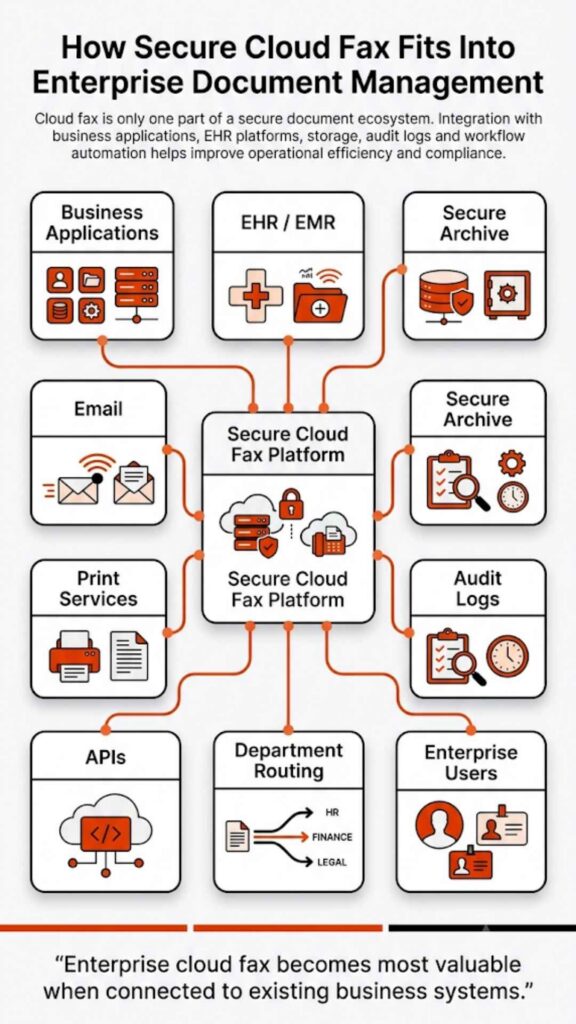
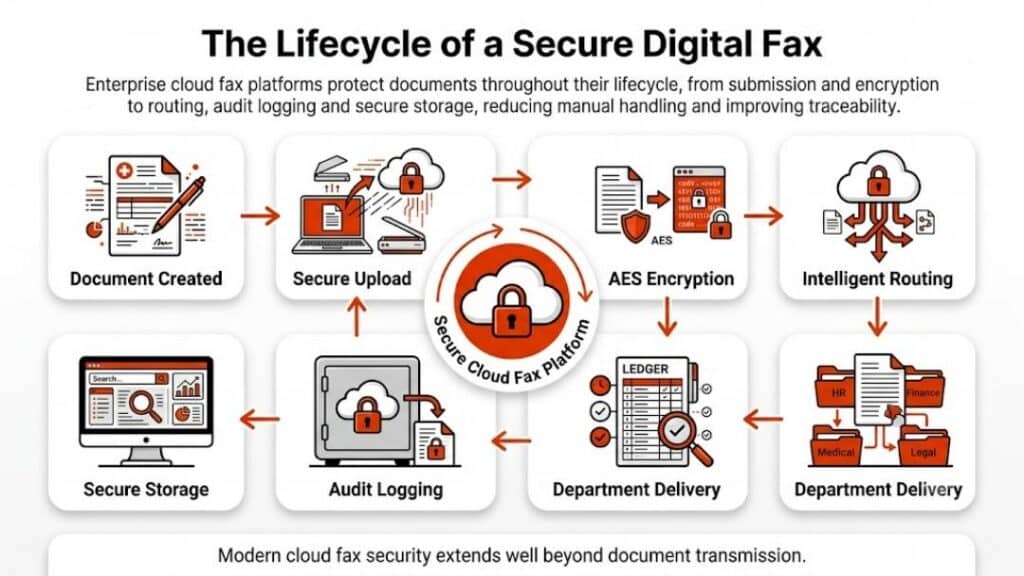
Softlinx treats fax as part of business infrastructure. That matters because many organizations still do not use fax as a standalone tool. A hospital may need inbound faxes routed to a patient record. A financial services firm may need audit trails. An insurance team may need secure document routing by department. A manufacturer may need production faxing from a business application. Softlinx’s own site points to cloud fax services for ISVs, enterprises, developers, IT service providers, healthcare, insurance, manufacturing, financial services, government, and higher education.
SRFax takes a more account-based online fax approach. Users can send a fax through email, receive faxes in email, use a web application, access a printer driver, and use API tools. Its public plan page states that SRFax serves every type and size of business in the U.S. and Canada, with options for healthcare organizations and standard business users.
That difference is the heart of Softlinx vs SRFax. SRFax works well when the buyer asks, “How can I send a fax without a fax machine?” Softlinx becomes more relevant when the buyer asks, “How do we manage secure faxing across departments, applications, EHR workflows, users, audit trails, and high-volume document processes?”
Secure Cloud Fax, HIPAA Compliance, and Audit Readiness
For healthcare and other regulated industries, compliance is not a marketing label. It affects access control, transmission security, audit history, vendor agreements, and internal policy. The U.S. Department of Health and Human Services explains that “The Security Rule requires regulated entities to implement reasonable and appropriate administrative, physical, and technical safeguards” for ePHI. That quote matters because choosing a HIPAA-compliant online fax service is only one part of a larger compliance program.
Softlinx says its healthcare fax solution uses a HIPAA-compliant, SOC 2-audited data center, AES 256-bit encryption, and TLS protocols over a secure communication link. The same healthcare page references annual SOC 2 audits, penetration testing, vulnerability testing, Business Associate Agreements, MFA, audit trails, delivery confirmation, and user activity reports.
SRFax says its healthcare plans are fully HIPAA compliant, with PHIPA support for Canada. It also says it signs a Business Associate Agreement, uses SSL encryption and firewalls, and offers optional PGP encryption. SRFax’s security describes SSL encryption, firewalls, a dedicated cybersecurity team, optional PGP encryption, data center practices, backups, continuity management, authorization systems, and monitoring.
In plain English, both providers speak to secure online fax needs. The difference is how the buyer evaluates risk. A smaller clinic may value SRFax’s clear healthcare plans and simple email fax setup. A larger organization may need Softlinx’s broader controls around enterprise cloud fax, department administration, routing, EHR integration, and reporting.
Fax API, EHR Integration, and Workflow Automation
The API comparison is where Softlinx vs SRFax becomes more interesting. SRFax does offer a developer path. Its developer section says the SRFax API helps developers add email-to-fax capability to projects and provides downloadable classes in PHP, Ruby, C#, and VB. SRFax also says its API can support large hospitals, healthcare institutions, enterprise organizations, and small businesses.
Softlinx, however, places API and workflow deeper into the center of its platform story. Its enterprise faxing says ReplixFax supports both SOAP and REST fax APIs, sample code, tutorials, out-of-the-box integration toolkits, metadata handling, folder-based outbound fax automation, and inbound or outbound fax filing.
Softlinx also has dedicated healthcare integration positioning. Its Epic integration says ReplixFax allows Epic users to send and receive faxes directly from Epic, sends fax status back to Epic, gives administrators access to a ReplixFax web portal, and supports inbound fax delivery through folders or secure FTP drops for document management workflows.
That makes Softlinx a stronger candidate for businesses where fax must connect to EHR, EMR, PM, LIS, document management, finance, insurance, or internal workflow systems. SRFax still has API value, but Softlinx presents a more enterprise-heavy story around electronic fax workflow and application-level faxing.
Sending Fax From Computer, Email, Web, and Print
Both platforms support the basic question many buyers still ask: can you fax from a computer? Yes, with both Softlinx and SRFax, fax can move through digital tools instead of a physical fax machine.
SRFax explains that users can send and receive documents from a desktop computer, phone, tablet, or laptop, with email-to-fax and fax-to-email workflows. Its “How SRFax Works” says users can open an email program, create a message, and enter the destination fax number followed by the SRFax domain.
SRFax also offers a Windows printer driver that lets users send a fax from printable programs. For Mac users, SRFax provides a Mac client that can send or receive faxes directly from the desktop client.
Softlinx also supports multiple user methods. Its highlight web portal, email-to-fax, print-to-fax, workflow, and developer API options. Its enterprise section says users can send and receive faxes by email, ReplixFax Printer Driver, or web interface on PC and mobile devices.
The practical difference is not whether each service can send an electronic fax. Both can. The difference is whether your team needs simple online faxing services or a broader faxing solution with department control, routing logic, application integration, usage reporting, and compliance documentation.
Pricing Model and Buying Fit
SRFax has public pricing, which makes it easier for smaller buyers to estimate an account before a sales conversation. Its healthcare plans include Healthcare Lite at 200 combined sent and received pages per month and Healthcare Basic at 500 combined pages per month, with listed monthly rates and additional page charges.
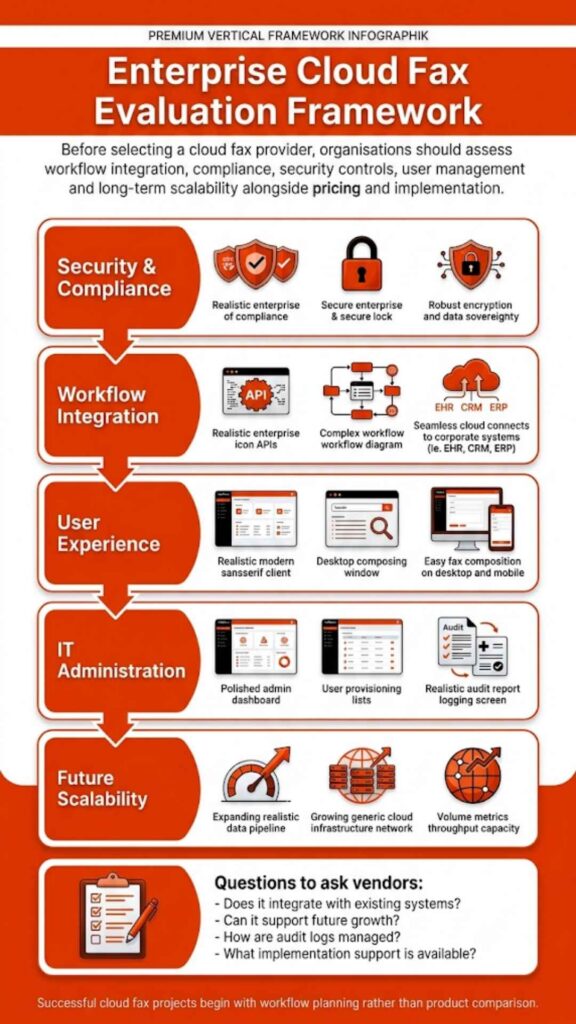
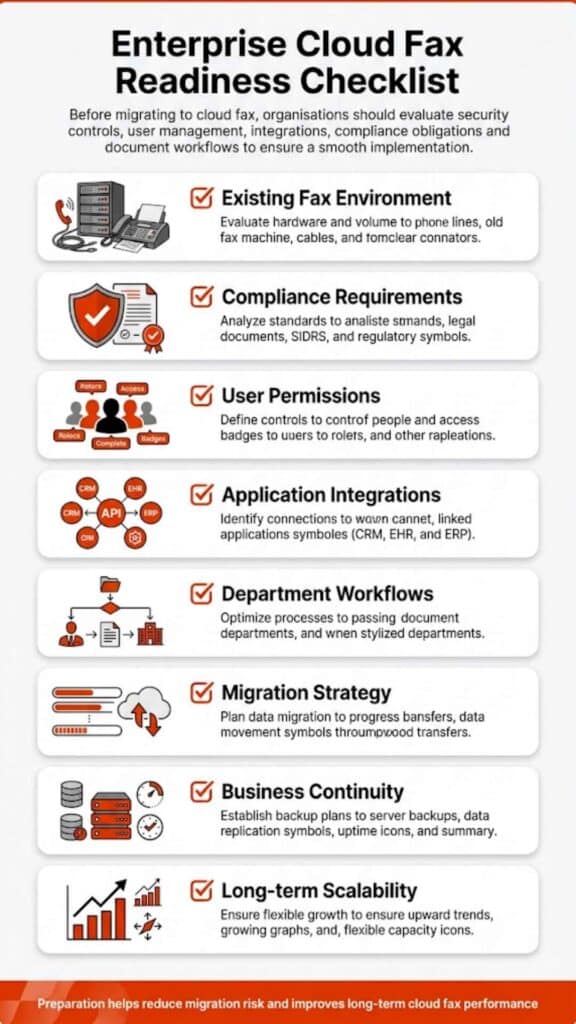
Softlinx is better approached as a quote-based enterprise cloud fax provider. For buyers with high-volume faxing, EHR integration, production faxing, API needs, multiple departments, or regulated workflows, a quote-based review can be more useful than a small-business price grid. That does not mean Softlinx will be right for every budget. It means the evaluation should include workflow complexity, compliance requirements, user roles, number porting, application integration, fax volume, support expectations, and implementation needs.
SRFax is easier to price quickly from public plans, while Softlinx is easier to justify when fax is part of a larger secure document workflow.
Softlinx Pros and Cons vs SRFax Pros and Cons
| Provider | Pros | Cons |
| Softlinx | Strong fit for healthcare and enterprise fax workflows. Supports web, email, print, API, and workflow-based fax. Better positioned for EHR integration, production faxing, barcode workflow, and regulated document routing. References HIPAA, PCI-DSS, BAA, AES-256, TLS, MFA, SOC 2 audit practices, audit trails, and detailed reporting. | Pricing is not as instantly visible as SRFax public plans. May be more than a very small team needs for occasional faxing. Some buyers may need a sales conversation before they can judge fit. |
| SRFax | Clear public healthcare plans. Strong fit for email fax, fax-to-email, web fax, basic online fax, and healthcare office use. Offers HIPAA healthcare plans, PHIPA references, BAA, SSL, optional PGP, API access, printer driver, and Mac client. | Less visibly focused on complex enterprise workflow than Softlinx. HIPAA positioning is strongest around healthcare plans, so non-healthcare buyers should review plan details carefully. Direct EHR workflow depth appears less central than it is with Softlinx. |
Best Use Cases for Each Online Fax Service
| Use Case | Better Fit | Why |
| Small business that needs to send fax online from email | SRFax | Public plans and simple email-to-fax setup make the buying path straightforward. |
| Healthcare clinic with routine fax volume | SRFax or Softlinx | SRFax may fit simpler use; Softlinx may fit if routing, audit, EHR workflow, or department management matters. |
| Hospital, medical group, or health system | Softlinx | Stronger fit for EHR integration, audit trails, centralized administration, and enterprise fax workflow. |
| Financial services, insurance, or government workflow | Softlinx | Better match for regulated document routing, reporting, and enterprise administration. |
| Developer adding fax into an application | Softlinx or SRFax | SRFax has a RESTful API; Softlinx supports REST and SOAP APIs with broader enterprise workflow positioning. |
| High-volume production fax | Softlinx | Production faxing, workflow automation, and enterprise controls are part of the Softlinx positioning. |
| Buyer who wants public pricing before any call | SRFax | SRFax publishes plan details, while Softlinx is quote/demo oriented. |
| Team replacing fax machines across departments | Softlinx | Department management, web portal control, application faxing, and workflow tools are more central to Softlinx. |
Which Fax Service Is Better for Healthcare?
For healthcare, Softlinx vs SRFax comes down to workflow depth. SRFax is a credible HIPAA-compliant online fax service for clinics, physicians, pharmacies, remote teams, and healthcare offices that want secure email fax and web fax tools. It publishes healthcare plans and clearly explains its BAA and encryption posture.
Softlinx is stronger when healthcare faxing touches EHR integration, multiple departments, inbound routing, patient-document workflows, audit trails, and enterprise oversight. Its healthcare fax page references SOC 2 audit practices, AES 256-bit encryption, TLS, BAA support, MFA, audit trails, and user activity reporting, while its Epic integration adds a deeper EHR workflow layer.
So, for a small healthcare office, SRFax may be enough. For a hospital, medical center, lab, imaging center, billing company, or multi-location practice, Softlinx may offer a better long-term fit.
If your healthcare team needs fax tied to EHR workflows, routing rules, audit trails, and secure document handling, Softlinx is worth reviewing before you choose a basic online fax account.
Which Fax Service Is Better for Enterprise Teams?
Enterprise teams usually need more than a fax inbox. They need administration, reporting, permissions, routing rules, uptime expectations, user management, and support for business applications. Softlinx’s enterprise fax offering highlights features like self-service fax administration, user accounts, departments, retries, notifications, fax usage reports, custom cover pages, high-volume faxing, API integration, workflow tools, and secure cloud fax hosting.
SRFax can still serve enterprise-level users, especially when the organization wants account-based online fax with API access. Its developer section highlights support large hospitals, healthcare institutions, enterprise-level organizations, and small businesses.
The difference is emphasis. SRFax is easier to understand as an online fax provider. Softlinx is easier to understand as an enterprise cloud fax and workflow platform.
FAQs About Softlinx vs SRFax
Can you fax from a computer with Softlinx and SRFax?
Yes. Both services allow users to send faxes from a computer without a physical fax machine. SRFax supports email-to-fax, web fax, a Windows printer driver, and a Mac client. Softlinx supports web portal fax, email-to-fax, print-to-fax, API-based fax, and workflow-based fax.
Is online fax secure enough for healt3hcare?
Online fax can support healthcare workflows when the provider and the healthcare organization use the right safeguards. HIPAA compliance depends on more than the fax service name. Buyers should review BAA availability, encryption, audit logs, access controls, authentication, user permissions, routing, storage, and internal policies.
Is SRFax HIPAA compliant?
SRFax says its healthcare plans are HIPAA compliant and include safeguards such as BAA support, SSL encryption, firewalls, and optional PGP encryption. Healthcare buyers should still confirm plan terms, user permissions, retention settings, and internal policies before sending PHI through any fax online service.
Does Softlinx support EHR fax workflows?
Yes. Softlinx positions ReplixFax for healthcare workflows and EHR-related fax use cases, including Epic integration, inbound fax routing, fax status updates, secure FTP delivery, web portal administration, and workflow support for healthcare organizations.
Is SRFax better than Softlinx?
SRFax may be better for small businesses, individual offices, or clinics that want quick pricing and standard online fax functionality. It is less likely to be the stronger choice when the buyer needs a more complex faxing solution across departments, applications, and regulated workflows.
Which service is better for HIPAA-compliant cloud fax?
Both providers publish HIPAA-related information. SRFax has dedicated healthcare plans and BAA language. Softlinx has broader healthcare cloud fax and enterprise compliance positioning, with references to BAA support, AES-256, TLS, SOC 2 audit practices, MFA, audit trails, and EHR workflow support. The better choice depends on the organization’s size, workflow, and compliance review process.
The Better Choice Depends on the Fax Job You Need Done
Softlinx vs SRFax is really a comparison between two different types of buyers. SRFax works well for teams that want a secure online fax service, public plan details, email-to-fax, web fax, and a familiar path for sending faxes from a computer. It is a practical choice for many small businesses and healthcare offices.
Softlinx is better suited for organizations where fax is still mission-critical and tied to larger systems. If your team needs secure cloud fax across healthcare, insurance, finance, government, manufacturing, higher education, or enterprise workflows, Softlinx offers a more workflow-focused route. Its ReplixFax platform is especially relevant when you need web portal fax, email-to-fax, print-to-fax, API faxing, EHR integration, production faxing, barcode fax workflow, audit trails, and compliance-focused administration.
For a simple online fax account, SRFax may do the job. For regulated teams that need fax to fit the way the business actually works, Softlinx is the stronger option to evaluate.
Ready to compare your current fax setup with a secure cloud fax workflow? Review Softlinx’s healthcare cloud fax service, explore enterprise faxing, or request a Softlinx quote to see how ReplixFax fits your organization.