How to Cut Costs with Electronic Fax Filing

Faxing is an essential mode of communication and document transmission for many companies across the world. It’s one of the most secure and convenient ways to transport a document from point A to point B and is a safer method of sending private data than many alternatives. But with the latest technological improvements and a newfound focus on software over hardware, the traditional fax system is outdated. However, electronic fax filing is a direct alternative that takes the convenience and security of faxing and consolidates it with your internet-based workflow. By migrating to cloud services rather than continuing with outmoded legacy units, you’ll save your company money and time while promoting increased productivity among your employees. This guide will take you through some of the top reasons to switch to electronic fax filing and explain how your business can benefit from cloud services.

What Is Electronic Fax Filing?

Many industries use fax services to transmit information. It’s been a staple of offices around the world for the past few decades and remains a popular method of sending and receiving documents and data. But with the advancements in cloud-based services and software technology, the traditional methods have been decreasing in popularity, and more companies are turning to alternative options, like electronic fax filing.

Online faxing — also referred to as online cloud faxing, electronic fax filing or e-fax — is one of the top options, directly resolving many issues related to traditional faxing and providing multiple benefits as well. It’s a reliable form of data transmission that uses internet services, rather than telephone lines, to send transmissions, and they can save businesses a significant amount of time and money.

The goal of any e-fax solution is to virtualize and streamline your communication processes. Traditional faxing systems are prohibitive and can often hold your employees back. They require the sender or receiver to be on-premises, can only process one job at a time and leave a few security risks unchecked. While they were the best option for security at one point, advancements in business technology and software have allowed for a much safer and more capable process.

By using a cloud fax service, you can allow your workers more freedom and provide them with a system that integrates smoothly into their workflow. The electronic fax filing software provides each individual with a dashboard that’s accessible anywhere that has available internet access. They can send and receive faxes with ease and process multiple requests simultaneously, all while remaining compliant with industry security standards.

Online cloud fax is an excellent choice for companies in every industry, especially those that have to send confidential or sensitive documents back and forth. Many of these businesses are also subject to restrictions that prohibit them from sending private data via email or any other unsecured medium. For example, healthcare companies must observe and comply with HIPAA, which requires them to send sensitive information through secure online channels and restricts sending it in email format.

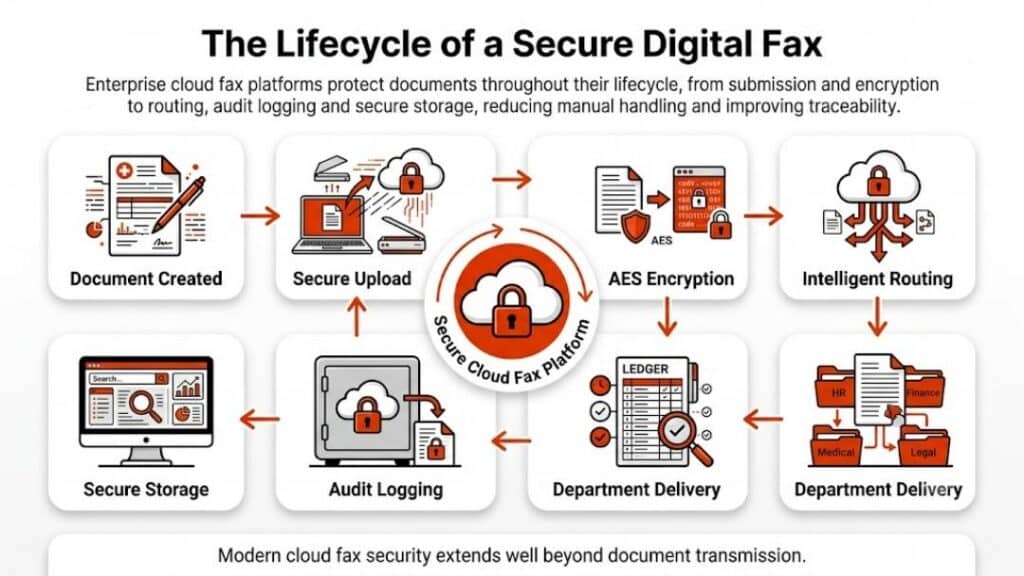
However, electronic fax filing makes compliance easy, as it’s more secure than email and traditional faxing. Sending faxes through online channels, rather than telephone lines, allows for encryption and ensures the information goes directly to your recipient. The document will safely sit in their inbox until they are ready to open and download it.

How Do You Use Electronic Fax Filing?

The process of using cloud fax services is relatively simple, especially if you’re familiar with the cloud. It’s a method of virtual hosting where a provider uses remote servers to store, process and access data, allowing your company to use the servers as a replacement for on-premises units. Moving your servers off-site is valuable, as it takes pressure off of your IT department, promotes cost savings and simplifies your workflow.

The faxing part of the equation is relatively similar to standard faxing, so there isn’t much of an understanding gap when you migrate from one to the other. Using cloud services can make the process simpler for most employees, reducing the amount of time you spend faxing and increasing overall productivity.

To use online faxing, you must first find a reliable provider like Softlinx. Once you’ve installed the relevant software and are on a service plan, you can begin faxing. Sending information is as easy as uploading your documents to the e-fax solution and inputting your desired recipient’s fax number or email. The software works to encrypt your data and transmit the documents to the correct address, providing your team with an easy way to send data, receive faxes and remain compliant.

Traditional Faxing vs. E-Fax

While traditional faxing has been the standard for years, e-fax use is gaining popularity. Online cloud faxing services are widely considered a stark improvement to the outdated traditional process, and companies that migrate to the new and improved version are seeing several benefits.

Here are the major differences between the traditional method of faxing and online fax services:

Traditional Faxing

Traditional faxing is an older form of transmitting documents, and it hasn’t changed much since it’s original inception. Still, many companies have used it as a reliable form of sending and receiving information in the past.

Some of the main characteristics of traditional faxing include:

  • Requires supplies: To send and receive traditional faxes, you have to keep your office stocked with the proper kinds of paper and toner. They enable you to send and receive faxes, and keeping the units filled is essential to transmitting data.
  • One fax at a time: Legacy faxes can only send or receive one document at a time. While that might be acceptable for small businesses that only send a few faxes per day, it can be a nuisance and cause a decline in productivity for larger companies and enterprises.
  • Decent security: Since the beginning of faxing services, the process of transmitting information through fax has been a reliable and relatively secure way to send or receive data. However, it does leave some risk, as printed faxes remain open and available in a tray until the recipient files it safely. Also, every fax prints as a physical document, making the information susceptible to loss and requiring your employees to scan it to create a digital copy.
  • On-premise system: Traditional faxing systems require your company to host your services on-premise, meaning you must have any necessary hardware internally. Additionally, maintenance and repairs are the responsibility of your IT department.
  • Telephone service: Landline telephone services were much more popular during the early days of fax systems. Legacy units require telephone lines to transmit information to the recipient. As companies are moving away from using traditional telephone providers, they’re also moving towards cloud-based fax systems.

Electronic Fax Filing

While it does follow the same premise as traditional faxing, e-fax has a few significant advantages. Overall, it’s easier to integrate with the rest of your processes and workflow and can help you boost your company’s productivity while decreasing costs.

Some of the main characteristics of implementing an online fax service include:

  • Direct downloading: Rather than printing as the sender transmits data, the recipient can download the files directly to their computer as a secure file. They can print the document if necessary, but the system doesn’t require it. However, the services are also backward compatible, meaning even legacy systems can decode the transmission if your recipient doesn’t use cloud services or requests you send to their fax number.
  • Simultaneous fax capability: Since cloud faxing uses internet servers rather than telephone lines, the systems allow your employees to send or accept multiple faxes simultaneously. All they have to do is submit multiple documents or multiple fax jobs to the software.
  • Excellent security: Where traditional faxing creates physical copies for anyone to see, online cloud faxing is about the safest way you can send sensitive data. It doesn’t print upon receipt. Instead, once you send a fax through the cloud server, it goes directly to the recipient’s inbox, encrypted and protected by their computer and email passwords. It removes the risk of accidental loss or theft from the equation.
  • Off-premise system: When you partner with an online fax service provider, you have the advantage of the off-premise system. This shift means you won’t have to store, maintain or stock any hardware or supplies for the sake of faxing. You can complete every function from a computer, and your IT department won’t have to worry about resolving fax issues or preventing downtime. The off-premise setup also means e-fax costs are significantly lower than traditional systems.
  • Versatility: As long as you have a secure internet connection, you can send and receive faxes from anywhere. The cloud servers allow your employees to fax from their work or home computers, tablets or smartphones. There’s no need to access a physical fax unit or wait for each document to go through individually.
  • Internet service: Every company uses internet services. As the need and desire for integration increases, the cloud is becoming a more popular tool. With the development of Voice over Internet Protocol (VoIP) and Fax over Internet Protocol (FoIP), cloud-based services have nearly eliminated the need for telephone lines, consolidating all communication functions to online dashboards and off-premise centers. Cloud fax services are no different, integrating your faxing capabilities with your online software and workflow.

How Online Faxing Cuts Costs

Beyond all the benefits online faxing provides your employees and your company as a whole, migrating to cloud-based services can also help you significantly cut costs. And the savings begin as soon as you switch. By creating a less expensive faxing system for your employees, you’ll boost your budget and promote productivity, regardless of the industry you serve.

Here are several reasons why using cloud services is a fax cost-saver:

Hardware

With traditional faxing, you need specific hardware to support your document transmissions. To send or receive faxes, you need to be near the equipment, and to send information immediately, you have to make sure no one else is using the device at the same time.

With online faxing, you won’t need to rely on hardware at all. Cloud services move all of the physical elements off premises, meaning there’s no line to send a fax, and you don’t need to commit storage space to legacy units. You’ll save in several ways by moving off-premises, including creating more usable space, reducing your electricity usage and avoiding the need for costly repairs or IT department fixes.

Maintenance

Speaking of your IT department, using cloud-based faxing means they won’t have to spend their time on maintenance. In traditional systems where hardware is necessarily internal, your team is responsible for any repairs, replacements, software upgrades and bug fixes. More severe issues can cause costly downtime and prevent your employees from getting their work done. You also have to factor any replacement parts and labor into your budget.

When you migrate to online faxing, your IT team no longer has to provide regular maintenance or be responsible for repairs. The service provider you partner with takes on those responsibilities. They ensure that if any issues arise, they deal with them quickly and effectively. With no need to maintain legacy units, you can save money on hardware, IT costs and the risk for downtime.

Supplies

Office supplies can rack up significant costs when you’re using them regularly. Traditional faxing requires you to order enough paper and toner to support the number of faxes you send. If your employees collectively send a large number of faxes per day, your fax expenses can use a large portion of your supply budget.

Since e-fax services allow you to move all hardware off-premises, you can cut down on the supplies you order each month, significantly decreasing your spending.

Services

Consolidating your faxing to your existing online service allows you to send and receive faxes through your high-speed internet, removing the need for a separate telephone carrier or line plan. Faxing through the traditional method requires you to pay for a telephone line, and if you don’t already have one or send a large number of faxes, you’ll often need an independent line for the fax alone. Without a separate plan for your phone line, faxing can interrupt or affect the quality of calls.

This extra plan can drive up your expenses. An individual telephone fax-only line can cost your company hundreds of dollars per year on average, without the addition of any long distance charges.

Since cloud services operate solely online, you can use your current high-speed internet service. You may also have versatile payment options depending on how often your company sends faxes.

Power

When it comes to saving costs, reducing your electricity bill will both decrease your expenses and do the planet a favor. Legacy fax systems typically use a significant amount of electricity each day, as you have to leave them running to accept calls and receive documents. While they sit in standby mode, they use energy and drive your bill higher. If your employees send and receive a large number of faxes daily, it can raise your electricity bill significantly.

Cloud-based faxing helps you decrease your electricity bill and bring your power usage down, reducing your company’s carbon footprint. By moving your systems off-premises and relying on your high-speed internet services rather than a telephone line and internal hardware, you’ll cut a portion of your electricity costs.

Also, when your systems are directly connected to your office’s power, your units are susceptible to any outages or weather interference your building experiences. If your faxing is on-premises, this can mean an inability to send and receive documents until the outage is resolved. With cloud services, your employees can continue conducting business off-site through laptops, home computers or any other smart device with an internet connection.

Why Choose Softlinx?

When it comes to choosing a cloud fax service provider, it’s essential to partner with a company that has your business’s best interests in mind. Softlinx ReplixFax is an excellent way to migrate to cloud faxing while reducing your fax costs significantly.

1. Easy Migration

With Softlinx, electronic fax filing is easy and fast, allowing you to get back to work and start saving in no time. Our customer support will provide your company with same day service, shifting your system from on-premises faxing to a virtual cloud server with no delay.

Softlinx also has a variety of plans to suit every need and budget. We let you decide whether you want to pay as a monthly or annual subscription and flexible plans to allow for shifts in faxing volume.

2. Straightforward User Interface

Softlinx’s services include a full suite of electronic fax filing tools, all of which integrate into your current systems with ease. With our full suite, you can receive and send faxes through a multitude of mediums, including PC and mobile web interfaces, email providers and Windows applications. There’s virtually no learning curve, and with minimal training needs from your staff, you’ll be able to shift entirely to cloud faxing quickly.

Our fax services also include an easy-to-use web portal, which allows you to manage users and conduct internal user-related administrative tasks, while we take care of the system-related administration efforts.

3. Powerful and Secure Systems

For companies that need to meet specific data regulations, secure faxing is essential. Softlinx Enterprise Cloud Fax Service is compliant with government and industry regulations, including HIPAA and PCI-DSS. When you send documents through our secure servers, we secure the information throughout the transmission process and host it in a reliable data center using AES-256 bit encryption standards and continual virus scanning.

While traditional faxing may present a significant amount of downtime or force your employees to wait for service availability, our systems are consistently up and running, ready to take on any amount of transmissions. Our cloud infrastructure supports far more than the traditional fax systems, providing you with continued service availability and limited disruption.

4. Advanced Customer Support

If you have any service issues or questions, response time makes all the difference. With fast responses and real-time performance monitoring, Softlinx ensures your systems are running smoothly, and our service infrastructure is error-free. If we detect any complications, our servers send out an immediate notification, allowing our team to take care of the issue fast and providing maximum uptime and availability.

At Softlinx, we also offer 24/7 technical customer support to handle your problems as soon as they arise. You can get in touch with our support team by way of email, phone and web conferencing at any time, whichever medium best suits your needs.

Upgrade to Online Cloud Faxing With Softlinx

The future of fax is cloud-based. Migrating to an electronic fax filing solution will bring your company to a new level of communication, and Softlinx is here to help you make the change. With our versatile, competitive and comprehensive systems, your employees will see higher levels of productivity with almost no learning period. Meanwhile, you’ll benefit from lower costs, increased uptime and data security.

Start your transition today with Softlinx — fill out our form for a free quote or contact us with any questions.

Security & Compliance

HIPAA-Compliant Since 1999 25+ years of secure, encrypted fax transmission for healthcare organizations.

HIPAA
PCI-DSS
Encrypted
Audit Trail
25+ Years Experience
100% HIPAA Compliant
Learn About Our Compliance

Industries We Serve

Healthcare Cloud Fax Solutions

Healthcare & Medical

Financial Services

Insurance Companies

Government Agencies

Manufacturing

Higher Education

Trusted by Fortune 1000 companies including State Street, IBM, HSBC, and United Nations.

Explore Industry Solutions

Why Choose Softlinx

No Hardware Required Eliminate costly fax servers and infrastructure. Cloud-based solution accessible anywhere, anytime.

Seamless Integration Easy API integration with your EHR, EMR, or business applications. Epic-certified integration available.

Enterprise Reliability 99.9% uptime SLA. No busy signals. Disaster recovery in real-time with automatic failover.

Superior Support U.S.-based technical support team. Dedicated account management for enterprise clients.

Cost Savings Reduce IT overhead by up to 60%. Pay only for what you use with flexible, scalable pricing.

Ready to Go Cloud?

Join healthcare leaders, financial institutions, and Fortune 1000 companies who trust Softlinx for secure, compliant faxing.

(978) 881-0560

Headquarters: 19321 US Highway 19 N, Suite 607
Clearwater, FL 33764 | help@softlinx.com

Trusted By Industry Leaders

"For over 25 years, Fortune 1000 companies and healthcare organizations have relied on Softlinx for mission-critical document transmission."

State Street
IBM
HSBC
Ericsson
Fannie Mae
United Nations
500+ Clients Worldwide
4.8★ Capterra Rating

Latest Articles By Softlinx

A professional works alone at a modern office workstation, representing the cloud fax migration steps for a secure enterprise transition in 2026.

Cloud Fax Migration Steps: A Practical Guide for Secure Enterprise Transition

Shifting away from legacy fax systems isn’t just a technical upgrade anymore. Across the U.S., telecom changes, compliance pressure, and workflow inefficiencies are forcing businesses to rethink how they send and receive documents. This guide breaks down cloud fax migration steps in a practical, real-world format, grounded in how enterprises actually operate and aligned with the capabilities organizations expect from providers like Softlinx.

Cloud Fax Migration Steps

The phrase cloud fax migration steps refers to the structured transition from traditional fax infrastructure, think aging phone lines, fax machines, and on-premise servers, to a secure, cloud-based fax environment.

Here’s the thing. Most organizations don’t move because they want to. They move because the underlying infrastructure is fading. The decline of the copper network and the ongoing conversation around Verizon copper retirement are pushing IT teams into action. Systems that once felt stable now fail without warning. That’s where cloud fax comes in. Not as a replacement alone, but as a long-term fix.

Why Businesses Are Moving Away from Traditional Fax Infrastructure

The shift away from legacy fax isn’t driven by a single factor. It’s a mix of infrastructure decay, operational inefficiencies, and rising compliance demands. Many teams don’t realize how deeply these issues affect daily workflows until disruptions begin to pile up. Below is a closer look at where traditional systems fall short:

AreaLimitations of Traditional FaxOperational Impact
InfrastructureDependent on physical phone linesFrequent service instability
ScalabilityLimited by hardware capacityDifficult to handle high volume
AccessibilityOn-site access onlyRemote work limitations
SecurityMinimal encryptionIncreased compliance risk
MaintenanceHardware-dependent upkeepHigher operational overhead

These limitations don’t always appear at once. But over time, they create friction that slows down document workflows and increases risk exposure.

Decline of Copper Network and Landlines

Telecom providers have been phasing out copper-based systems for years. What used to be a gradual shift has now reached a point where many businesses are directly affected. Questions like Is Verizon getting rid of landlines reflect a real concern, not speculation.

As part of the broader Verizon copper-to-fiber migration, traditional fax lines tied to copper infrastructure face disruptions. Delayed transmissions, dropped connections, and inconsistent delivery reports are becoming more common.

And that’s where the risk sits. Fax remains critical in regulated industries, but the network behind it doesn’t offer the same reliability it once did.

Limitations of Fax Machines and Fax Servers

Traditional fax systems rely on physical devices and on-premise infrastructure. At first glance, they seem straightforward. In reality, they introduce inefficiencies that build up over time.

ComponentLimitationBusiness Impact
Fax MachinesManual handling requiredSlower document processing
Fax ServersComplex maintenanceIncreased IT workload
Phone LinesFixed capacityBottlenecks during peak usage
Legacy SystemsLimited integrationDisconnected workflows

Over time, these limitations affect productivity in ways that aren’t always obvious. A missed fax here, a delayed transmission there, it adds up. Many organizations start noticing these issues when evaluating outdated fax server infrastructure against modern alternatives.

A technician inspects a dense tangle of cables beside outdated fax equipment in a server room, showing the hidden costs of maintaining legacy fax infrastructure.

Pre-Migration Assessment: What Needs to Be Evaluated First

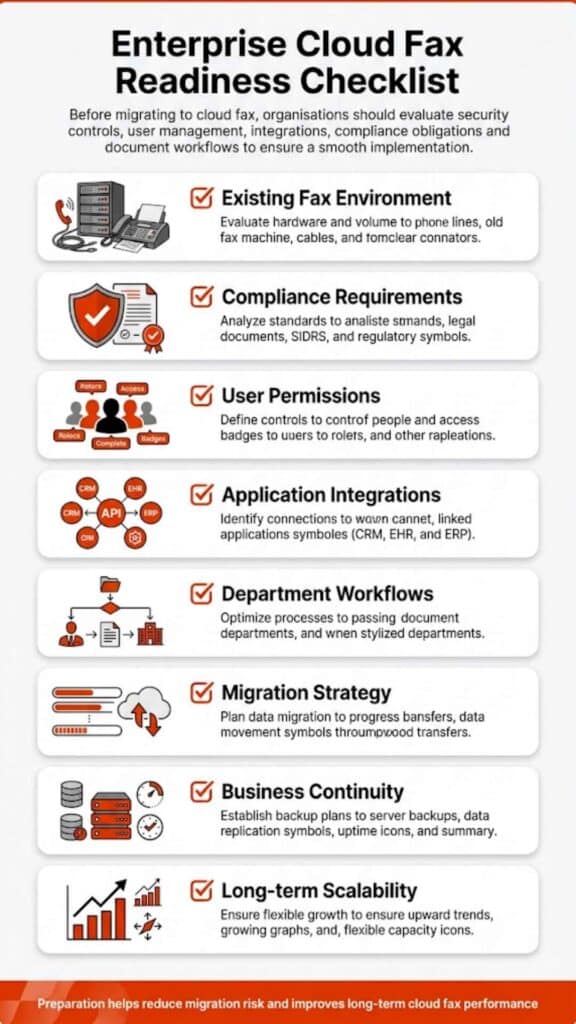
Before diving into cloud fax migration steps, organizations need a clear picture of their current setup. Skipping this stage often leads to misaligned workflows later.

Start with a full audit. Identify how many fax numbers are active, how departments use them, and where bottlenecks occur. Look closely at routing rules, document handling processes, and any manual intervention points.

Compliance requirements also deserve attention early on. Healthcare organizations, for example, must align with strict standards. Reviewing HIPAA fax compliance requirements helps ensure that the new system supports secure document exchange from day one.

Step-by-Step Cloud Fax Migration Process

The actual transition doesn’t happen in a single move. It unfolds in phases, each building on the previous one.

Step 1: Define Migration Goals and Use Cases

Migration starts with purpose. Some organizations aim to improve document flow, while others focus on compliance or reducing reliance on physical infrastructure. Identifying these goals helps shape the entire process.

Step 2: Choose a Cloud Fax Provider

Not all providers are built for enterprise needs. Security certifications, uptime reliability, and integration capabilities should guide the selection process. For example, exploring a dedicated cloud fax platform reveals how modern systems support both security and scalability without requiring additional hardware.

Step 3: Plan Number Porting and Routing

Maintaining continuity matters. Many businesses prefer to retain their existing fax numbers. A structured plan ensures that inbound and outbound communications remain uninterrupted during migration.

Step 4: Integrate with Business Systems

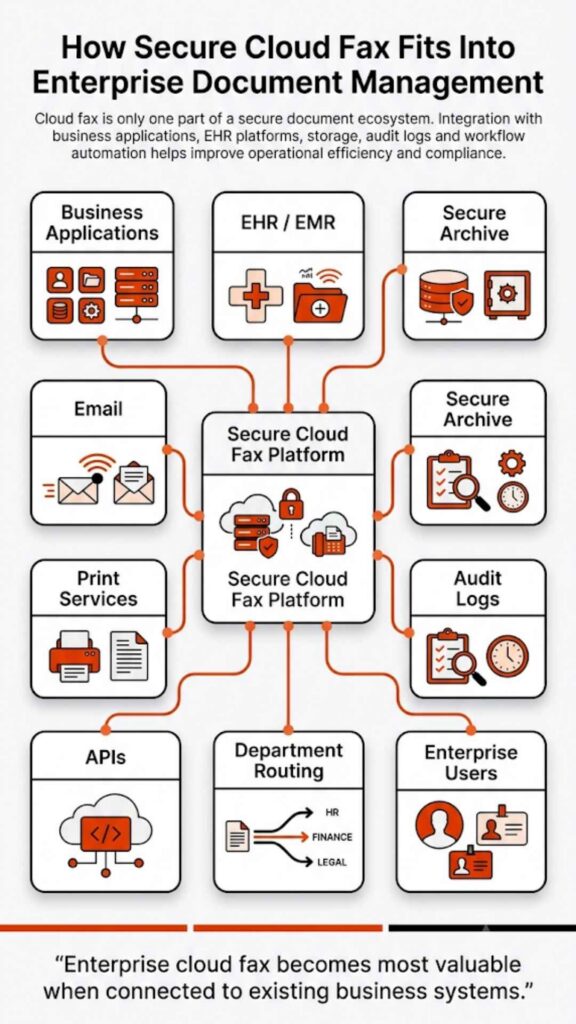
Cloud fax does not operate in isolation. Integration with document management systems, CRMs, or EHR platforms ensures smooth workflows. In many environments, this also extends to flexible transmission methods such as web portal faxing, email-to-fax, and print-to-fax, allowing teams to send and receive documents without changing how they already work. Organizations in healthcare often prioritize EHR integration to connect fax communication directly with patient records.

Step 5: Configure Security and Compliance Controls

At this stage, encryption protocols, user permissions, and audit tracking come into play. This ensures that all fax communications meet industry regulations.

Step 6: Test Fax Workflows in Real Time

Testing helps identify issues early. Sending and receiving faxes across departments ensures that routing rules and delivery confirmations function as expected.

Step 7: Train Teams and Roll Out Gradually

Adoption takes time. A phased rollout allows employees to adapt while minimizing operational disruption.

At this stage, many organizations realize that migration isn’t just a technical shift, it’s a workflow transformation. If your current setup still depends on manual routing or aging infrastructure, exploring an enterprise-ready cloud fax platform like Softlinx can help simplify the transition without disrupting operations.

Integration Considerations for Healthcare and Regulated Industries

In regulated sectors, integration isn’t just about convenience. It’s about compliance and efficiency.

Healthcare providers rely heavily on fax for patient data exchange. Solutions such as hospital cloud fax solutions help connect fax workflows directly with clinical systems. This reduces manual handling and improves accuracy.

Softlinx has spent over 25 years supporting enterprise fax workflows, particularly in healthcare environments where compliance and reliability are non-negotiable.

Integration also extends to automation. Routing incoming faxes based on metadata, linking documents to records, and enabling real-time access all contribute to smoother operations.

Common Challenges During Cloud Fax Migration (And How to Avoid Them)

Even with planning, challenges tend to surface. The key is recognizing them early.

ChallengeRoot CauseHow to Address It
Workflow disruptionPoor mapping of processesConduct pre-migration workflow audits
User resistanceLack of trainingIntroduce phased onboarding
Integration gapsSystem incompatibilityChoose API-capable platforms
Compliance risksMisconfigured settingsImplement strict access controls

When these issues are handled upfront, migration becomes far more predictable.

Frustrated woman holding documents beside a traditional fax machine in an office, with headline "Downtime Reality: How Often Traditional Fax Systems Fail" by Softlinx.

Cloud Fax vs Traditional Fax: Operational Comparison

When comparing both systems side by side, the differences become clear.

FeatureTraditional FaxCloud Fax
InfrastructureHardware and phone linesInternet-based
AccessibilityLocation-boundRemote access
SecurityBasic safeguardsAdvanced encryption
ScalabilityLimitedFlexible
MaintenanceContinuous upkeepMinimal

This comparison highlights why many organizations are rethinking their approach to fax infrastructure.

Migration Timeline and What to Expect

Migration timelines vary depending on system complexity. Still, most follow a similar structure.

PhaseDurationKey Activities
Assessment1–2 weeksInfrastructure review
Planning2–3 weeksProvider selection
Implementation3–6 weeksIntegration setup
Testing1–2 weeksWorkflow validation

This phased approach helps reduce disruption while ensuring a stable transition.

Security and Compliance in Cloud Fax Environments

Security tends to be the deciding factor in most cloud fax migration steps, especially for organizations handling regulated data. The difference between legacy fax and cloud-based systems isn’t just technical; it’s structural.

As noted by HIMSS, fax remains deeply embedded in healthcare workflows because it provides a universally accepted method for secure document exchange, highlighting why modernization, not elimination, is the priority.

Traditional fax relies on analog transmission. Once a document is sent, visibility is limited. There’s no clear audit trail, no controlled access, and often no encryption at all. That creates exposure, particularly in healthcare and financial environments.

Cloud fax changes that dynamic entirely. Instead of relying on unsecured phone lines, documents move through encrypted channels, often protected by protocols such as TLS and AES-level encryption. Access is controlled through user permissions, and every action sent, received, or viewed is logged.

That level of visibility matters. It’s not just about preventing breaches; it’s about proving compliance when required.

According to the U.S. Department of Health & Human Services, covered entities must implement technical safeguards to protect electronic protected health information (ePHI). That expectation has pushed many organizations to rethink how fax fits into their security model.

Beyond encryption, modern platforms introduce features that legacy systems simply cannot support:

  • Role-based access control
  • Detailed audit logs
  • Secure storage environments
  • Real-time monitoring

This is where Softlinx differentiates itself. Its enterprise-grade cloud fax platform supports compliance-first workflows, built for industries where regulatory alignment is not optional. Security, in this context, isn’t a feature; it’s the foundation.

Real-World Use Cases Across Industries

Cloud fax doesn’t operate in theory. Its value shows up in daily operations, often in places where reliability and compliance intersect.

In healthcare, fax remains a primary channel for exchanging patient records, referrals, and lab results. A delay of even a few minutes can affect care coordination. With cloud fax, documents move instantly, and integration with clinical systems ensures they land in the right place without manual sorting.

Financial institutions rely on fax for document verification and approvals. These workflows require both speed and confidentiality. A cloud-based approach ensures that documents are transmitted securely while maintaining a clear audit trail.

Insurance companies face similar demands. Claims processing often involves high volumes of documents moving between departments. Manual fax handling slows this process. Automation—particularly through API-driven workflows—helps route documents based on predefined rules.

Government agencies also depend on fax for secure communication. In many cases, legacy infrastructure still exists, but cloud fax provides a bridge between traditional workflows and modern systems.

What stands out across all these industries is consistency. Secure delivery, reliable transmission, and improved visibility all contribute to smoother operations.

Softlinx supports these environments at scale, with workflow automation and API integrations that reduce manual handling and improve document accuracy across departments.

Office desk featuring a legacy fax machine with papers scattered around, with headline "Compliance Risk: Where Legacy Fax Falls Short" by Softlinx

Cost and Operational Impact Over Time

Cost discussions around cloud fax often miss the bigger picture. It’s not just about reducing expenses; it’s about how operations evolve. Here’s how the operational impact compares over time:

Cost AreaTraditional Fax ImpactCloud Fax Impact
HardwareOngoing replacement and repairEliminated
Phone LinesMonthly telecom expensesReduced or removed
IT MaintenanceContinuous support requiredMinimal oversight
Workflow EfficiencyManual routing and delaysAutomated processes
Error RatesHigher due to manual handlingLower with automation

What becomes clear over time is that the shift isn’t just financial, it’s structural. Processes become faster, errors decrease, and teams spend less time managing documents.

Softlinx’s platform strengthens this advantage through automation capabilities and enterprise-scale reliability, allowing organizations to handle high-volume fax workflows without added complexity.

That’s why many organizations don’t just view cloud fax as a replacement. They see it as a long-term operational upgrade.

Moving Forward with Cloud Fax Migration

Cloud fax migration steps are no longer optional for many organizations; they’ve become a necessary shift as legacy infrastructure continues to decline. Infrastructure changes, compliance requirements, and operational challenges continue to push businesses toward modern solutions.Softlinx brings more than just cloud fax; it delivers enterprise-grade reliability, automation, and compliance built for high-volume environments. If your organization is planning cloud fax migration steps, now is the right time to evaluate a platform that supports long-term growth, not just short-term fixes. Connect with Softlinx to map out a migration strategy that aligns with how your business actually operates.

A team reviews document workflow systems at shared office workstations, illustrating what businesses need to know about cloud fax reliability before switching.

Cloud Fax Reliability: What Businesses Need to Know Before Switching

Cloud fax reliability has quietly become one of those things businesses can’t afford to overlook. Whether it’s a hospital sending patient data or a financial firm handling sensitive records, the margin for failure is slim. This guide breaks down how cloud fax actually works, why reliability matters more than ever, and how enterprise-grade solutions are reshaping document transmission in regulated industries.

Cloud Fax Reliability: Why It Matters for Modern Businesses

Cloud fax reliability isn’t just a technical metric; it’s operational stability. When systems fail, workflows stall. When documents don’t arrive, processes break. Most organizations used to rely on a fax machine tied to a phone line. That setup worked, until it didn’t. Hardware failure, busy signals, and paper jams weren’t rare issues. They were routine interruptions.

Now, secure cloud fax reliability depends on distributed infrastructure, not a single device. That shift removes fragile points in the system and replaces them with scalable, monitored networks designed for continuity.

And that’s exactly why industries dealing with sensitive information are moving toward enterprise cloud fax reliability models that prioritize uptime, encryption, and delivery assurance.

What Is Cloud Fax and How Does It Work?

Cloud fax, sometimes called internet fax or electronic fax, replaces physical machines with a digital system that sends documents through secure servers.

Instead of dialing a number from a fax machine, users can send a fax from a computer, email inbox, or browser-based platform. A document is uploaded, converted, and transmitted across encrypted networks. On the receiving side, it arrives digitally, no printing required.

Many businesses start by exploring a cloud fax solution that allows them to send and receive documents without hardware. Others focus on workflow efficiency and look into how to fax from a computer to simplify operations.

What’s changed isn’t just convenience, it’s reliability. Digital transmission eliminates mechanical failure and replaces it with monitored, automated systems.

Cloud Fax Reliability vs Traditional Fax Machines

Before comparing the two, it helps to look at how each system actually behaves under pressure. Reliability isn’t just about sending a document; it’s about what happens when something goes wrong.

FeatureCloud FaxTraditional Fax
UptimeHigh (redundant systems)Dependent on one device
TransmissionDigitalAnalog
Failure RiskDistributedHardware-based
ScalabilityFlexibleFixed capacity
MaintenanceMinimalFrequent

Traditional fax systems rely on physical components. If one part fails, the entire process stops. On the other hand, cloud fax systems operate across multiple servers with failover mechanisms. If one route fails, another takes over automatically, often without the user even noticing. And honestly, that’s where online fax reliability really starts to show up in day-to-day operations.

Key Factors That Define Cloud Fax Reliability

Reliability doesn’t just happen on its own. It’s built into the system, piece by piece. It’s built into the system. Modern enterprise cloud fax reliability depends on redundancy, monitoring, and intelligent routing. Data centers replicate traffic, delivery attempts retry automatically, and audit trails record every transmission.

Businesses that handle high volumes often evaluate whether enterprise fax solutions offer reliable uptime before making a switch.

Encryption also plays a central role. Secure cloud fax reliability requires protocols that protect data both in transit and at rest, especially for regulated industries.

Is Cloud Fax More Secure Than Traditional Fax?

Traditional fax machines were never designed for modern security standards. Documents often sit exposed, and transmission over phone lines offers limited protection. Cloud fax systems take a different approach. Data is encrypted, access is controlled, and activity is logged.

Healthcare organizations, for example, rely on HIPAA fax solutions to ensure compliance. Many also review whether fax is HIPAA compliant before implementing new systems.

According to the U.S. Department of Health & Human Services, healthcare organizations must ensure that electronic protected health information is safeguarded. This is where secure cloud fax reliability becomes critical, not just for delivery, but for compliance and accountability.

Real-World Use Cases Where Reliability Is Critical

Cloud fax reliability becomes non-negotiable in environments where delays or errors directly impact outcomes.

In healthcare, documents move constantly: patient records, lab reports, and referrals. A missed fax isn’t just a delay; it can disrupt care. Many providers rely on hospital cloud fax solutions that integrate with clinical systems to ensure continuity.

Integration matters here. Reliable faxing is no longer isolated; it connects directly with digital workflows. That’s why organizations prioritize EHR integration to ensure documents move seamlessly between systems without manual intervention.

Insurance companies face similar pressure. Claims processing depends on timely document exchange. Financial institutions handle contracts and verification documents that must be transmitted securely and without interruption.

According to research, over 70% of healthcare organizations still rely on fax for document exchange, reinforcing the need for reliable digital fax infrastructure.

Beyond healthcare, adoption continues to rise across industries. According to CMS, fax remains one of the most widely used methods for exchanging clinical information due to its compatibility with existing systems. 

Meanwhile, security benchmarks from Statista and IBM show that data breaches in healthcare average over $10 million per incident, reinforcing the need for secure cloud fax reliability in document transmission.

IT technicians monitor a system status wall display showing 99.97% server uptime, illustrating what 99.99% fax availability actually means for enterprises.

Can Cloud Fax Handle High Volume Sending Without Failure?

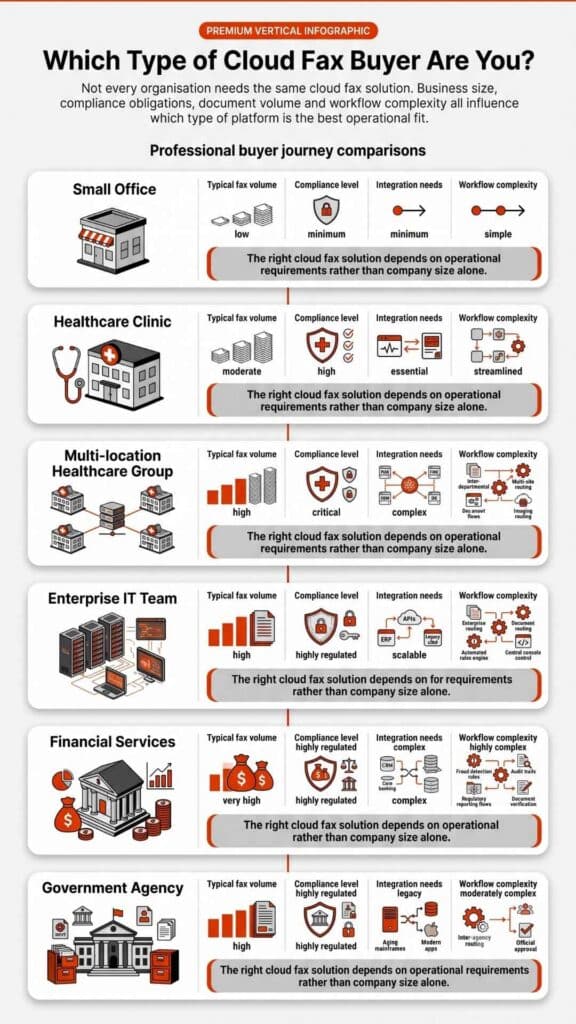
This is where enterprise cloud fax reliability truly stands apart from basic online fax services. High-volume environments, think hospitals, insurance firms, or large enterprises, don’t send a handful of faxes. They process thousands daily.

Reliable cloud fax systems handle this load through intelligent routing, load balancing, and retry mechanisms. If a transmission fails, the system automatically retries using alternate paths. This ensures delivery without manual intervention.

CapabilityStandard Online FaxEnterprise Cloud Fax
Volume HandlingLimitedHigh throughput
Retry LogicBasicAdvanced automated retries
API SupportLimitedFull integration
Workflow AutomationMinimalEnd-to-end automation

Organizations often explore whether cloud fax APIs support bulk faxing before scaling operations. This level of infrastructure is what defines true enterprise cloud fax reliability, not just sending faxes, but ensuring they arrive every time. 

Businesses handling high-volume workflows typically move toward enterprise-grade platforms like Softlinx, where reliability is built into the infrastructure, not added as an afterthought.

How Cloud Fax Improves Workflow Reliability

Reliability doesn’t stop at delivery. It extends into how documents flow inside an organization. Cloud fax systems reduce human involvement in routing and handling documents. Incoming faxes can be automatically sorted, tagged, and delivered to the right department without manual steps. 

Many organizations adopt solutions to automate electronic fax workflows and eliminate delays caused by manual processing. Automation also reduces errors. Misrouted documents, lost pages, and duplicate transmissions become far less common when workflows are system-driven. 

In healthcare settings, this improves response times. In financial services, it speeds up approvals. That’s really the difference between just sending faxes and actually having a system you can rely on.

How to Ensure Cloud Fax Reliability in Daily Operations

Even the most advanced system depends on how it’s used day to day. And honestly, that’s where cloud fax reliability either holds up or quietly starts to break down.

For teams that send documents regularly, small habits make a noticeable difference. Before sending a fax from a computer or using an online fax service, it helps to verify file formats, confirm recipient numbers, and ensure encryption settings are active.

Many businesses also standardize how they send faxes from PC environments by routing documents through a centralized platform instead of individual tools. That reduces inconsistency and improves delivery success rates.

Another overlooked factor is monitoring. Reliable systems provide delivery confirmations, but teams still need to review logs, especially in high-volume environments. This is where enterprise cloud fax reliability stands apart from basic tools.

And here’s what often gets missed: reliability isn’t just about sending. It’s about how quickly issues are detected and resolved. Systems with built-in alerts and retry logic can prevent small failures from becoming operational problems.

Workers manage large volumes of paper documents and printers in a busy enterprise mail room, illustrating how enterprises process millions of fax pages monthly.

Common Misconceptions About Online Fax Reliability

Some assumptions about online fax persist, even though technology has moved on.

MisconceptionReality
Internet fax is less reliableDistributed systems improve reliability
Free fax services are sufficientLimited features and uptime
Cloud fax lacks securityEncryption and compliance standards apply
Fax machines are more stableHardware introduces more failure points

These misconceptions often come from outdated experiences with early internet fax systems. Modern platforms operate very differently. Online fax reliability today is built on enterprise-grade infrastructure, not experimental technology.

Choosing a Reliable Cloud Fax Provider

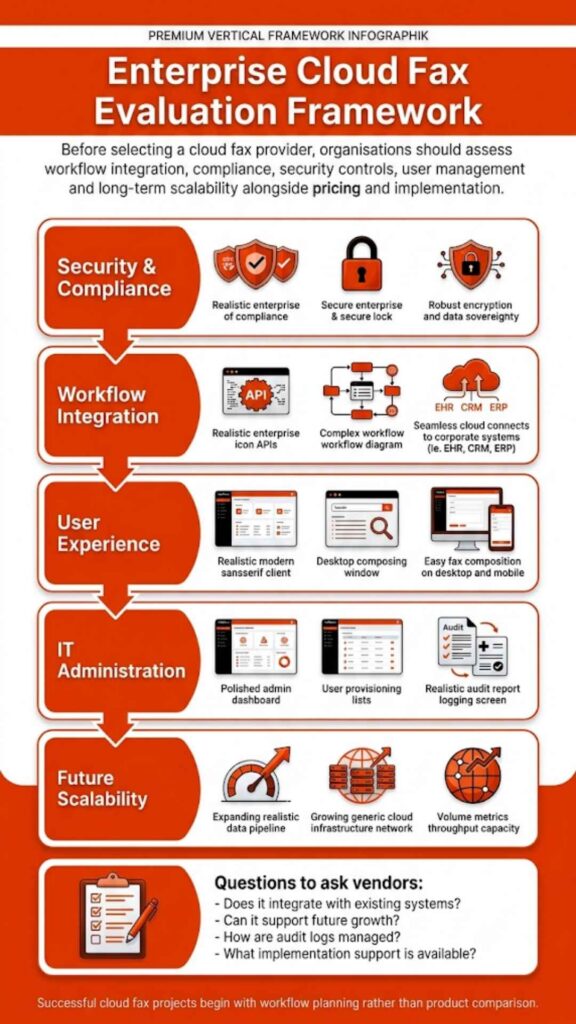
Selecting a provider requires more than comparing features.

CriteriaWhy It Matters
Uptime SLAIndicates system stability
Compliance CertificationsRequired for regulated industries
API CapabilitiesSupports integration
Support AvailabilityEnsures quick issue resolution

Organizations looking for secure cloud fax reliability often prioritize providers that specialize in regulated industries rather than general-purpose fax services.

How to Transition Without Disrupting Reliability

Switching systems always carries risk, but with the right approach, it doesn’t have to disrupt operations. A structured migration typically starts with porting existing fax numbers, followed by system integration and controlled testing. This phased approach ensures continuity during the transition.

Businesses often review how to switch from a fax machine to a cloud fax to understand the process. What makes the difference is planning. Reliable providers support staged rollouts, parallel systems, and testing environments to ensure nothing breaks during the shift.

For organizations with compliance requirements, maintaining audit trails and data integrity during migration is just as important as uptime itself.

FAQs About Cloud Fax Reliability

Can I send a fax from my computer reliably without a phone line?

Yes. Modern cloud fax systems allow you to send a fax from a computer using internet-based transmission, which is often more reliable than traditional phone lines.

How does enterprise cloud fax reliability differ from free online fax services?

Enterprise systems offer redundancy, security, and automation, while free tools typically lack uptime guarantees and compliance features.

What makes secure cloud fax reliability important for compliance?

It ensures encrypted transmission, audit tracking, and controlled access, all of which are required in regulated industries like healthcare and finance.

How reliable is cloud fax compared to traditional fax?

Cloud fax is generally more reliable due to redundancy and automated failover systems.

What affects cloud fax reliability the most?

Infrastructure, uptime guarantees, encryption, and workflow automation all play a role.

Is secure cloud fax reliability suitable for healthcare?

Yes, especially when the provider meets HIPAA compliance requirements.

Does online fax reliability depend on internet speed?

Partially, but enterprise systems compensate with retry logic and routing.

How do I receive faxes online without interruptions?

Reliable providers use redundant systems to ensure consistent delivery.

Staff process documents at workstations in a regulated office environment, illustrating compliance in action through secure document handling in regulated industries.

Why Reliable Cloud Fax Is Now a Business Requirement

Cloud fax reliability has shifted from a technical feature to a business necessity. Organizations don’t just need to send documents anymore, they need systems that perform consistently under pressure, across departments, and at scale.

When reliability fails, it’s rarely a small issue. Delayed patient records, stalled insurance claims, missed approvals, these aren’t edge cases. They’re real operational risks that impact outcomes, compliance, and trust.

That’s why businesses are moving away from generic fax services and toward enterprise-grade infrastructure designed for regulated environments. Reliability today depends on more than uptime, it depends on integration, automation, and the ability to handle high-volume workflows without disruption.

Businesses that rely on consistent document delivery don’t leave reliability to chance. They move to infrastructure designed for regulated, high-volume environments. Softlinx delivers that level of reliability, built specifically for organizations where uptime, compliance, and workflow continuity are critical.

If your current fax system still depends on manual processes or outdated infrastructure, now is the time to evaluate a platform designed for modern business demands. Softlinx provides secure cloud fax reliability that supports healthcare, finance, and enterprise operations without compromise.

A presenter points to a cloud fax implementation roadmap on a boardroom screen, showing how long cloud fax implementation really takes in 2026.

Cloud Fax Implementation Timeline: How Long It Really Takes in 2026

The cloud fax implementation timeline isn’t fixed. Some organizations switch in a few days, while others take several weeks due to integrations, compliance checks, and workflow complexity. What changes the timeline isn’t just the technology; it’s how deeply faxing is embedded in your operations.

Cloud Fax Implementation Timeline

The cloud fax implementation timeline reflects the shift from legacy fax systems to a secure, cloud-based fax solution. On paper, it sounds straightforward. In practice, it depends on how your current fax environment behaves, how many fax numbers you use, how documents move across departments, and whether those workflows are automated or manual.

A small team with basic faxing needs may go live almost immediately. A hospital system with EHR integration, compliance validation, and high fax volumes won’t move that quickly, and shouldn’t, especially in environments like healthcare where secure document exchange is critical.

What Is Cloud Fax and Why Timeline Matters?

Cloud fax allows organizations to send and receive faxes over the internet, removing the need for physical fax machines or on-premise servers. This also includes capabilities such as email-to-fax, which lets users send documents directly from their inbox without dedicated fax software. A modern cloud fax solution doesn’t just replicate fax; it reshapes how documents flow across systems.

But here’s where things get complicated. Many organizations still rely on legacy routing, manual handling, and disconnected systems. Replacing that with a structured platform, like Softlinx’s ReplixFax enterprise cloud fax system, means rebuilding workflows, not just installing software.

And that’s why the cloud fax implementation timeline matters. It determines whether the transition feels smooth or disruptive.

Despite widespread digital transformation, fax remains deeply embedded in regulated industries. According to a report, over 70% of healthcare communication still relies on fax-based workflows, largely due to compliance requirements and interoperability gaps. 

At the same time, studies from KLAS Research show that organizations transitioning to cloud fax report measurable reductions in manual document handling errors and improved delivery reliability. This explains why the cloud fax implementation timeline isn’t just a technical upgrade; it’s an operational shift that directly affects risk, compliance, and efficiency.

Typical Cloud Fax Implementation Timeline Breakdown

Before looking at exact durations, it helps to see how the process unfolds in real-world deployments. Each phase builds on the previous one, and skipping steps often leads to delays later.

PhaseDurationComplexityWhat Actually Happens
Assessment1–3 daysLow–MediumAudit workflows, fax volumes, dependencies
Design2–5 daysMediumConfigure a secure cloud fax environment
Porting3–10 daysMedium–HighTransfer fax numbers, including the ability to keep your existing fax number during migration
Integration3–14 daysHighConnect APIs, EHR, internal systems
Testing2–5 daysMediumValidate routing and delivery
Deployment1–3 daysLowRollout and onboarding

What this timeline shows is that most delays don’t come from the technology itself; they come from integration depth and operational complexity, especially in environments where faxing is tied to critical workflows.

Key Factors That Affect Cloud Fax Implementation Timeline

Before diving into migration, it helps to understand what slows things down. Not every delay is technical; many are operational.

FactorImpact on TimelineWhat It Means in Practice
Fax VolumeMedium–HighHigh-volume environments need load testing
Legacy SystemsHighOlder systems require mapping and cleanup
Compliance RequirementsHighHIPAA, audits, and validation add steps
Integration NeedsHighAPIs and EHR connections extend timelines
Number PortingMediumExternal carriers control speed
Internal Approval CyclesMediumLegal and IT reviews slow deployment

What stands out here is that the timeline isn’t driven by the cloud fax provider alone; your internal complexity shapes it. Organizations that prepare early often move faster without cutting corners.

A stressed office worker reacts to a system downtime error on screen, illustrating the hidden downtime risk during a fax migration in critical industries.

Cloud Fax Migration Steps

First, teams map how documents currently move through the business. That includes identifying where delays occur, where manual steps are involved, and where errors occur. Next, workflows are rebuilt inside the cloud faxing solution. With platforms like ReplixFax, this often includes automation rules, barcode routing, and API-driven document handling.

Then comes integration. Healthcare organizations, for example, connect directly with EHR systems through secure APIs. For application development, Softlinx supports workflows aligned with how to set up cloud fax API functionality, enabling systems to exchange documents securely and efficiently without disrupting existing processes.

In healthcare environments, integration often extends beyond basic EHR connectivity. Platforms like ReplixFax support direct integration with systems such as Epic, allowing inbound and outbound documents to flow automatically into patient records without manual intervention. This level of integration reduces delays, minimizes human error, and ensures that time-sensitive data, such as lab results or referrals, reaches the correct destination instantly.

Advanced workflow automation also plays a critical role here. Instead of routing faxes manually, enterprise cloud fax systems use barcode recognition, intelligent routing rules, and metadata extraction to direct documents automatically. For organizations managing high fax volumes, this eliminates bottlenecks that would otherwise extend the cloud fax implementation timeline.

Finally, testing ensures that documents reach the right destination without failure. Only after that does full deployment begin.

Consider a mid-sized hospital transitioning over 500 active fax lines tied to multiple departments. During early testing, routing inconsistencies caused critical documents to be delayed because legacy workflows were not fully mapped. 

Once automated routing rules and API integrations were configured correctly, delivery times stabilized, and manual handling dropped significantly. This kind of scenario is common, and it highlights why rushing the cloud fax implementation timeline often creates more problems than it solves.

Is Cloud Fax More Secure Than Traditional Fax?

Yes, but only if implemented correctly. Traditional fax machines leave documents exposed, printed pages sit unattended, transmission logs are limited, and security depends heavily on physical control.

Cloud-based faxing changes that entirely. Modern secure cloud fax platforms use:

  • End-to-end encryption (TLS, HTTPS)
  • Role-based access control
  • Detailed audit logs
  • Secure storage environments
  • Multi-factor authentication

Softlinx goes further with its enterprise-grade approach. ReplixFax is designed to align with strict compliance frameworks, including HIPAA requirements and audit-ready controls often associated with SOC 2 environments. 

This includes detailed audit trails, secure transmission protocols, and controlled access to sensitive data, critical for organizations operating under regulatory oversight.

Organizations often evaluate whether fax is HIPAA-compliant before migrating. The reality is that compliance depends less on the technology itself and more on how it’s implemented.

Cloud Fax Reliability and Performance Expectations

Reliability isn’t just about uptime; it’s about consistency under pressure. A cloud fax server must handle spikes in fax volumes, simultaneous transmissions, and document-heavy workflows. At a technical level, enterprise cloud fax systems operate through a distributed infrastructure. 

Incoming documents are received through secure gateways, processed through routing engines, and then delivered via APIs or user interfaces. This architecture allows systems like ReplixFax to handle high-volume transmission without the bottlenecks commonly seen in legacy fax servers. Here’s where enterprise cloud fax solutions differ from basic providers.

Platforms like ReplixFax are designed for high-volume environments, meaning they can process thousands of faxes without delays, dropped transmissions, or busy signals.

Softlinx also supports automated retry mechanisms, load balancing, real-time monitoring, and 24/7 US-based support for issue resolution. That last point matters more than most realize. When fax fails in healthcare or finance, it’s not just an inconvenience; it can disrupt operations.

Common Delays in Cloud Fax Implementation

Even well-planned migrations hit roadblocks. The difference is whether those risks are expected.

Delay TypeWhy It HappensReal-World Impact
Number Porting DelaysCarrier dependenciesSlows full transition
Workflow MisalignmentPoor mapping of processesDocuments routed incorrectly
Integration IssuesAPI or system mismatchData flow disruptions
Compliance ApprovalLegal/security reviewsExtended timelines
User ResistanceChange management issuesSlower adoption

In real deployments, delays rarely come from the cloud fax provider; they come from gaps in preparation. That’s why structured planning matters more than speed.

What’s often overlooked is the cost of these delays. A misrouted fax in a healthcare setting isn’t just an inconvenience; it can delay treatment, impact patient outcomes, or trigger compliance violations. That’s why understanding the cloud fax implementation timeline isn’t just about speed; it’s about reducing operational risk.

An office worker sorts through large stacks of incoming, outgoing, and urgent fax documents at her desk, illustrating the real cost of manual fax handling.

Cloud Fax vs On-Premise Fax Timeline Comparison

The difference between cloud and on-premise isn’t just cost, it’s time.

FactorCloud FaxOn-Premise Fax
Setup TimeDays to weeksWeeks to months
InfrastructureNo hardwareRequires servers
ScalabilityImmediateLimited
MaintenanceVendor-managedInternal IT

Organizations comparing options often find that cloud deployments eliminate weeks of infrastructure setup and significantly reduce long-term operational costs.

When Cloud Fax Implementation Can Be Completed in Days

Not every deployment is complex. Fast-track scenarios usually include no legacy system dependencies, no number porting required, simple send-and-receive workflows, and minimal compliance constraints.

In these cases, businesses can go live within days using cloud fax services. However, this is where many organizations underestimate their environment. What looks simple often includes hidden routing rules or undocumented workflows that surface during implementation.

Why Enterprise Cloud Fax ≠ Basic Cloud Fax

This is one of the biggest misunderstandings in the market. Basic cloud fax providers focus on sending and receiving documents. That works for small teams. Enterprise cloud fax solutions, like Softlinx, are built differently:

  • API-driven architecture
  • workflow automation
  • EHR and system integration
  • compliance frameworks
  • high-volume performance

That difference directly affects the cloud fax implementation timeline. Simpler tools deploy faster, but they rarely scale or integrate the way enterprise systems need.

Choosing a basic cloud fax provider may shorten initial setup time, but it often introduces long-term inefficiencies, manual routing, limited scalability, and integration gaps. For organizations handling sensitive or high-volume data, these limitations tend to surface quickly, forcing rework that ultimately extends the timeline further.

What Can Go Wrong During Implementation

Organizations often face incorrect routing rules leading to lost documents, incomplete integration causing data gaps, compliance failures due to misconfiguration, and delays from underestimated complexity. Many organizations also struggle to reduce fax errors without automation. These risks don’t disappear with better technology; they disappear with better planning.

FAQs About Cloud Fax Implementation Timeline

What is the fastest way to reduce the cloud fax implementation timeline?

Minimize dependencies, skip number porting, simplify workflows, and reduce integration requirements.

Can cloud fax be implemented without disrupting operations?

Yes, phased deployment allows parallel operation with existing fax systems during transition.

Does EHR integration increase implementation time?

Yes, integration adds complexity, especially in healthcare environments, but it improves long-term efficiency.

What causes delays in cloud fax migration?

Number porting, workflow mapping errors, and internal approvals are the most common causes.

Can multiple departments share one cloud fax system?

Yes, enterprise cloud fax solutions allow centralized systems with role-based access and routing.

How do I know if my organization is ready for cloud fax?

If your current fax systems involve manual handling, delays, or compliance risks, migration is worth evaluating.

A team reviews datacenter performance dashboards in a meeting room, illustrating why the testing phase determines go-live success in system migrations.

Where This Leads Next

The cloud fax implementation timeline ultimately comes down to one decision: whether you prioritize speed alone or long-term reliability and compliance. Organizations that choose the right platform early avoid rework, reduce risk, and create workflows that scale with their operations.

If your current fax environment involves manual handling, delays, or compliance concerns, it may be time to evaluate a more structured approach. Solutions like Softlinx’s ReplixFax are built specifically for high-volume, regulated environments, where accuracy, security, and uptime aren’t optional.

The next step isn’t just switching to cloud fax. It’s choosing a system that gets it right the first time.

Skip to content